6408 216th Street SW | Mountlake Terrace, WA 98043 USA
T +1.425.778.7728 F +1.425.778.7727 | www.SymetrixAudio.com
12
Quick Start Guide
CobraNet
Express
Cobra
SWITCH
PC
SWITCH
CobraLink
8x8 DSP
BreakIn12
BreakOut12
Express
Cobra
Receive
Transmit
Receive
Transmit
Receive
Transmit
Receive
Transmit
SymLink
RS-232
Ethernet
CobraNet
Legend:
CobraLink
Express
Cobra
PC
SWITCH
CobraNet
Developed by Cirrus Logic, CobraNet™ is the industry’s
leading technology for distributing uncompressed real-time
digital audio over a Fast Ethernet network. It is the standard
technology for the transport of multi-channel audio and
controldata.CobraNetusesaFastEthernet(100Base-T)
network. The CobraNet implementation in allows for 32
transmit channels and 32 receive channels.
Note:Bundlesareameansofgroupingchannels.Bundles
may be multicast (one to many) or unicast (one to one). Only
one device may transmit on a particular bundle.
The limitations of Fast Ethernet also apply to CobraNet. This
means that when using standard copper CAT5 cabling, the
total network diameter is limited to 200 meters (100 meters
between devices (nodes) and their common hub; switch,
router, etc.).
If greater distance between devices is necessary, you can
convert to fiber using media converters or network hardware
with fiber bridging/conversion built-in. In all cases, the
networking hardware used for CobraNet should be on Cirrus
Logic’s recommended hardware list. For further information
on designing CobraNet networks, or to obtain a list of
recommended network hardware, see Cirrus Logic’s web
site: http://www.cobranet.info.
CobraNet Examples
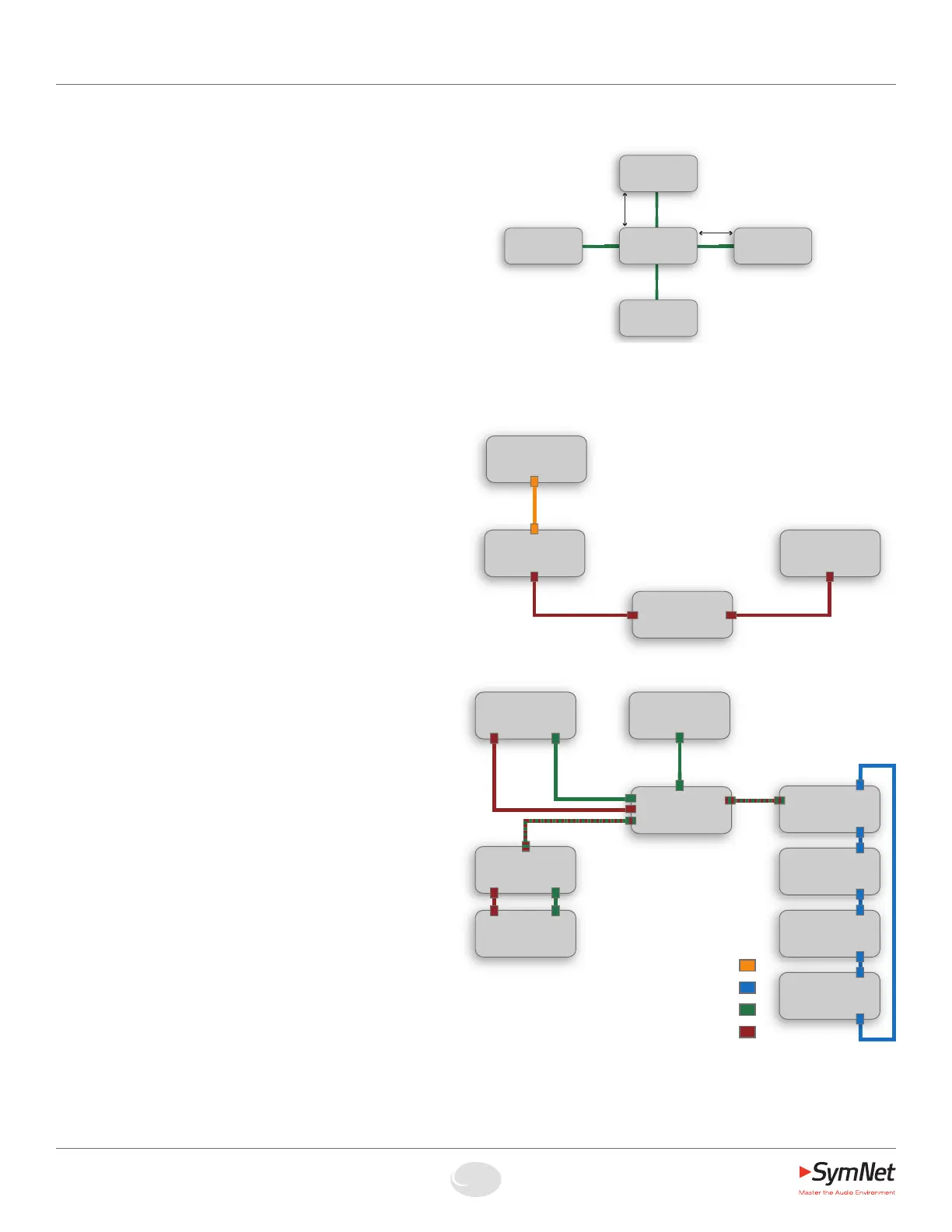
The following diagrams depict some typical CobraNet
networks and what can be accomplished with each
particular network.
Serial control of a CobraNet network:
Two or more CobraNet devices on a common private
CobraNet audio network controlled from a PC via a
serial (RS-232) connection. The PC may connect to any
CobraNet-networked Express or CobraLink. This most basic
setup allows the sharing of audio and control data between
CobraNet devices while minimizing setup, security and
network traffic issues.
Integrating Express Cobra with existing or
additional SymNet devices via CobraLink:
Express Cobra can share audio and control data with a
traditional SymNet ring if that ring contains a CobraLink
device. CobraLink has only one RJ-45 connector which
carries both CobraNet and data traffic. Therefore, it is
necessary to combine the dedicated Ethernet and CobraNet
RJ-45 connectors on an Express Cobra using a hub,
switch or router. Remember to use Cirrus Logic approved
networking hardware.
Note: “SWITCH” is used as a
generic label for any Switch,
Router, etc.
Serial control of a
CobraNet network
Integrating Express
Cobra with existing
or additional SymNet
devices via CobraLink
SWITCH
NODENODE
NODE
NODE
100m max.
100m max.


 To Next Page
 Loading...