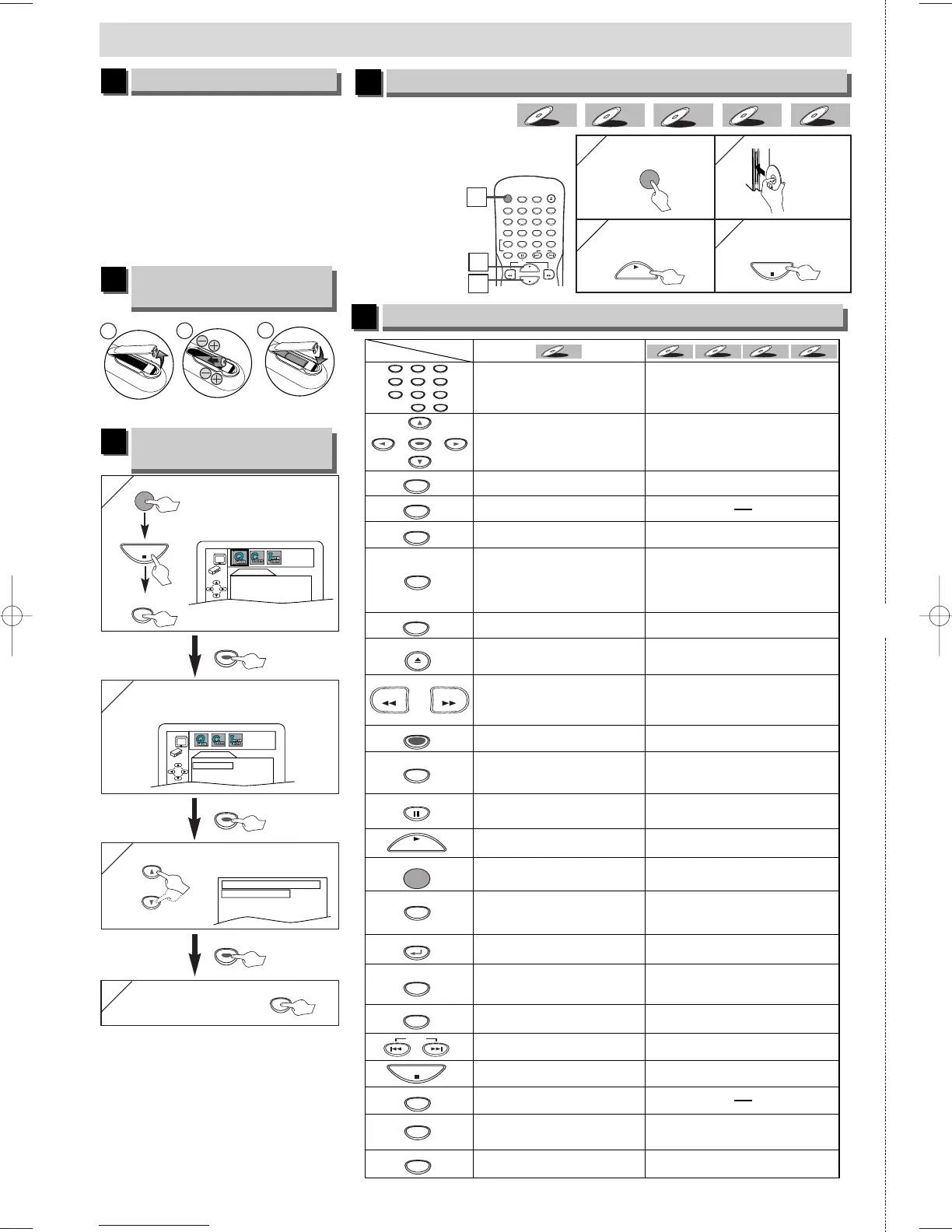
Before:
¡Turn on the TV, amplifier
and any other equipments
which are connected to this
unit. Make sure the TV and
audio receiver
(commercially
available) are set
to the correct
channel.
If your TV has AUDIO/VIDEO
input jacks, see the section
“Connection to a TV” on page
6 of the Owner’s Manual. If not,
see the section “Connection to
RF Modulator ” on page 6 of
the Owner’s Manual.
1VMN22865 E61S7UD ★★★★★
✄
Printed in China
DVD-V
DVD-V
CD
CD
VCDVCD
WMA
WMA
MP3
MP3
• To turn the unit on/off. • To turn the unit on/off.
• To display the current disc
mode.
• To display the current disc
mode.
• To select chapter or title
directly.
• To select track directly.
• To select camera angles on
a disc.
• To select subtitles on a disc.
• To select audio language on
a disc.
• To select STEREO,
L-ch or R-ch. (CD/VCD)
• To repeat between your
chosen point A and B.
• To repeat between your
chosen point A and B. (CD/VCD)
• To play a chapter or title
repeatedly.
• To play a track or disc
repeatedly. (CD/VCD)
• To play a track, group or disc
repeatedly. (MP3/WMA)
• To return to the previous
operation menu.
• To set black level on/off.
• To set virtual surround on/off.
• To call up the Menu
on a disc.
• To call up the Top Menu
on a disc.
• To magnify part of a picture.
(x2/x4)
• To magnify part of a picture.
(x2)(VCD)
• To return to the previous
operation in menu.
• To search chapter, title or time.
• To set or search the
markers.
• To search track.
• To search time. (CD/VCD)
• To set or search the
markers. (CD/VCD)
• To clear the markers.
• To cancel the point for A-B
repeat.
• To cancel the point for A-B
repeat. (CD/VCD)
• To clear the markers. (CD/VCD)
• To remove status number
in program input.
• To clear the numbers
entered incorrectly.
• To clear the numbers
entered incorrectly.
• To search forward/backward
through a disc.
• To begin slow forward
/reverse playback in the
pause mode.
• To search forward/backward
through a disc.
• To begin slow forward playback
during the pause mode. (VCD)
• To call up the file list.
(MP3/WMA)
• To advance playback
one frame at a time.
• To pause disc playback.
• To pause disc playback.
• To advance playback
one frame at a time. (VCD)
• To stop playback. • To stop playback.
• To return to the top file of the
highest hierarchy in the program
and file list. (MP3/WMA)
• To skip chapters or titles. • To skip tracks.
• To begin disc playback. • To begin disc playback.
• To call up the DVD setup
menu.
• To call up the DVD setup
menu.
• To move the cursor and
determine its position.
• To move the cursor and
determine its position.
POWER
DISPLAY
MENU
TOP MENU
ZOOM
SUBTITLE
MODE
ANGLE
SEARCH
MODE
REPEAT
A-B
AUDIO
CLEAR
123
456
789
0
+1 0
PAUSE
PLAY
STOP
SETUP
Button
(Alphabetical order)
Disc
ENTER
RETURN
REV FWD
SKIP
• Press to remove the disc. • Press to remove the disc.
• To arrange the playing order or
play randomly.(CD/MP3/WMA)
• To set virtual surround on/off.
• To set black level on/off. (VCD)
EJECT



 To Previous Page