5-1 L2200EA
ELECTRICAL ADJUSTMENT INSTRUCTIONS
General Note:
"CBA" is abbreviation for "Circuit Board Assem-
bly."
NOTE:
Electrical adjustments are required after replacing
circuit components and certain mechanical parts.
It is important to perform these adjustments only
after all repairs and replacements have been com-
pleted.
Also, do not attempt these adjustments unless the
proper equipment is available.
Test Equipment Required
1. NTSC Pattern Generator (Color Bar W/White
Window, Red Color, Dot Pattern, Gray
Scale, Monoscope, Multi-Burst)
2. DC Voltmeter
3. Oscilloscope: Dual-trace with 10:1 probe,
V-Range: 0.001~50V/Div,
F-Range: DC~AC-60MHz
4. Plastic Tip Driver
5. Remote control unit: Part No. N0121UD or N0134UD
6. DC power supply 13.2V/5A
7. Color Analyzer
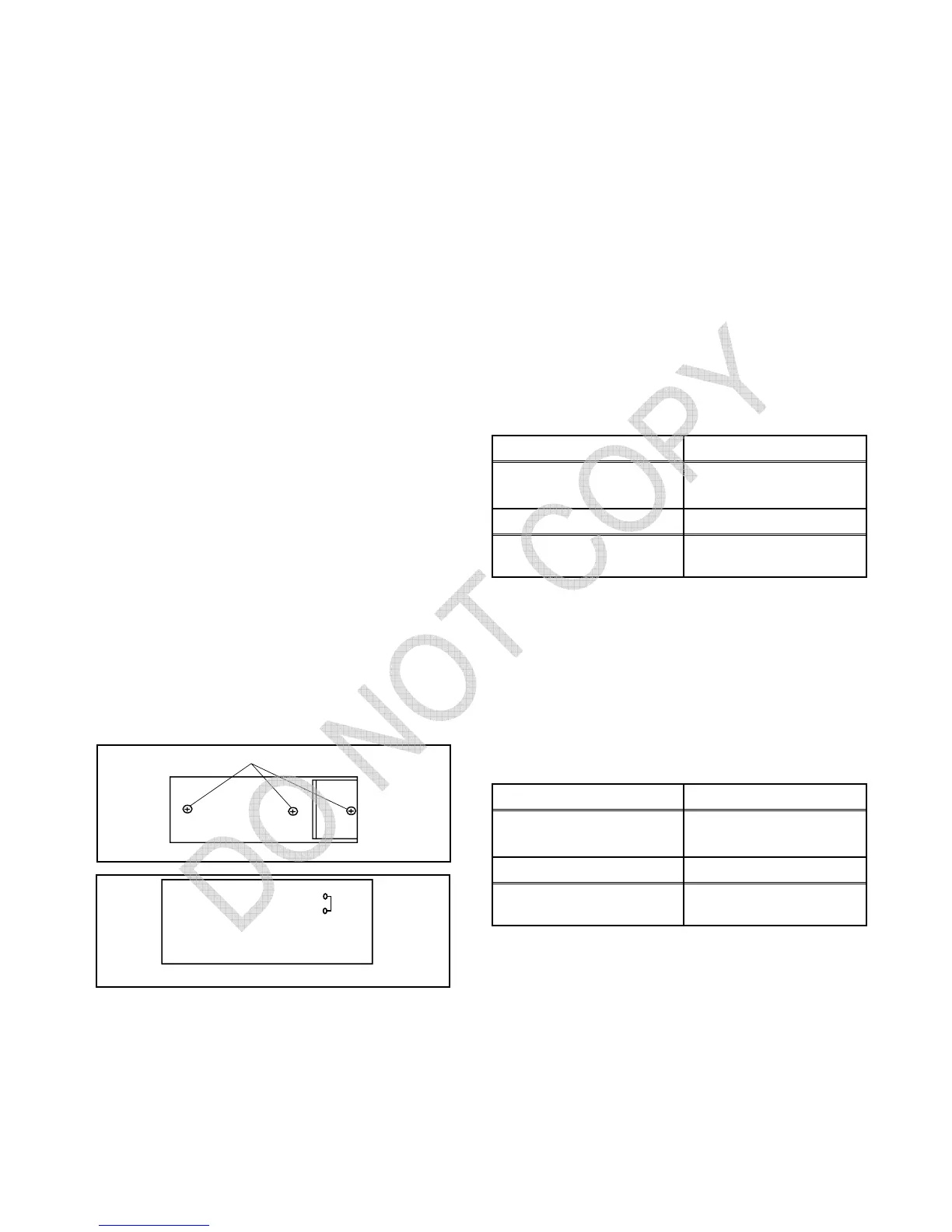
How to make service remote control
unit:
1. Prepare normal remote control unit. (Part No.
N0121UD or N0134UD) Remove 3 Screws from
the back lid. (Fig. 1-1)
2. Add J1 (Jumper Wire) to the remote control CBA.
(Fig. 1-2)
How to set up the service mode:
Service mode:
1. Use the service remote control unit.
2. Turn the power on. (Use main power on the TV unit.)
3. Press "SLEEP" button on the service remote con-
trol unit. Version of micro computer will display on
the CRT. (Ex: 058-0.06)
4. When CPU version is 058-0.06: Check the display
on the lower left is "0200," set it at "0200" accord-
ing to "3-1. Setting for Data Values."
1. DC 105V Adjustment [ ST413E ]
Purpose: To obtain correct operation.
Symptom of Misadjustment: The picture is dark and
the unit does not operate correctly.
Note:TP601, TP300 (GND), VR661 --- Main CBA
1. Connect DC Volt Meter to TP601 and TP300(GND).
2. Adjust VR661 so that the voltage of TP601 becomes
+105±0.5V DC.
1. DC 114V Adjustment [ ST419E ]
Purpose: To obtain correct operation.
Symptom of Misadjustment: The picture is dark and
the unit does not operate correctly.
Note:TP601, TP300 (GND), VR661 --- Main CBA
1. Connect DC Volt Meter to TP601 and TP300(GND).
2. Adjust VR661 so that the voltage of TP601 becomes
+114±0.5V DC.
SCREW
REMOTE CONTROL UNIT
Fig. 1-1
J 1
Fig. 1-2
REMOTE CONTROL CBA
Test Point Adj. Point
TP601
TP300 (GND)
VR661
M. EQ. Spec.
DC Voltmeter,
Plastic Tip Driver
+105±0.5V DC
Test Point Adj. Point
TP601
TP300 (GND)
VR661
M. EQ. Spec.
DC Voltmeter,
Plastic Tip Driver
+114±0.5V DC



 To Next Page