Need help?
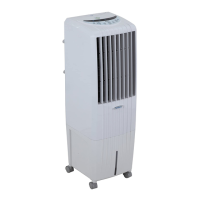
Do you have a question about the Symphony DiET 22 and is the answer not in the manual?
Position the cooler in front of an open window or install it in a window for optimal cooling.
Option to remove the over-flow plug to allow water overflow, slightly reducing tank capacity.
Instructions for filling the water tank, adding ice cubes, and using the water level indicator.
Details the float valve facility for automatic water filling and proper connection to prevent leaks.
Connect the cooler to the power source and switch it on.
Switch on the pump and wait for the cooling pad to become wet.
Adjust the air flow control to 'High' for maximum cooling performance.
Manually adjust the horizontal louvers to direct airflow as desired.
Controls the main power supply to turn the cooler on or off.
Allows setting ON or OFF timers for automated cooler operation.
Enables or disables the water pump for cooling; indicated by an LCD icon.
Increases or decreases the fan speed through multiple levels.
Activates or deactivates the automatic oscillation of the louvers.
Varies fan speed automatically to simulate natural breeze.
Turns the air purifying ionizer feature on or off (model dependent).
Memorizes and restores the last used settings for all functions.
Turns the cooler on or off, indicated by color-coded status lights.
Starts or stops the water pump, with water level indicators.
Allows choosing between High, Medium, and Low fan speeds via LED indicators.
Toggles the swing function on or off, indicated by a glowing icon.
Sets an automatic OFF timer in hourly intervals from 1 to 7 hours.
Recalls the previously saved settings for all cooler functions.
Disconnect power, avoid hazards, and contact authorized service for electrical issues.
Procedure to drain water from the tank and clean the cooling pads.
Wiring diagram for Class I models including Kaizen, Kaizen Jr., and Sumo Jr.
Wiring diagram for Class II models like Super Jumbo, Jumbo, and Diet variants.
Specific wiring diagram for Storm 100i and Storm 70i models.
Wiring diagram for various DIET and HiCool Smart models.
Unplug before maintenance, handle damaged cords carefully, and use ELCB outlets.
Not for unsupervised children; avoid use in explosive or corrosive atmospheres.
Instructions for responsible disposal of the product to prevent environmental harm.
Notes that the cooler works with sine-wave type inverters of appropriate rating.
Fields for purchase date, model, customer information, and product serial number.
Details coverage for 12 months, excluding cooling pads, plastic parts, and misuse.
Information on how to register warranty, request service, and contact support.
 General
| Blower/Fan | Yes |
|---|---|
| Remote Control | Yes |
| Ice Chamber | Yes |
| Water Level Indicator | Yes |
| Power Supply | 230 V, 50 Hz |


 To Next Page