Need help?
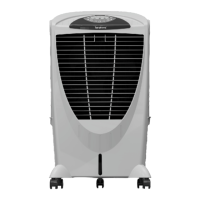
Do you have a question about the Symphony Winter and is the answer not in the manual?
Remove protective covers from carton and position cooler in a well-ventilated area.
Fill tank through lid/spout, add ice, and manage water overflow using the plug.
Install float valve for automatic water filling, ensuring leak-free connections.
Connect to power, switch on, then activate the pump in cool mode.
Set desired controls, optimize airflow to high, and adjust louvers manually.
Sit back and relax once the cooler is set up and running.
Turn the cooler on/off and set ON/OFF timers in 30-minute intervals.
Adjust fan speed (1-8) and activate the cooling pump.
Control swing motion, auto breeze mode, and optional ionizer.
Move cooler by handle and utilize the system restore for last setting.
Manage power, pump activation, and fan speeds (High, Medium, Low).
Activate swing mode and set the OFF timer from 1 to 7 hours.
The last used settings are memorized for all functions.
Disconnect power, avoid electrical hazards, and contact authorized service providers.
Drain the water tank and clean cooling pads from the outside.
Troubleshoot problems like low cooling, water leakage, and fan issues with provided solutions.
Details rated voltage, power consumption, and current for various models.
Displays certifications like CE, NOM, Intertek, confirming product standards.
Illustrates the electrical connections for Class I and Class II models.
Provides detailed wiring for Storm, DIET, and HiCool models.
Clarifies that the water level sensor is for select models/variants.
Ensure proper electrical connections and avoid hazards during use.
Supervise children and avoid use in hazardous atmospheric conditions.
Guidelines for environmentally friendly disposal of the product.
Specifies the need for a sine-wave inverter for proper operation.
Form to register the product for warranty coverage with company details.
Outlines the duration, coverage, limitations, and exclusions of the warranty.
Information on how to request service and contact customer support.
 General
| Brand | Symphony |
|---|---|
| Model | Winter |
| Category | Air Conditioner |
| Language | English |

 To Next Page