ErrorCustomize
①
③②
①
②
③ ③
④
⑥
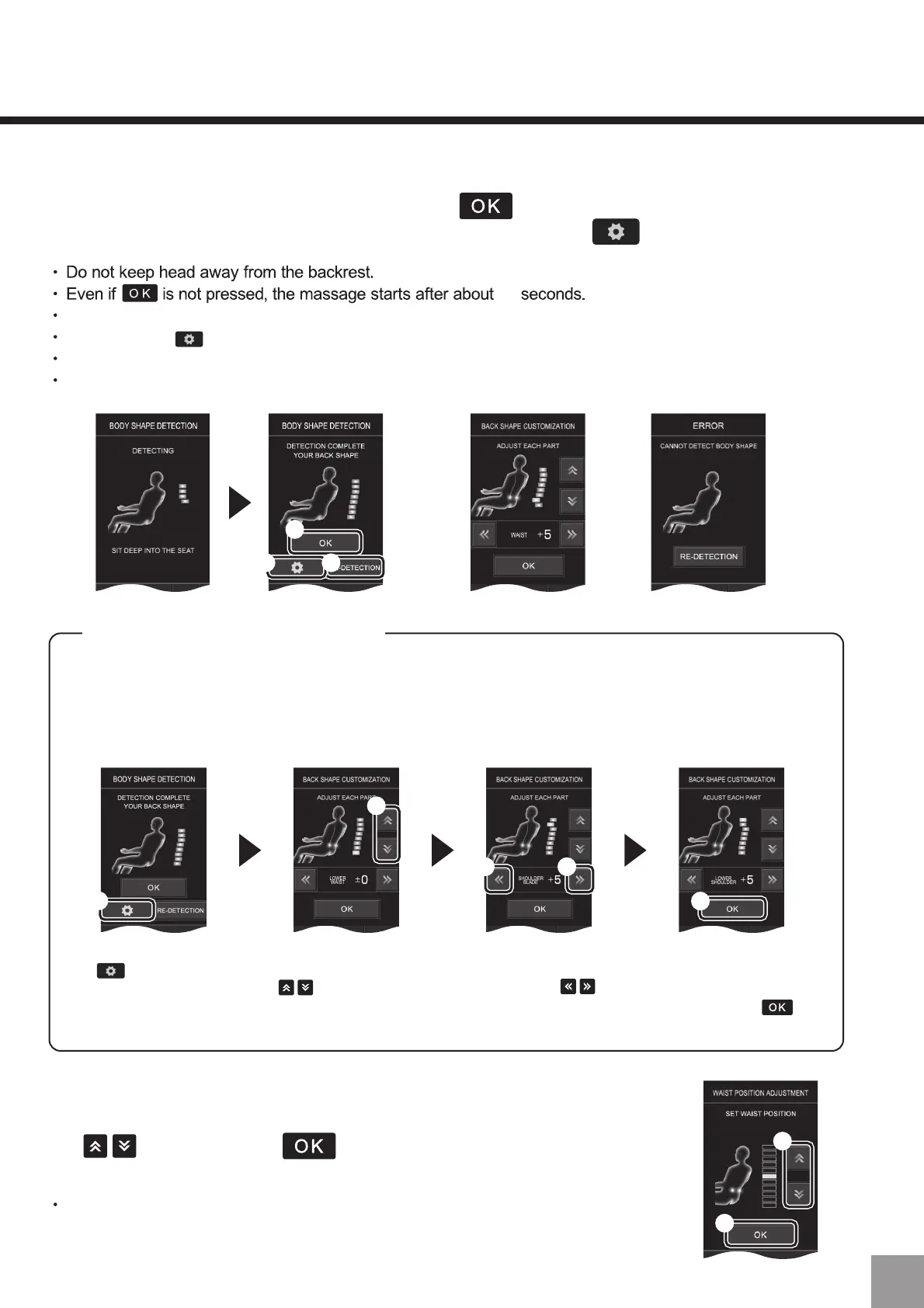
About back line customization
Generally, massage will be performed with a uniform force along the back line, but the
massage standard force of each part can be changed by customizing according to
user`s preferences.
(For example) To increase intensity for head and shoulder parts
After detection, press
(①).
After selecting the part to
be adjusted through
(②), kneading balls
will move and massage
with standard force.
Change the standard
force of the kneading
balls through (③).
(there are ± 7 levels
for setting)
Adjust it to the back line
information to strengthen
the head and shoulder
parts and press (④)
to register.
⑤
3. After the registration of shoulder position is complete, back line detection will
start. After detection is complete, press (①) and the back line will be
registered. Further adjustments can be done through (②).
4. After the registration of the back line is complete, waist position
adjustment will start. Adjust kneading balls position through
(⑤) and press (⑥) to register. If “Registration
completed” is displayed, the registration is completed.
Press the “Re-detection (③)” key to detect the back line again.
After pressing (②), the back line can be adjusted manually.
Please refer to the “About customizing back line” below.
In case of detection error, press “Re-detection”.
10
Do not turn off the power during registration, otherwise the registration of
customized information cannot be completed.
59


 To Next Page
 Loading...