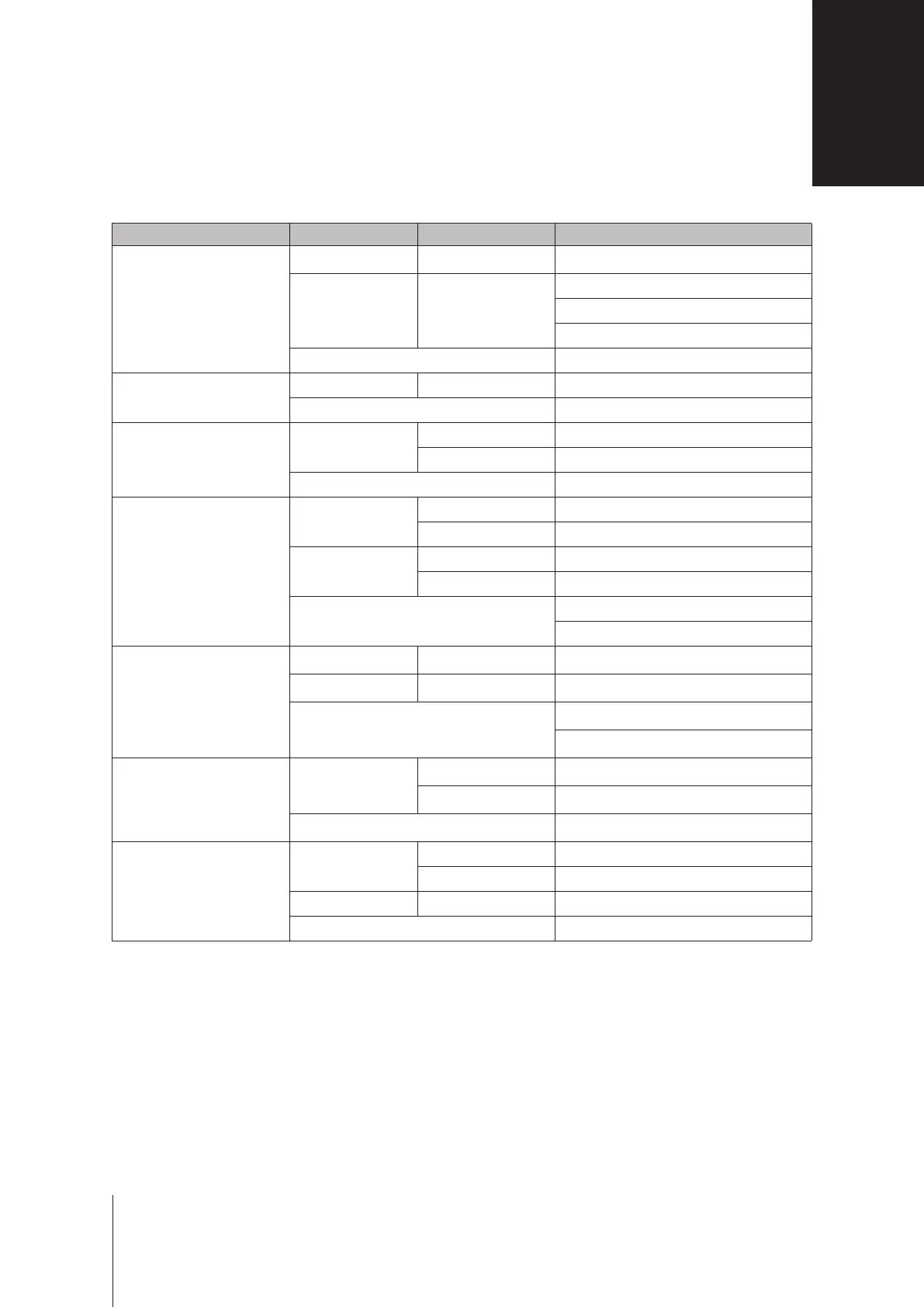
LED Indicator Color Status Description
STATUS
Green Static Volume normal
Orange Blinking
Volume degraded / Crashed
Volume not created
DSM not installed
O HDD hibernation
ALERT
Red Blinking Fan failure / Over temperature
O System normal
Power
Blue
Static Powered on
Blinking Booting up / Shutting down
O Powered o
Front LAN
Green
Static Gigabit connection
Blinking Gigabit network active
Orange
Static 100 Mbps connection
Blinking 100 Mbps network active
O
10 Mbps connection
No network
Rear LAN
(on upper side of jack)
Green Static Gigabit connection
Orange Static 100 Mbps connection
O
10 Mbps connection
No network
Rear LAN
(on lower side of jack)
Green
Static Network connected
Blinking Network active
O No network
Drive Status Indicator
(on tray)
Green
Static Drive ready and idle
Blinking Accessing drive
Orange Static Drive error
O No internal drive
Note:
Model specications are subject to change without notice. Please refer to
www.synology.com
for the latest information.
LED Indicator Table
B
19
Appendix









 To Previous Page