EasyManua.ls Logo

Synthes Codman Neuro DirectLink - User Manual

Synthes Codman Neuro DirectLink
104 pages
Print Icon
To Next Page IconTo Next Page
Loading...
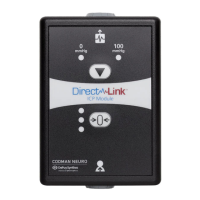
DirectLink™ ICPModule
(REF 82-6828)
LCN 208523-001/D
© 2015-2016 Codman Neuro, a division of DOI 2015. All rights reserved.
Revised 11/16
Medos International SÁRL
Chemin-Blanc 38, 2400
Le Locle, Switzerland
+41 32 934 80 00
Codman & Shurtleff, Inc.
325 Paramount Drive
Raynham, MA 02767-0350 USA
800 225 0460
+1 508 828 3000

Table of Contents

Questions and Answers

  • U
    uduncanAug 4, 2025
    Why is the red status LED illuminated on my Synthes Medical Equipment?
    • K
      karengrantAug 5, 2025
      The red status LED on your Synthes Medical Equipment could indicate a few issues. First, ensure that no buttons were pressed during startup. If this isn't the case, try disconnecting the cable from both the patient monitor and the ICP module to reboot. Then, reconnect the interface cable and patient monitor, ensuring the self-test completes successfully. If the red LED persists, the DirectLink module may need replacement. Another cause might be incompatibility between the patient monitor and the DirectLink Module. Verify that the excitation voltage from the patient monitor is between 2.5 and 6.5 V, as an out-of-range voltage can cause the red LED to illuminate.
  • P
    perezlisaAug 18, 2025
    Why is the amber status LED illuminated instead of green on Synthes Medical Equipment?
    • J
      Jon NicholsAug 19, 2025
      If the amber status LED illuminates instead of the green LED on your Synthes Medical Equipment, consider these possibilities: the sensor might already be implanted (probes can only be zeroed before implantation), the sensor may have vibrated, moved, or been touched during zeroing, the module could be damaged, the sensor itself might be damaged or the module is experiencing electrical interference. Verify the probe is un-implanted. If not, repeat the zeroing process. If it fails again, replace the DirectLink Module. If it continues to fail, replace the sensor. Also, ensure that all cables connected to the DirectLink Module are separated from other electrical equipment and cables, then repeat the zeroing process.
  • C
    collinsdavidAug 27, 2025
    How to fix Synthes Medical Equipment when the self-test does not start?
    • D
      danielbrownAug 27, 2025
      If the self-test on your Synthes Medical Equipment does not start, it could be due to a damaged interface cable. Try replacing the Patient Monitor Interface Cable and check if the self-test completes successfully. If it still doesn't start, the module may need to be replaced.
  • J
    Jessica MorganNov 10, 2025
    What to do if red status LED is illuminated on Synthes Medical Equipment?
    • A
      amber22Nov 10, 2025
      If the red status LED is illuminated on your Synthes Medical Equipment, several factors could be responsible. It could be due to a damaged ICP Extension Cable, a faulty DirectLink Module, or a damaged sensor. Try disconnecting all cables from the ICP Module and the patient monitor. Then, reconnect the Patient Monitor Interface Cable to both the DirectLink Module and the patient monitor, and check if the self-test completes successfully (indicated by a solid amber LED). If the red LED returns, test with a new extension cable. If it still returns, test with a new sensor. If the issue persists, the DirectLink Module may need to be replaced. Another potential cause is corrupted DirectLink memory. To resolve this, disconnect all cables to reset the device, then reconnect and ensure the self-tes...

Summary

Important Product Information

Product Overview and Usage

Details the DirectLink ICP Module's purpose and connection to ICP sensors and monitors.

Contraindications and User Profile

Lists conditions where the device should not be used and the intended user profile.

Warnings and Precautions

Covers critical safety warnings and general precautions for device use.

ESD and Symbols

Explains ESD risks and lists product/manual symbols.

Instructions for Use

Connecting the Module

Steps for connecting the DirectLink Module to the patient monitor and ICP sensor.

Calibration and Zeroing

Procedures for calibrating the patient monitor and zeroing the ICP sensor.

Implantation and Disconnection

Guidance on sensor implantation, temporary disconnection, and reconnection.

System Discontinuation

Instructions for discontinuing monitoring, wiping down, and inspecting the system.

Technical and Maintenance Information

Sterilization, Storage, and Specs

Details on sterilization, storage conditions, and technical specifications.

Standards and Accessories

Lists applicable standards and recommended accessories for the device.

Troubleshooting and Repair

Guidance on troubleshooting issues and information on service and repair.

Operational Lifecycle and Compliance

Maintenance and End-of-Life

Covers routine maintenance, service, repair, and product end-of-life procedures.

Warranty and Compatibility

Details the product warranty and electromagnetic compatibility information.

Synthes Codman Neuro DirectLink Specifications

General IconGeneral
BrandSynthes
ModelCodman Neuro DirectLink
CategoryMedical Equipment
LanguageEnglish

Related product manuals