EN
5
2. Description
3. Prior to first use
• Take your coffee maker out of the box and
remove the packaging and all other items
(Stickers, hang tags, etc.)
• Wash the detachable parts of the machine in
warm soapy water.
• Operate your coffee maker for the first time
without coffee using 1 liter of water to rinse
the circuit.
4. Setting the clock
1- Press the H button (o) to set the current hour.
2- Then press the MIN button (p) to set the
current minute.
There is an AM indicator at the bottom left side
or a PM indicator at the bottom right side.
You have to press the H button and make a
complete turn of the clock in order for the AM
or PM indicator to appear.
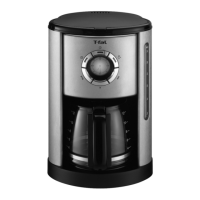
a Main body
b Top lid
c Water tank
d Water level indicator
e Carafe lid
f Carafe handle
g Carafe
h Heating plate
i Filter holder
j Permanent filter
k On/Off button with red LED
l Keep warm button with orange LED
m Auto button with blue LED
n Programming button
o H Clock button
p MIN Clock button
q Clock
r Spoon
Notes: Your clock
has now been set
and will continue to
keep the correct
time, even after the
coffee maker has
been shut off.
Unplugging the
coffee maker or a
power failure will
reset the clock.
Repeat the
instructions above
to reset the clock.


 To Next Page