1
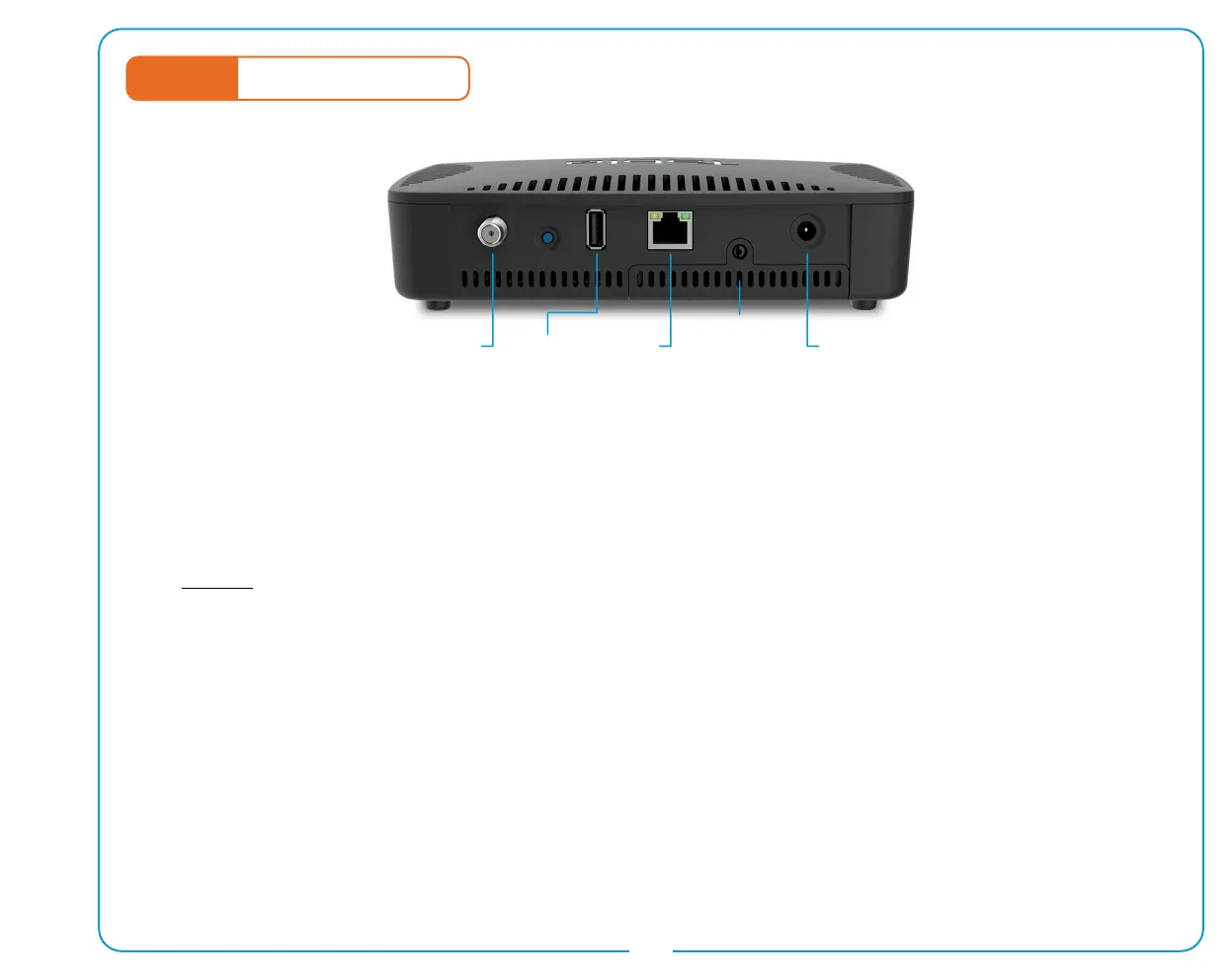
PowerUSBAntenna
SATA
CompartmentEthernet
STEP 1
Getting Connected
1. Connect Your HDTV Antenna
For optimal OTA reception, place your antenna near a window or outdoors, pointing towards your local
broadcast towers. Next, connect your antenna to your Tablo DVR via the coaxial connection. Ensure the
connector is tightly secured.
2. Connect a USB or SATA Hard Drive
BEFORE you connect the power adapter, connect a USB hard drive (1 TB to 8 TB in size) to the USB port
OR unscrew and slide off the SATA Compartment cover to insert and connect a 2.5” SATA hard drive
(standard 7 mm or 9.5 mm height, 1TB–4TB in size).
3. Connect Tablo to Your Home Network
Use the Ethernet cable (provided) to connect your Tablo DVR to your router. If your antenna placement does
not enable you to connect via Ethernet, connect Tablo to your home network via WiFi. See page 2 for details.
4. Connect the Power Adapter
In order to function correctly, your Tablo DVR must be powered on at all times, including overnight.
For help with antenna selection and positioning, a list of recommended hard drives,
additional set-up instructions and troubleshooting tips visit www.TabloTV.com/setup.


 To Next Page