4
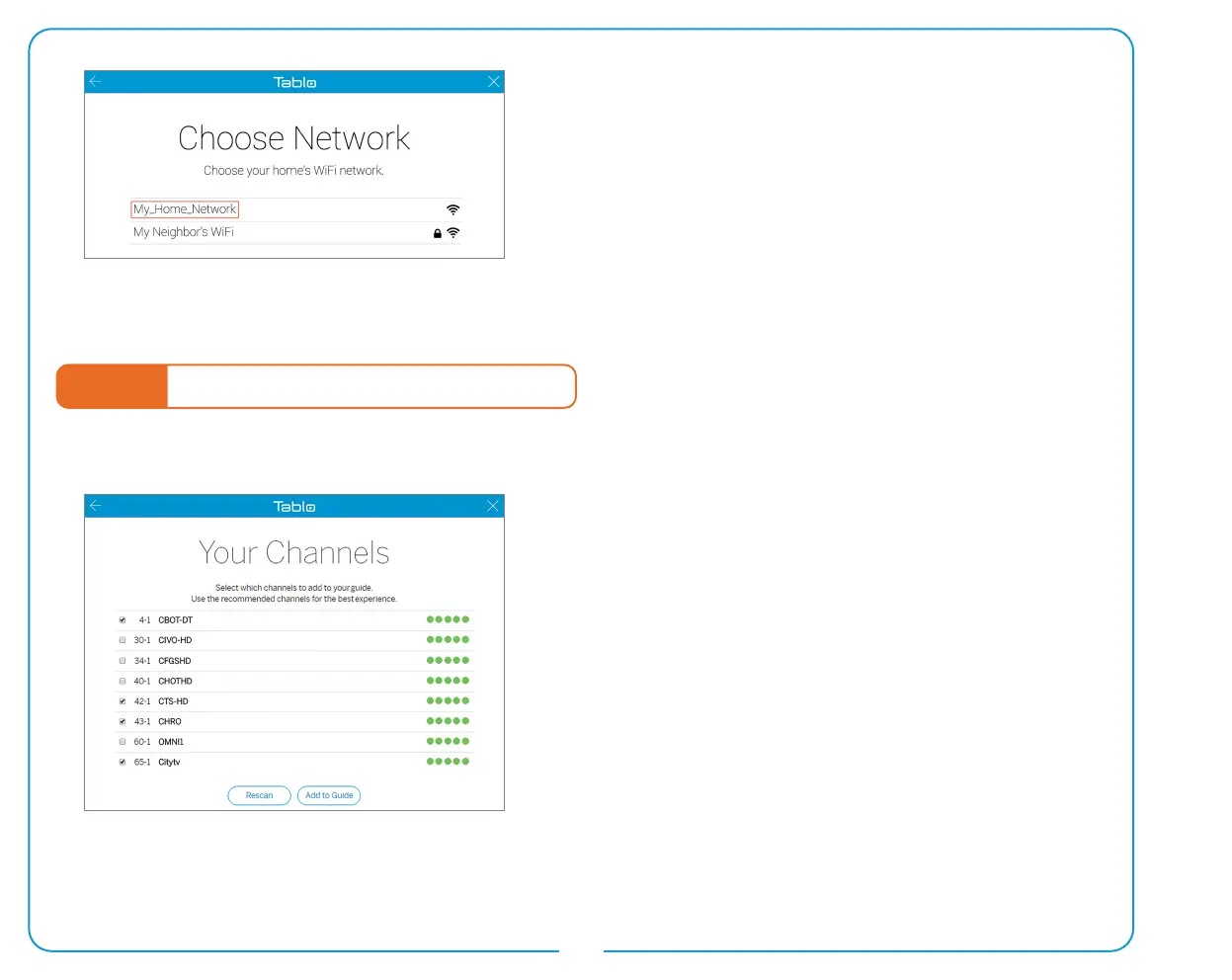
Next, return to the Tablo app and select the name of your
home’s WiFi network. You will be asked to enter your home’s
WiFi network password.
Your Tablo should then be connected via WiFi and ready to
proceed to STEP 4 (below).
Having trouble? Visit www.TabloTV.com/wi for device
specic instructions, tips, and a how-to video.
STEP 4 Follow the Tablo DVR Setup Wizard
The setup wizard will perform a channel scan to determine what channels can be received by your antenna.
You can add/remove recommended channels from your
guide at this time. Be sure to select ‘Rescan’ if you change or
adjust your antenna’s position after the initial channel scan.
The wizard will also ask to format your USB or SATA hard drive.
Is your lineup missing local channels you expected to see? Is
your Tablo DVR not nding any channels during a scan? Visit
www.TabloTV.com/channelscan for help.


 To Next Page