
 Need help?
Do you have a question about the TabTimer Careousel MK3/11 and is the answer not in the manual?
The TabTimer® Careousel MK3/11 Automatic Pill Dispenser is a device designed to assist users in taking their medication on time. It automatically dispenses pills at pre-set times, helping to ensure adherence to medication schedules.
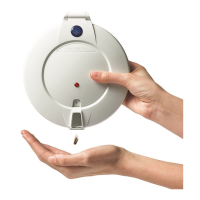
The dispenser reminds the user by means of an alarm and flashing light when it's time to take their medicine. It makes the correct dose available at the correct time of day or night, while keeping other pills out of sight. Medicine is dispensed from an internal tray containing 29 sections, with a maximum of 28 daily alarm settings. When an alarm sounds, the internal tray rotates one position, and the correct dosage becomes visible in the lid opening. Pills should be removed by tilting the dispenser upside down into the hand or a suitable container. This action cancels the alarm signal and the flashing light.
The device features a lock for added security, preventing unauthorized access to the medication. A battery cover screw is also provided to prevent inappropriate access to the batteries.
The dispenser is operated using three buttons.
The device offers two main setting menus:
Setting the Clock: Press Button 1 repeatedly until 'CLOCK' is visible. Set the correct time using Buttons 2 and 3. Fast forward or reverse by pressing and holding the buttons.
Setting Doses per Day: Press Button 1 repeatedly until 'DOSES' is visible. Adjust the number of doses per day using Buttons 2 and 3.
Setting Alarm Times: Press Button 1 repeatedly until 'ALARM' is visible. Set the first alarm time using Buttons 2 and 3. Press Button 1 again for subsequent alarm times.
'BEFORE' (Early Dose): Allows medication to be taken up to 5 hours before the normal pre-set alarm time. Set the required time (up to 5 hours in 5-minute increments) using Buttons 2 or 3. If enabled, the user can access medicine in advance by tilting the dispenser upside down twice. The dispenser will then rotate, sound the alarm, and make the medicine available. Tilting it again dispenses the medicine and stops the alarm. If medicine is taken early, the dispenser will not activate again until the next scheduled dose. If not required, set to 00.00. This function is not recommended for individuals with confusion.
'AFTER' (Alarm Duration): Adjusts the length of time the alarm will sound/light will flash. Press Button 1 until 'AFTER' is displayed. Adjust duration (minimum 5 minutes / maximum 1 hour) using Buttons 2 or 3.
Sound: Four alarm sounds are available. Press Button 1 until 'SOUND' is displayed. Choose sound 01, 02, 03, or 04 using Buttons 2 or 3. Set to 00 for no sound. The alarm will sound every 4 seconds for the first minute, then every 30 seconds until medicine is taken or the duration limit is reached.
Light: Controls the flashing light. Press Button 1 until 'LIGHT' is displayed. Set to '00' for no light or '01' for light using Buttons 2 or 3.
HOURS (24hr / AM-PM Clock Settings): The dispenser is pre-set to 24hr display. To change to AM/PM, press Button 1 until 'HOURS' is displayed. Choose AM/PM or 24hrs using Buttons 2 or 3. 24hr clock is recommended.
DLS (Daylight Saving): Automatically adjusts for daylight saving. Press Button 1 until 'DLS' is displayed. Set to '01' to enable or '00' to disable using Buttons 2 or 3.
DATE: Sets the current date. Press Button 1 until 'DATE' is displayed. Set the Year (YY), Month (MM), and Day (DD) using Buttons 2 and 3.
START (Start Delay Function): Delays the time at which the dispenser will start to operate. This is useful if the dispenser is being filled offsite (e.g., by a pharmacy) and not being delivered to the user until a later date. Press Button 1 until 'START' is displayed. Set the Year (YY), Month (MM), Day (DD), and Hour (HH) using Buttons 2 and 3. The time (HH) should be in advance of the first dose.
RECORD: Records the actual times the previous 28 medicines were dispensed. Press Button 1 until 'RECORD' is displayed. The time the last medicine was taken is displayed. Buttons 2 or 3 show times for all 28 medicines.
TEST FUNCTION: An inbuilt test function. Press Button 1 until 'TEST' is displayed. The tray will rotate, 'MOVING' and then 'TAKE' is displayed. The alarm will sound. Tilt the dispenser to stop the alarm. 'TEST' is then displayed again.
Pharmacy Filling: Many pharmacies can fill the TabTimer® Careousel MK3/11 Dispenser. The device meets the requirements of the Quality Care Pharmacy Program (QCPP).
Fault Handling:
Batteries: The dispenser uses 4 x AA Alkaline batteries, which last up to 12 months. To check battery life:
Cleaning:
Transport: Remove all batteries if the dispenser is being shipped.
Repositioning the Tray: Always lift the medicine tray out and then lower it directly into the case in the correct position. Do not force the tray to rotate to avoid damaging the mechanism.
General Observations:
Important Notice: The TabTimer® Automatic Pill Dispenser is not a medical device and is intended as an aid. It is not tamper-proof, and users should be prevented from forcing access to medicine. The user is responsible for ensuring that medicine is taken as prescribed. TabTimer cannot accept responsibility for faults or consequences arising from misuse (e.g., dropping, water damage, foreign objects, forced turning of the pill tray, or forced opening).

 To Next Page
 General