11
Pharmacy lling:
Many pharmacies will ll TabTimer® dispensers.
The device meets the requirements of the Quality Care Pharmacy Program (QCPP)*.
For the suggested Standard Operang Procedure for pharmacy lling of the
MK3/11 dispenser, ask your pharmacist to contact
TabTimer® .
The new Pharmacy Filler tray is now available for
easier Pharmacy lling of dispenser trays.
Ask your Pharmacist to contact TabTimer® on 1300 822 846.
COMMONLY REPORTED ISSUES
‘I have just received my new dispenser but it is locked and there is no key.’
The unit is not locked but there is a knack to open (see Figure 2.) the key is inside.
‘The alarm sound/light has stopped working.’
Check the sound / light sengs – they may have been inadvertently set to ‘00’
‘The dispenser alarmed during the night when it should not have’.
Check the sengs, usually it has been incorrectly programmed to p.m. instead of a.m.
Set to 24 hour clock to avoid this happening.
‘The dispenser didn’t allow for the clocks going back/forward.’
The date needs to be programmed into the unit. Check DLS is set to ‘01’.
‘The unit is not rotang.’
Check that there is no obstrucon; check the baery level, check it is programmed correctly.
Use the TEST funcon in Menu B.
‘The compartments are too small I can’t get my ngers in to get the pills out, also the
alarm does not stop ringing.’
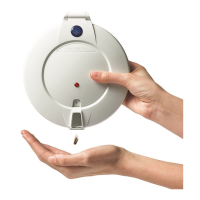
The pills should be pped out into the hand, which also stops the alarm ringing.
‘There is an intermient alarm sound and ‘ERROR’ is indicated on the screen.’
If the dispenser has been unable to rotate due to an obstrucon it will show ‘ERROR’ on the display
and emit the error alarm. This is a intermient sound with a longer interval ( 30 seconds) compared to
the normal ‘dispensing’ alarm interval. To stop alarm, take a baery out and then replace it.
Clear the obstrucon. If the ERROR message connues there may be another fault in which case
contact TabTimer® for inspecon.
‘The tray is rotang slowly.’
Check the baery level and replace if necessary. (Note- Do not use rechargeable baeries, they do not
have sucient power for extended use).
‘I have dropped the dispenser, should I send it back for checking?’
Use the TEST funcon in menu B. If all is operang sasfactorily then it is probably operang
normally. For extra reassurance reset the alarms and actually watch/listen to the rotaon.
‘If I take the baeries out will I have to reset all the alarms again?’
No, the alarm sengs are retained, only the clock would need to be reset if the baeries are not
replaced immediately.
‘The dispenser is not working and ‘TILTED’ is displayed?’
Dispenser has been le upside down at the dosage me and all of the AFTER me.
See FAULT HANDLING p.8.


 To Next Page
 Loading...