EasyManua.ls Logo

TACKLIFE TKD250 - Dehumidifier Care and Cleaning; Cleaning the Air Filter; Cleaning Exterior and Water Bucket

TACKLIFE TKD250
13 pages
Print Icon
To Next Page IconTo Next Page
To Previous Page IconTo Previous Page
Loading...
DEHUMIDIFIER
CARE
Your
new
dehumidifieris
designed
to
give
you
many
years
of
dependable
service.
This
section
explains
howto
clean
and
care
for
your
dehumidifier.
To
avoid
damage
to
the
compressor,
neverstore
orshipthe
appliance
upside
down
orsideways.
Cleaning
theAir
Filter
The
airfilteris
removable
foreasy
cleaning.A
clean
filter
helps
remove
dust,lint,
and
other
particles
from
the
air
and
is
importantfor
best
operating
efficiency.
Check
the
filter
every
two
weeks
to
see
whether
it
needs
cleaning.
1.
Turn
off
the
dehumidifier.
2.
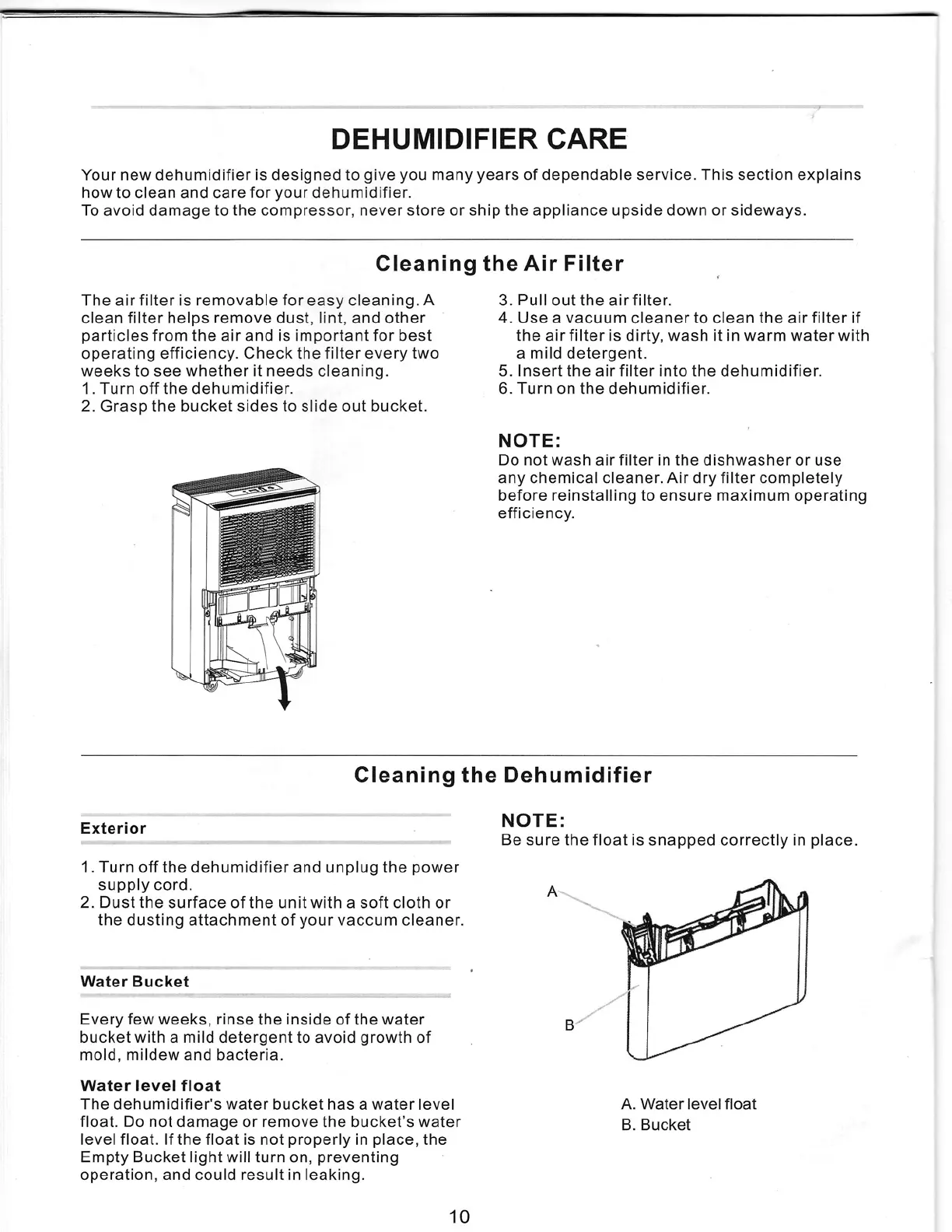
Grasp
the
bucketsidesto
slide
out
bucket.
~~==="
. .
'"
"
.
..
.
-
'""'
—:j--;"'_'x-'[j"'
'r
"""'
"'"""
"j
__"f5
I
l?
A,"""""m'
-
'
"·4i@'>["
3.
Pull
outthe
airfilter.
4.
Use
a
vacuum
cleanerto
clean
the
airfilterif
the
airfilteris
dirty,
wash
it
in
warm
waterwith
a
mild
detergent.
5.
lnsertthe
airfilterinto
the
dehumidifier.
6.Turn
onthe
dehumidifier.
NOTE:
Do
notwash
airfilter
in
the
dishwasher
or
use
any
chemical
cleaner.Airdry
filtercompletely
before
reinstalling
to
ensure
maximum
operating
efficiency.
Cleaning
the
Dehumidifier
Exterior
NOTE:
Be
sure
the
floatis
snapped
correctlyin
place.
1.
Turn
off
the
dehumidifierand
unplug
the
power
supply
cord.
2.
Dustthe
surface
of
the
unitwith
a
soft
cloth
or
the
dusting
attachment
of
your
vaccum
cleaner.
^
*e¢"
Water
Bucket
Every
few
weeks,
rinse
the
inside
of
the
water
bucketwith
a
mild
detergentto
avoid
growth
of
mold,
mildew
and
bacteria.
Water
level
float
The
dehumidifier's
water
bucket
has
a
waterlevel
float.
Do
not
damage
or
remove
the
bucket's
water
level
float.
If
the
float
is
not
properly
in
place,
the
Empty
Bucketlightwillturn
on,
preventing
operation,
and
could
result
in
leaking.
B
)
A.
Water
level
float
B.
Bucket
10