EasyManua.ls Logo

TACKLIFE TKD250 - Operating Indicators and Modes; Fan Speed and Humidity Control; Digital Display and Filter Reset

TACKLIFE TKD250
13 pages
Print Icon
To Next Page IconTo Next Page
To Previous Page IconTo Previous Page
Loading...
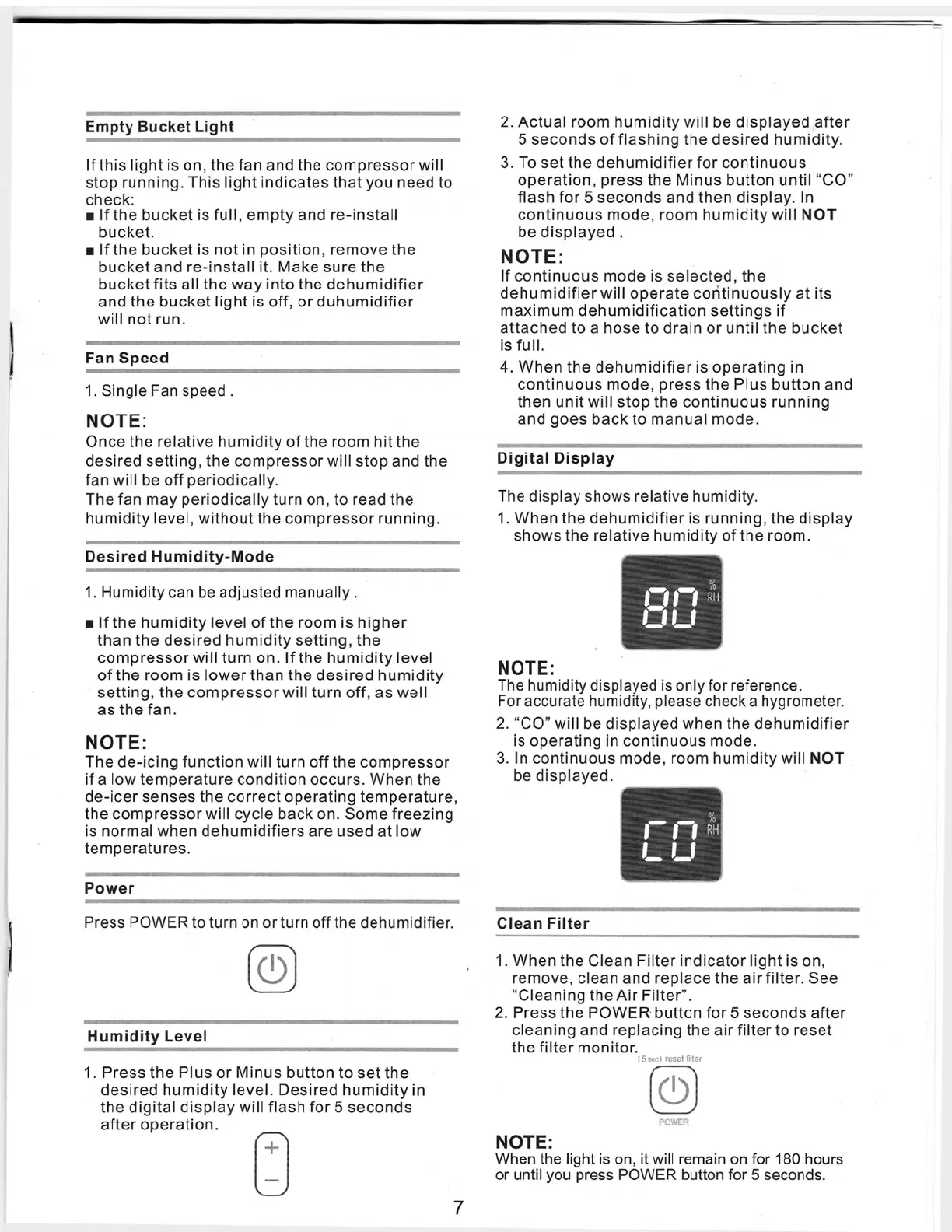
Empty
Bucket
Light
1
If
this
lightis
on,
the
fan
and
the
compressorwill
stop
running.
Thislightindicates
thatyou
need
to
check:
w
If
the
bucketis
full,
empty
and
re-install
bucket.
w
If
the
bucketis
notin
position,
remove
the
bucket
and
re-installit.
Make
sure
the
bucketfits
allthe
way
into
the
dehumidifier
and
the
bucketlightis
off,
orduhumidifier
will
not
run.
Fan
Speed
.
...
,...,.
..
1.
Single
Fan
speed
.
NOTE:
Once
the
relative
humidity
of
the
room
hitthe
desired
setting,
the
compressorwill
stop
and
the
fan
will
be
off
periodically.
Thefan
may
periodicallyturn
on,to
read
the
humiditylevel,
withoutthe
compressorrunning.
Desired
Humidity-Mode
1.
Humidity
can
be
adjusted
manually.
w
If
the
humiditylevel
of
the
room
is
higher
than
the
desired
humidity
setting,
the
compressorwillturn
on.
If
the
humiditylevel
of
the
room
is
lowerthan
the
desired
humidity
setting,
the
compressor
willturn
off,
as
well
as
the
fan.
NOTE:
The
de-icing
function
will
turn
off
the
compressor
if
a
low
temperature
condition
occurs.
When
the
de-icer
senses
the
correct
operating
temperature,
the
compressor
will
cycle
back
on.
Some
freezing
is
normal
when
dehumidifiers
are
used
atlow
temperatures.
Power
Press
POWERtoturn
on
orturn
offthe
dehumidifier.
0!0
'
Humidity
Level
1.
Press
the
Plus
orMinus
button
to
setthe
desired
humidity
level.
Desired
humidity
in
the
digital
display
will
flash
for5
seconds
after
operation.
+
2.
Actual
room
humidity
will
be
displayed
after
5
seconds
of
flashing
the
desired
humidity.
3.
To
setthe
dehumidifierfor
continuous
operation,
press
the
Minus
button
until"CO"
flash
for5
seconds
and
then
display.ln
continuous
mode,
room
humidity
will
NOT
be
displayed
.
NOTE:
If
continuous
mode
is
selected,
the
dehumidifier
will
operate
coritinuously
at
its
maximum
dehumidification
settings
if
attached
to
a
hose
to
drain
or
untilthe
bucket
is
full.
4.
When
the
dehumidifieris
operating
in
continuous
mode,
press
the
Plus
button
and
then
unitwill
stop
the
continuous
running
and
goes
back
to
manual
mode.
Digital
Display
The
display
shows
relative
humidity.
1.
When
the
dehumidifieris
running,
the
display
shows
the
relative
humidity
of
the
room.
Q
D
NOTE:
The
humidity
displayed
is
only
for
reference.
Foraccurate
humidity,
please
check
a
hygrometer.
2.
"CO"
will
be
displayed
when
the
dehumidifier
is
operating
in
continuous
mode.
3. In
continuous
mode,
room
humidity
will
NOT
be
displayed.
m
Clean
Filter
1.
When
the
Clean
Filterindicatorlightis
on,
remove,
clean
and
replacethe
airfilter.
See
"CleaningtheAirFilter".
2.
Press
the
POWER·
button
for5
seconds
after
cleaning
and
replacing
the
airfilterto
reset
the
filter
monitor.
15
sec)
reset
filter
©
POWER
NOTE:
When
the
light
is
on,
it
will
remain
on
for
180
hours
or
until
you
press
POWER
button
for
5
seconds.
7