Auto Set Relocate: Permanent 21 FlexSet 120/280 User Guide
Display Message Key LED
Auto Set Relocate: Permanent
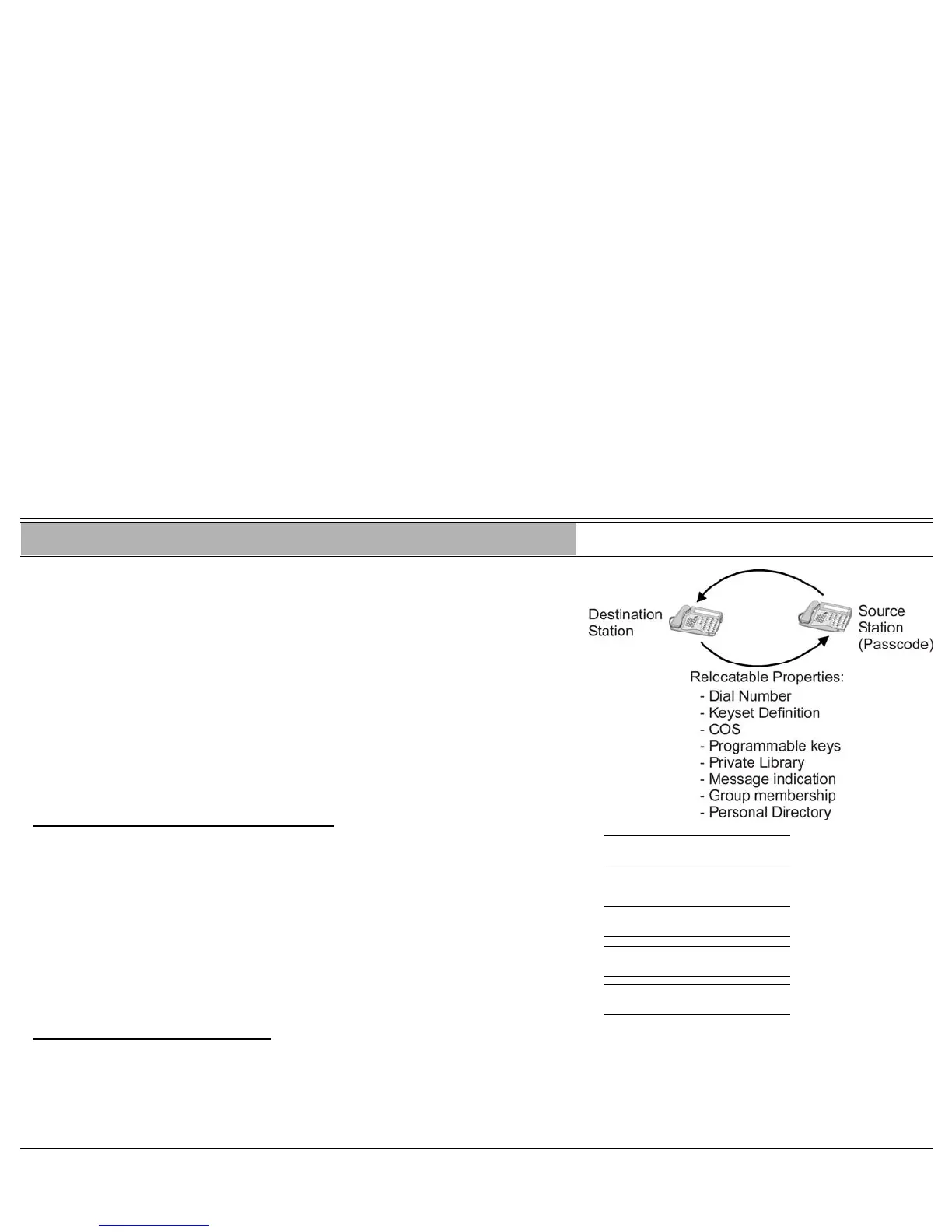
When defined for permanent relocation, this feature enables you to swap
phones within the same Coral system by assigning one FlexSet the profile of
the other FlexSet, and vice versa. All the phones' properties, numbering,
programmable keys, membership in groups, etc. are automatically exchanged.
This feature facilitates the phone relocation procedure, eliminating the need for
traditional phone moves that involve physical disconnection of the station
wires and reconnection at another location.
Both source and destination phones (see figure) should be keysets. The Auto
Set Relocate is activated at the destination station. The phone swap holds until
a reverse swap is performed.
To activate from the destination location:
1. Press [AUTO SET RELOCATE] or dial the Auto Set Relocate feature code. RELOCATE
ENTER SOURCE NO. ON
2. Dial your (source) station number.
3. Dial your (source) passcode (4 digits).
RELOCATE
ENTER PASSCODE ON
4. Dial activation code (no confirmation tone is heard). CONFIRM
ON
5. The station initializes with the source profile.
idle display of the
source number
OFF
To reverse the phone relocation:
1. Repeat the above procedure from your original source location.
WARNING: See warning on (see page 22).








 To Next Page