EasyManua.ls Logo

tado° Smart AC Control - Mobile App Navigation and Control; App Navigation Overview; Control Panel Usage

tado° Smart AC Control
14 pages
Print Icon
To Next Page IconTo Next Page
To Previous Page IconTo Previous Page
Loading...
14 15
MOBILE APP – NAVIGATION

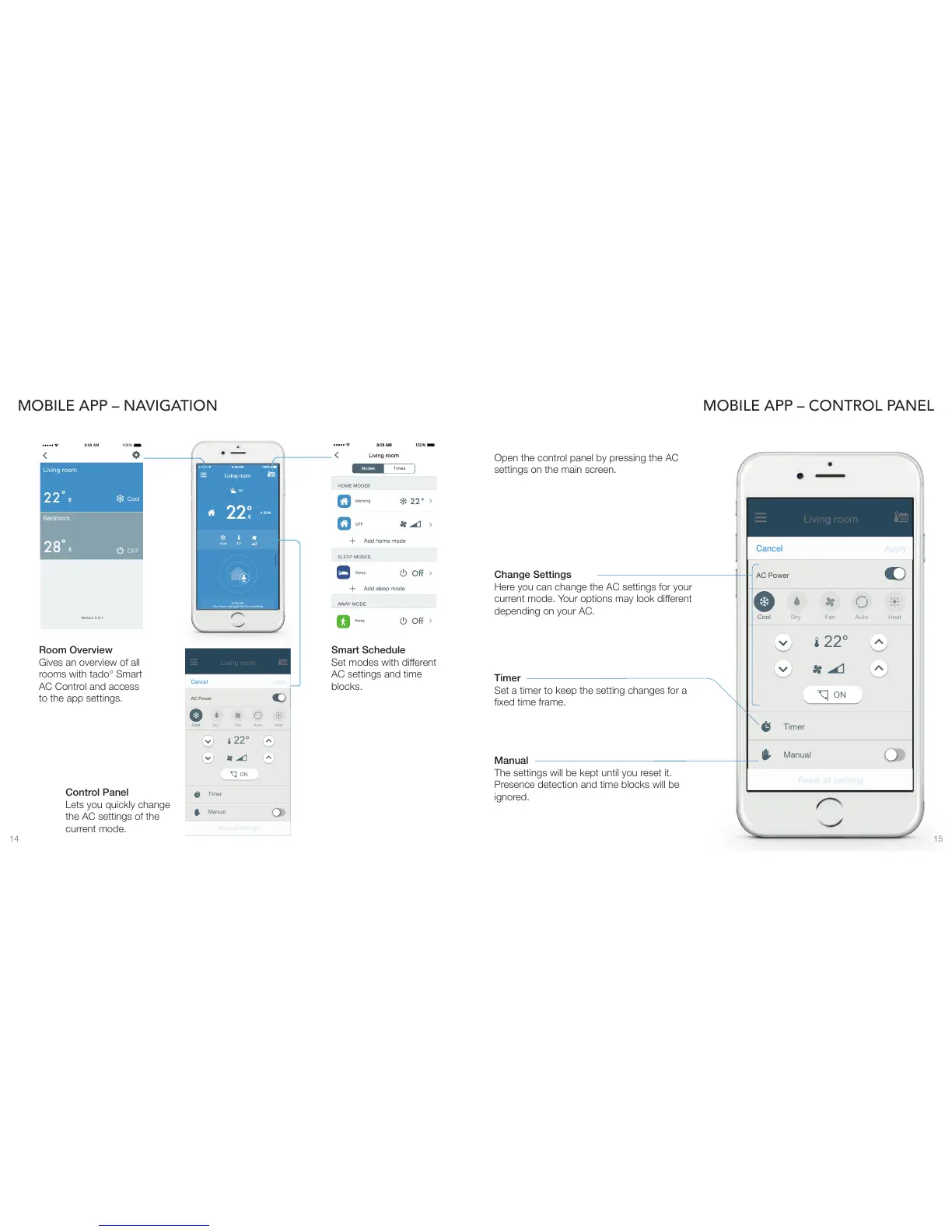
Gives an overview of all
rooms with tado° Smart
AC Control and access
to the app settings.

Lets you quickly change
the AC settings of the
current mode.


AC settings and time
blocks.
MOBILE APP – CONTROL PANEL
Open the control panel by pressing the AC
settings on the main screen.

The settings will be kept until you reset it.
Presence detection and time blocks will be
ignored.

Set a timer to keep the setting changes for a


Here you can change the AC settings for your

depending on your AC.
Version 2.0.1
2
2
Cool
Living room
28

OFF
Bedroom
100%8:08 AM
32°
26
55%
Living room
22°
AC Power
Apply
Cancel
ON
Reset all settings
Timer
Manual
Cool
Heat
Dry
Auto
You have changed the Home Mode.
8:08 AM:
32°
26
55%
Living room
22°
AC Power
Apply
Cancel
ON
Reset all settings
Timer
Manual
Cool
Fan
Heat
Dry
Auto