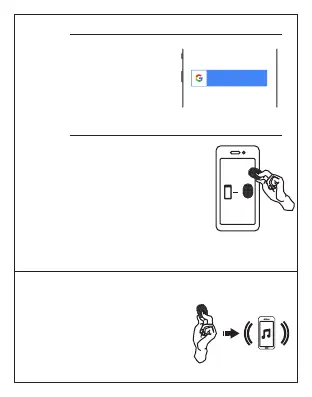
Pair the Dolphin tracker to your
Phone
1. Make sure to turn on your
phone’s Bluetooth
2. Hold the tag8 device close to
your phone
3. Hold the button on the till you
hear a beep
Dolphin Tracker
Step 4:
Sign in with Google account
Review and approve
permission requested by the
application, for the app to
work properly
Step 3:
Sign in with Google
When the Dolphin Tracker is
connected to your phone,
press and hold the button
on the Dolphin Tracker to
make your phone ring
(A) Find My Phone via Dolphin Tracker:__


 To Next Page