Registration of a design into the machine memory
40
Chapter 4
UO04
3-2. To use personal computer (Data Input LAN)
Register designs (saved in the personal computer) into the machine memory. Besides, it is possible to more
easily resister the designs into the machine memory using a commercially available bar code reader (*). The
maximum number of stitches per design is 800,000 stitches.
(*) It is possible to use only the USB connection bar code reader supporting CODE39.
Software sold separately (DG/ML by Pulse) and setting of IP address are necessary to perform this
operation. For details, consult the distributor.
3-2-1. Explanation on the screen
3-2-2. How to operate (not to use bar code reader)
The following is an example of registering a design (saved in a personal computer) into the machine
memory.
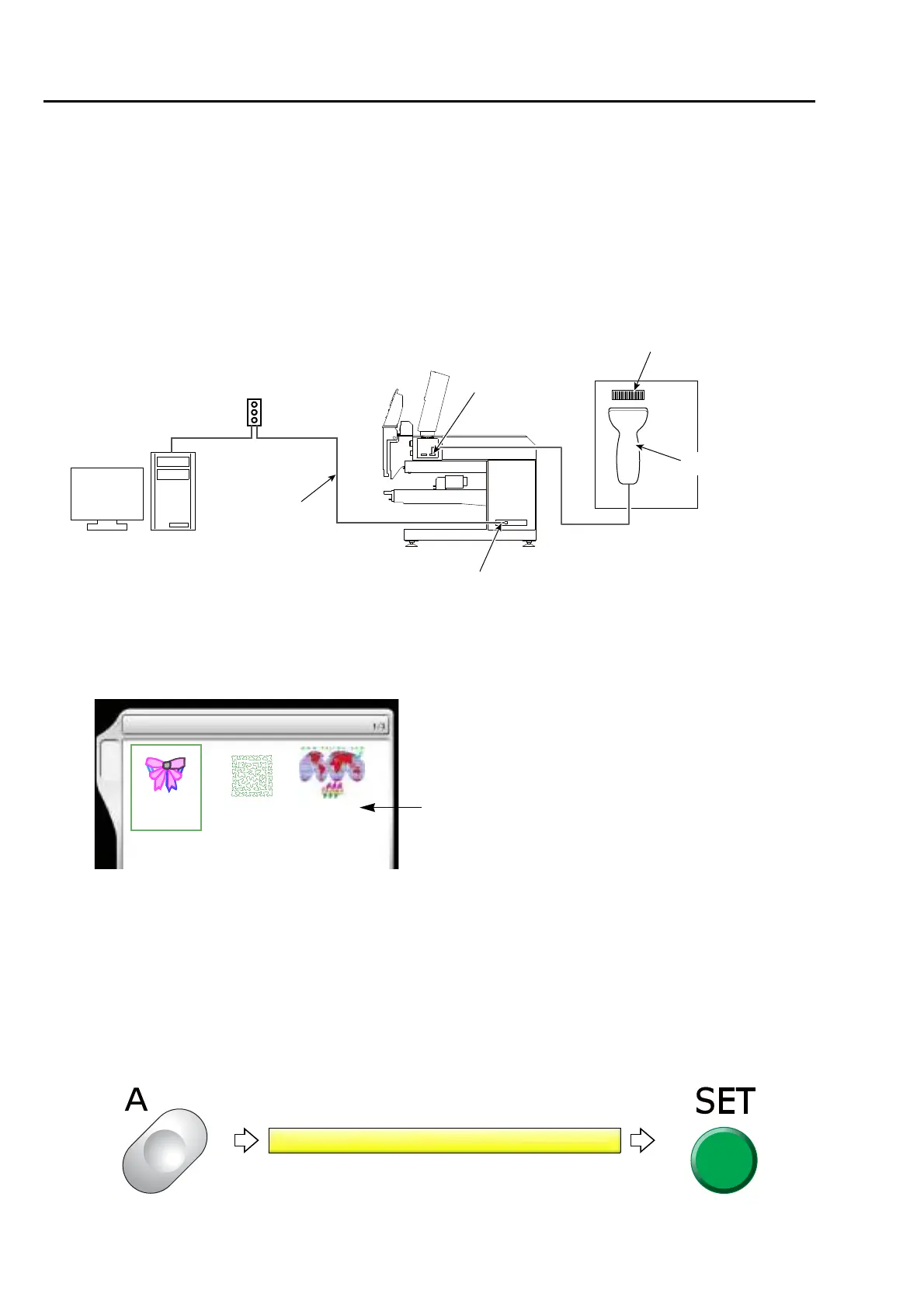
(1) After connecting the LAN cable to the LAN port on the right side of machine, start up DG/ML by Pulse first.
(2) Next, turn ON the machine power and check that the network setting is set to "Normal".
(3) To open screen
DG/ML
by Pulse
[Example of connection]
(DHCP server)
Router
LAN cable
LAN port
USB port
Bar code
Bar code reader
5 Data Input (LAN)
TBF
3
******
****
***
A
TBF
5
******
****
***
TBF
6
******
****
***
Designs saved in DG/ML by Pulse



 To Next Page