EasyManua.ls Logo

Takex OMS-12FE - User Manual

Takex OMS-12FE
12 pages
Print Icon
To Next Page IconTo Next Page
Loading...
We appreciate your purchase of a TAKEX passive infrared sensor. This sensor will provide long and dependable service when properly
installed. Please read this Instruction Manual carefully for correct and effective use.
Please Note : This sensor is designed to detect intrusion and to initiate an alarm ; it is not a burglary-preventing device.
TAKEX is not responsible for damage, injury or losses caused by accident, theft, Acts of God (including inductive
surge by lightning), abuse, misuse, abnormal usage, faulty installation or improper maintenance.
Instruction Manual
OMS-12FE
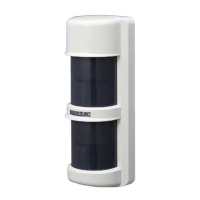
This product is a passive sensor that can be used both indoors and outdoors, and that detects the far infrared radiation given off by body heat.
Using this sensor with other products enables a variety of applications, such as giving notifications of visitors or waring in the detection of intruders.
Main Features
[3 DETECTION AREA]
[4 FUNCTION]
(2) Selection of area corresponding to intended
purpose
(1) Dual Zone system (3) Rainproof housing
(4) Back Tamper
Use of the provided back tamper rubber enables detection of
interference with the sensor, such as attempts to remove it
from the mounting surface.
[7 INSTALLATION]
(5) Support for mounting on poles
(optional pole attachment)
Use of the optional pole attachment enables mounting on
poles with a diameter of 1.49" to 1.77" (38mm to 45mm).
s5SINGTHEINCLUDEDAREAMASKINGSHEETENABLESPARTIAL
masking of zones for which detection is not required.
IEC standard: IP54 compliant.
Approximately 180°
φ1.49" to 1.77"
(38mm to 45mm)
Downwards zone
Horizontal zoneDetected
Detection range
Not detected
Dual Zone Outdoor PIR
s4HESENSORWATCHESA
wide, 180° angle, meaning
that a single unit can
cover a wide range.
s4HISSENSORISEQUIPPEDWITHA$5!,:/.%SYSTEM
which initiates an alarm only when detection occurs in
both the horizontal and downward zones simultaneously.
This prevents false alarms for distant automobiles or for
small animals.
s"YCHANGINGTHEANGLEOFTHEDOWNWARDSZONEITIS
POSSIBLETOCHANGETHEDETECTIONDISTANCE$ISTANTVEHICLES
that do not enter the downwards zone are not detected.
Small animals that do not enter the horizontal zone are
not detected. Similarly, birds and other objects that only
enter the horizontal zone are also not detected.
s!ªZONEEITHERTOTHELEFTORRIGHTCANBEDISABLED

Questions and Answers

  • M
    Michael Burton MDAug 9, 2025
    What to do if my Takex Security System sensor does not detect anything?
    • E
      Emily GarciaAug 9, 2025
      If your Takex Security System sensor isn't detecting anything, consider the following: * Check the power wiring and ensure the power supply voltage is correct, as the power supply might not be connected or the voltage might be low. * Make sure the detection area isn't shielded by any object, including glass; remove any obstacles. * Readjust the detection area settings, as they might be unsuitable, including the detection distance. * Wait approximately 1 minute after turning the power on, allowing the operation LED to stop blinking.
  • L
    Laurie HornAug 16, 2025
    Why Takex Security System sensor sometimes does not detect anything?
    • P
      Priscilla MasonAug 16, 2025
      If your Takex Security System sensor sometimes fails to detect, here are a few things to check: * The detection area settings, including the detection distance, might be unsuitable; readjust the detection area. * The detection lens might be covered with dust or water droplets; wipe it with a damp soft cloth, then dry it. * The detection or pulse count settings might be inappropriate; ensure they are correct.
  • K
    karenlopezAug 23, 2025
    How to troubleshoot Takex OMS-12FE Security System when operation LED is on, but connected devices are not operating?
    • S
      Sarah MosesAug 23, 2025
      If the operation LED is on but connected devices aren't working, consider these points: * There might be a wiring failure, broken wire, or short; connect the wiring correctly. * Ensure that connected devices are operating correctly.
  • A
    Alexander WolfeNov 1, 2025
    Why does my Takex Security System generate false alarms?
    • G
      gilbertjacobNov 1, 2025
      Your Takex Security System might generate alarms when no one is there for several reasons: * The power supply voltage might be unstable, so ensure it is appropriate. * Something might be moving within the detection area, or there could be sudden temperature changes; remove the object causing the issue. * There might be a source of electrical noise nearby, like a broadcasting station; consider changing the mounting location or removing the noise source. * Direct or reflected light, such as sunlight or headlights, might be shining on the sensor or into the detection area; adjust the mounting location or reflective item's position. * The sensor might be mounted at an angle; make sure it's level. * Cars or motorcycles might be detected at the edge of the detection area; reduce the...

Summary

Main Features of the TAKEX Dual Zone Outdoor PIR

Dual Zone System

Sensor initiates alarm only when detection occurs in both horizontal and downward zones simultaneously.

Area Selection Capability

Sensor covers a wide 180° angle, with options to disable 90° zones.

Rainproof Housing

Features IEC standard IP54 compliance for weather resistance.

Back Tamper Function

Detects attempts to remove the sensor from its mounting surface.

Pole Mounting Support

Supports mounting on poles with diameters from 38mm to 45mm.

Parts Description and Accessories

Product Components Overview

Details the parts included in the packaging and their functions.

Included Accessories List

Lists accessories such as the instruction manual and area masking sheets.

Operational Part Functions

Explains the functions of key operational parts like sensitivity adjustment.

Precautions and Safety Warnings

General Handling Precautions

Covers warnings, cautions, and prohibitions for safe product use.

Detection Area Configuration

Detection Area Overview

Describes the default horizontal and downward detection zones.

Area Adjustment Methods

Details how to adjust detection distance using the adjustment holder.

Area Masking

Explains how to use masking sheets to eliminate specific detection zones.

Area Confirmation Walk Test

Procedure to confirm detection area suitability after masking.

Device Functions

Operation LED Indicator

Describes the LED's states for warm-up, detection, and trouble.

Tamper Detection Functions

Covers cover tamper and back tamper detection mechanisms.

System Monitoring Functions

Details sensor trouble and power supply voltage monitoring.

Settings and Configuration Options

Sensitivity Adjustment

Adjusts sensor sensitivity from 30% to 170% based on environment.

Operation LED Settings

Configuration options for the operation LED.

Pulse Count Settings

Adjusts pulse count settings for detection sensitivity.

Alarm Contact Settings

Configures alarm contact output modes (Normal, N.O., N.C.).

Area Select Settings

Allows selection of 180° or 90° detection areas.

Factory Settings

Information on factory default settings.

Wiring and Installation Guide

Terminal Configuration and Supply Voltage

Details power, alarm, and tamper output terminals.

Wiring Distance Specifications

Provides maximum wiring distances based on wire gauge.

Wiring Insertion Methods

Instructions for embedded and external wiring.

Installation Procedures

Cover Removal

Steps to remove the sensor cover for wiring.

Installation Methods

Covers wall and pole mounting instructions.

Operation Confirmation and Walk Test

Walk Test Procedure

Steps to walk through the detection area to confirm settings.

Troubleshooting Common Issues

Product Specifications

External Dimensions Diagram

Limited Warranty Information

Takex OMS-12FE Specifications

General IconGeneral
Detection MethodPassive Infrared
Coverage Angle90 degrees
Operating Temperature-20°C to +50°C
Operating Temperature (Fahrenheit)-4°F to +122°F
IP RatingIP65
Detection Range12 meters
Current Consumption25mA
Output TypeRelay