SETTING
5
⑦
Regardless of the
settings of switch 6,
the sensor will cover
a 180° detection area.
Use 180°
area
[Factory set]
The right area is
disabled.
The left area is
disabled.
Use left
90° area
Use right
90° area
ON
12345678
ON
12345678
ON
12345678
OFF
OFF
OFF
Right side
Right side
Left side
Left side
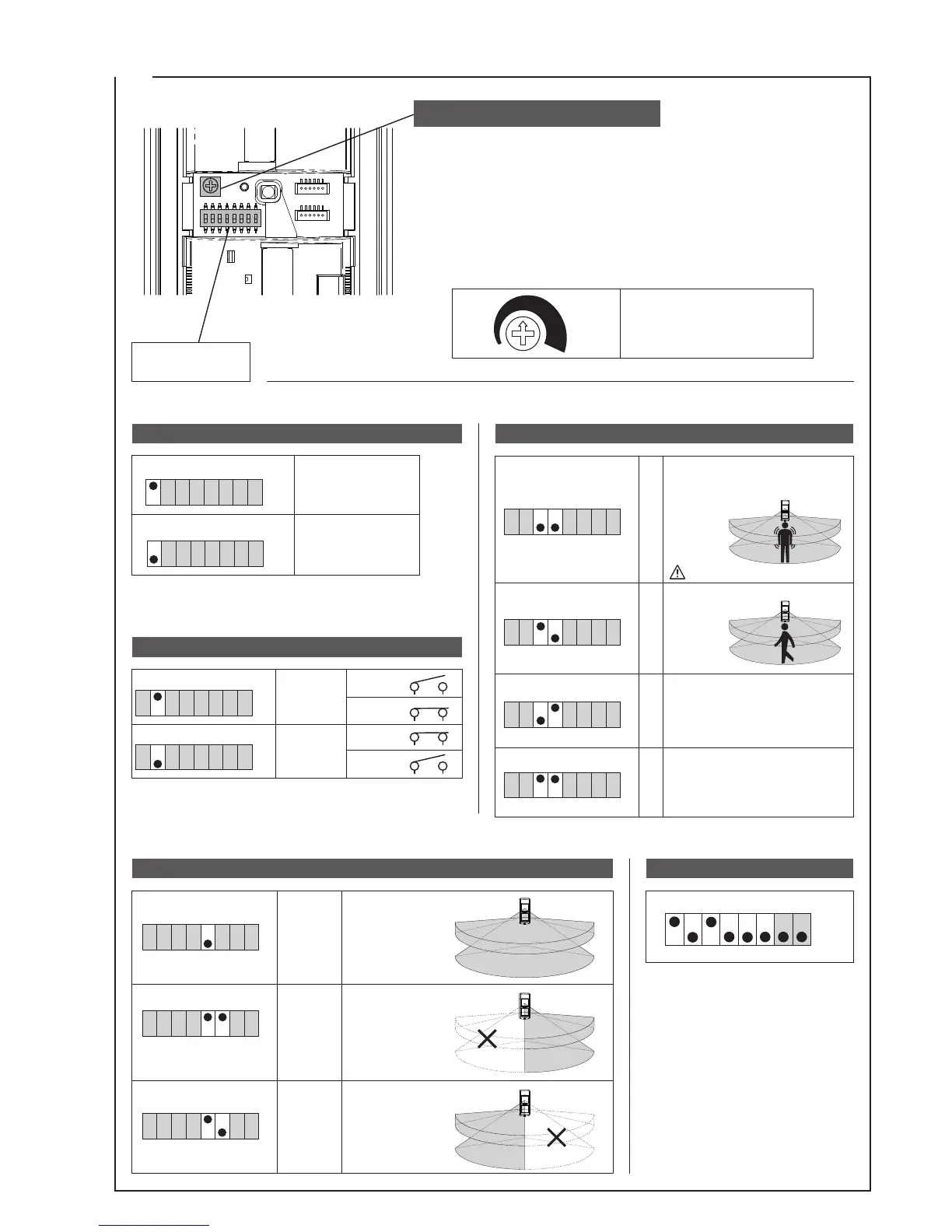
AREA SELECT (switch5,6)
FACTORY SET
ON
OFF
12345678
*Switches 7 and 8 are not used.
Ensure these are OFF during
operation.
*The display cannot be set to OFF for warm-up period,
device trouble, or low power supply voltage.
In normal operation, use this setting.
1
2
3
4
OFF
ON
This setting is suitable for locations with
frequent changes in temperature.
This is not as susceptible to false
alarms as pulse count 2, however this
is also not as sensitive to people.
This is not as susceptible to false
alarms as pulse count 3, however this
is also not as sensitive to people.
The sensor can be adjusted in accordance with the environment and
intended purpose.
Normally, use medium (100%).
Setting the sensitivity to 170% will trigger detection even at small changes
in temperature.
Use this in stable environments.
Setting the sensitivity to 30% will not trigger detection unless there is a
large change in temperature.
Use this in environments which are subject to large changes in temperature.
ON
12345678
ON
12345678
ON
12345678
ON
12345678
ON
12345678
ON
12345678
OFF
OFF
OFF
OFF
OFF
OFF
N.O.
N.C.
ON
12345678
ON
12345678
OFF
OFF
NORMAL
NORMAL
Set for sensitive detection of even
small movements by people, however
this may be more susceptible to false
alarms.
30% 170%
OPERATION LED (switch1)
ALARM CONTACT (switch2)
PULSE COUNT (switch3,4)
*
When changing the sensitivity dial, ensure that a walk test is carried out to check that the sensitivity is suitable.
For wall detection, use this setting.
[Factory set]
[Factory set]
[Factory set]
Sensitivity can be adjusted
between 30% and 170%.
[Factory set : 100%]
SENSITIVITY ADJUSTMENT
Mode setting
switches
ALARM
ALARM


 To Next Page