13
12
Professional Recording Microphone
PC-K600
Professional Recording Microphone
PC-K600
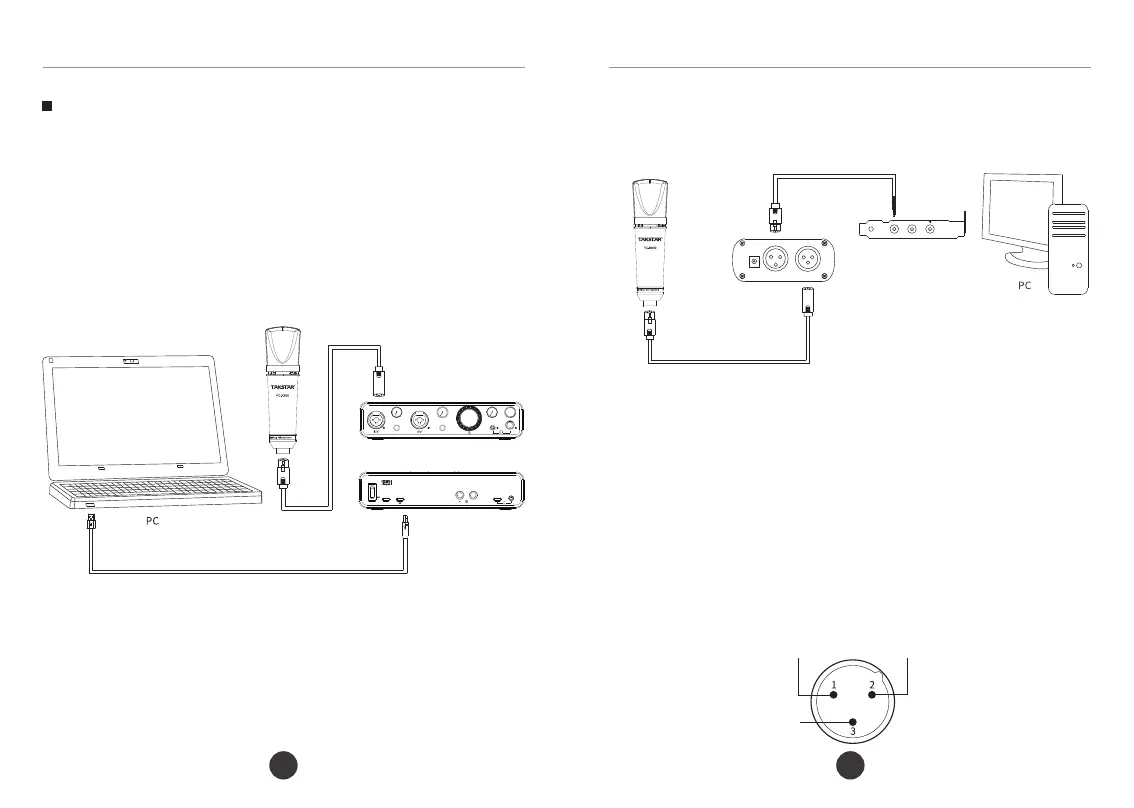
② Connection to audio device without built-in 48V phantom power:
Pin 1 (ground)
Pin 2 (+)
Pin 3 (-)
2. Fix the connection cable onto the mic stand or boom arm, and leave
a section/loop of cable at the mic. This helps to effectively isolate the
vibration.
3. Please turn the volume to the minimum on the audio device before
switching on the phantom power. Then gradually increase the volume to
an appropriate level. This helps to prevent speaker damage from high
sound pressure. Keep a proper distance between the mic and the
speakers to avoid feedback howling.
4. The mic output uses a three-pin XLR male connector, as shown below:
Female XLR to 3.5mm Audio Cable
48V Phantom Power
Audio Interface
Male/Female XLR Cable
1.Using the XLR male-to-female cable, connect the mic to an audio device
(e.g., audio interface, mixing console) with built-in 48V phantom power
supply, or use an external 48V power supply (not included) if none.
Note: The phantom power supply requirement for this product is
DC 48V±4V/2.8mA±20%.
① Connection to audio device with built-in 48V phantom power:
Male/Female XLR Cable
Audio Interface - Front
MX700
MX700
Audio Interface - Rear
USB Data Cable
Operation Instructions
GAIN
48V
GAIN
48V
+ - + -
+ -
+ - + -
NO
POWER
DC 5V
L
MX 700
USB Audio Interface
24·bit/192KHz


 To Next Page
 Loading...