EasyManua.ls Logo

Takstar WPM-200 - User Manual

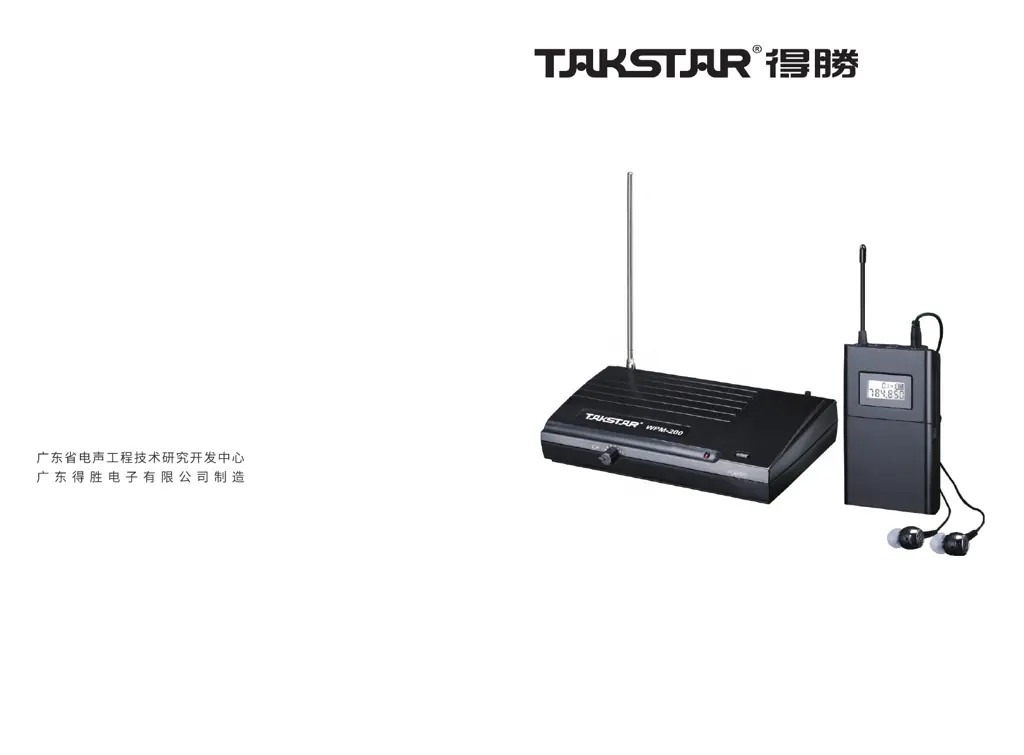
Takstar WPM-200
6 pages
Print Icon
To Next Page IconTo Next Page
Loading...
地址:广东省惠州市博罗县龙溪镇富康一路2
全国服务热线:400 6828 333
传真:0752-6383950
邮箱:xs@takstar.com
邮编:516121
网址:www.takstar.com
Guangdong Takstar Electronic Co., Ltd.
Address: No. 2 Fu Kang YiRd., Longxi Boluo
Huizhou, Guangdong 516121 China
Tel: 86 752 6383644
Fax: 86 752 6383952
Email: sales@takstar.com
Website: www.takstar.com
线
UHF Wireless Monitor System
WPM-200
User Manual

Questions and Answers

  • L
    lori10Jul 28, 2025
    Why does my Takstar Microphone have no sound?
    • D
      Donald NelsonJul 29, 2025
      If your Takstar Microphone has no sound, there are several potential causes: * The transmitter might not be turned on, so ensure it is switched on. * The receiver might not be turned on; make sure it is also on. * The battery power could be low, in which case you should replace it with a new one. * The receiver volume might be too low; adjust the volume on the receiver. * There could be a wrong connection between the transmitter and sound source; try reconnecting it correctly. * The receiver might be too far from the transmitter, activating the mute control; use the receiver within the specified effective range. * The frequencies may not be matched; adjust the CH button on the receiver to match the transmitter's channel.
  • D
    dspearsAug 7, 2025
    What to do if my Takstar Microphone receiver picks up other sound or broadcasting?
    • C
      Cynthia Romero MDAug 7, 2025
      If your Takstar Microphone receiver picks up other sounds or broadcasting, it might be because the transmitter's frequency is too close to another frequency channel. To resolve this, adjust both the receiver and transmitter to use a new channel.
  • D
    dawn44Aug 16, 2025
    How to fix a Takstar WPM-200 when the power indicator does not light?
    • A
      Ashley CampbellAug 16, 2025
      If the power indicator on your Takstar Microphone doesn't light up, it could be due to: * No power connection: Ensure the power adapter is correctly plugged into the transmitter's power socket. * Incorrect battery assembly: Verify the battery is assembled correctly, paying attention to the polarity. Reassemble it properly if it's in the wrong way.

Summary

Product Features

Transmitter Operation

Details on the transmitter's power switch, indicator, frequency adjustment, antenna, and input ports.

Receiver Operation

Details on the receiver's antenna, LCD panel, volume controls, frequency adjustment, battery, and power button.

Operation Instructions

Transmitter Setup

Connecting the power adaptor and audio system to the transmitter.

Receiver Setup

Installing batteries, connecting headphones, and powering on the receiver.

Channel and Volume Adjustment

Matching channels between transmitter and receiver, and adjusting volume.

Safety Precautions

General Safety Guidelines

Covers electrical safety, temperature, fire, radiation, mechanical risks, and improper use.

Product Handling and Environment

Guidelines for placement, avoiding liquids, impacts, and ventilation.

Installation and Usage Rules

Ensuring secure mounting, adhering to regulations, and avoiding self-repair.

Technical Specifications

Transmitter Specifications

Details on frequency range, power supply, transmit power, operating current, and range.

Receiver Specifications

Details on power supply, operating current, S/N ratio, sensitivity, frequency response, and separation.

Package Contents

List of all items included in the product packaging.

Troubleshooting Guide

No Sound Issues

Troubleshooting steps for when there is no audio output from the receiver.

Power Indicator Not Lighting

Diagnosing why the power indicator on the receiver or transmitter is off.

Interference and Other Audio

Resolving issues with receiving unwanted audio or interference.

Takstar WPM-200 Specifications

General IconGeneral
BrandTakstar
ModelWPM-200
CategoryMicrophone
LanguageEnglish

Related product manuals