The device is configured with device unique DevEUI and AppKey. The DevEUI is printed on
device box and the AppKey is distributed by the sales team. The device is default configured
for OTA provisioning. Contact the Talkpool team for ABP configuration. The device follows
the LoRaWAN standard related Join configuration parameters, such as RX1 and RX2
windows, RX2 downlink frequency etc.
The default setting is ADR enabled.
If you are not experienced of LoRaWAN, contact iot.support@talkpool.com to get started.
5.2 Sensor states and state check
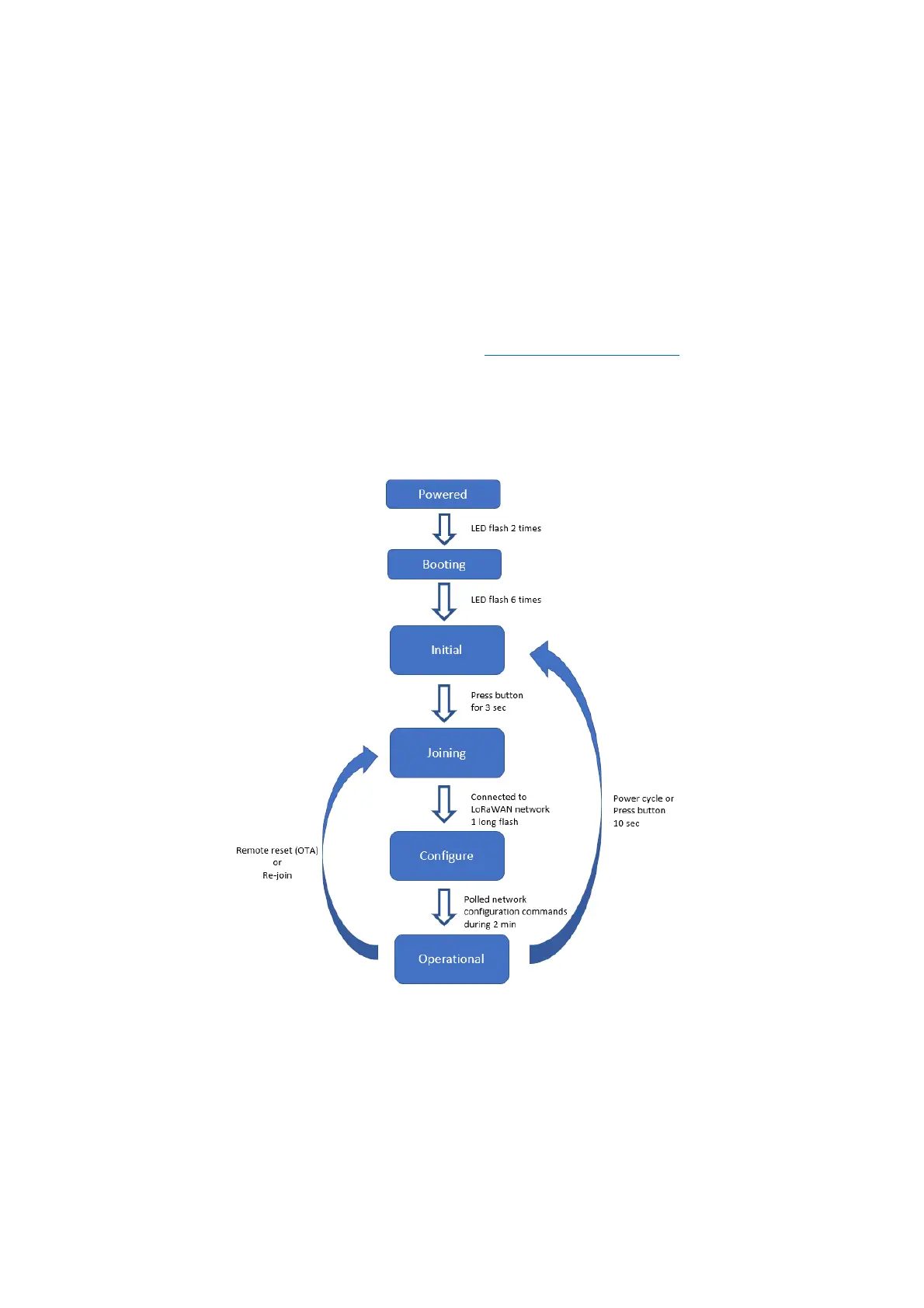
The sensor has five states: Booting, Initial, Joining, Configure and Operational state.
Figure 1 Device states
When the unit is initially powered, it flashes 2 times with the LED, after a few seconds the
unit enters initial state automatically. This is indicated by flashing 4 times.
To check the device state, press the button and hold it pressed until the red LED starts
flashing after 0.5s.


 To Next Page