EasyManua.ls Logo

Tandy CM-11 - Page 5

Tandy CM-11
12 pages
Print Icon
To Next Page IconTo Next Page
To Previous Page IconTo Previous Page
Loading...
Description
of
the CM-11
-
-
-
I
\
I
!!oil
II
II
n
I '
u
'lfll
11
c=:JII
LJ
---
.....
~--(j)
~
-
~-®
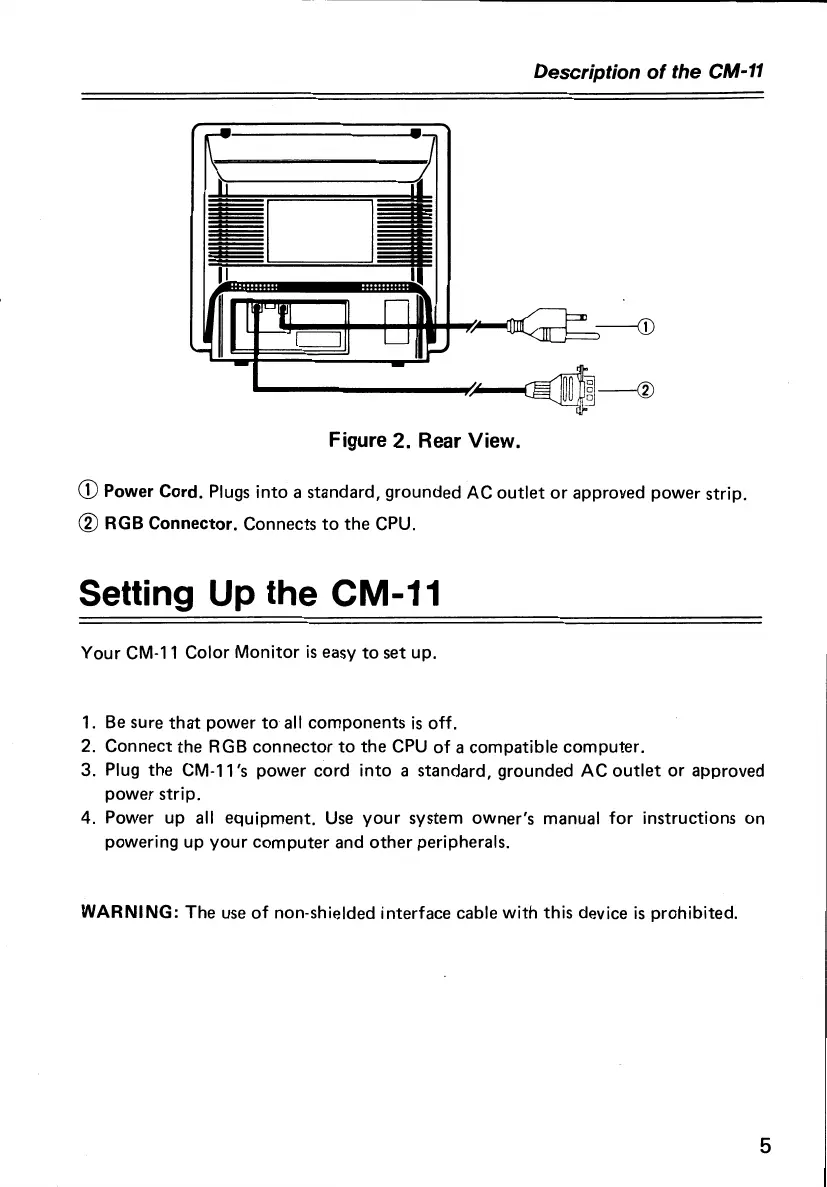
Figure 2. Rear View.
CD
Power Cord. Plugs into a standard, grounded AC
outlet
or
approved power strip.
® RGB Connector. Connects
to
the
CPU.
Setting Up the CM-11
Your
CM-11
Color Monitor
is
easy
to
set
up.
1.
Be
sure
that
power
to
all
components
is
off.
2. Connect
the
RGB
connector
to
the
CPU
of
a compatible
computer.
3. Plug
the
CM-11
's power cord
into
a standard, grounded AC
outlet
or
approved
power strip.
4. Power up all
equipment.
Use
your
system owner's manual
for
instructions
on
powering up
your
computer
and
other
peripherals.
WARNING:
The
use
of
non-shielded interface cable with this device
is
prohibited.
5

Related product manuals