EasyManua.ls Logo

Tanita TBF-310 - Page 32

Tanita TBF-310
37 pages
Print Icon
To Next Page IconTo Next Page
To Previous Page IconTo Previous Page
Loading...
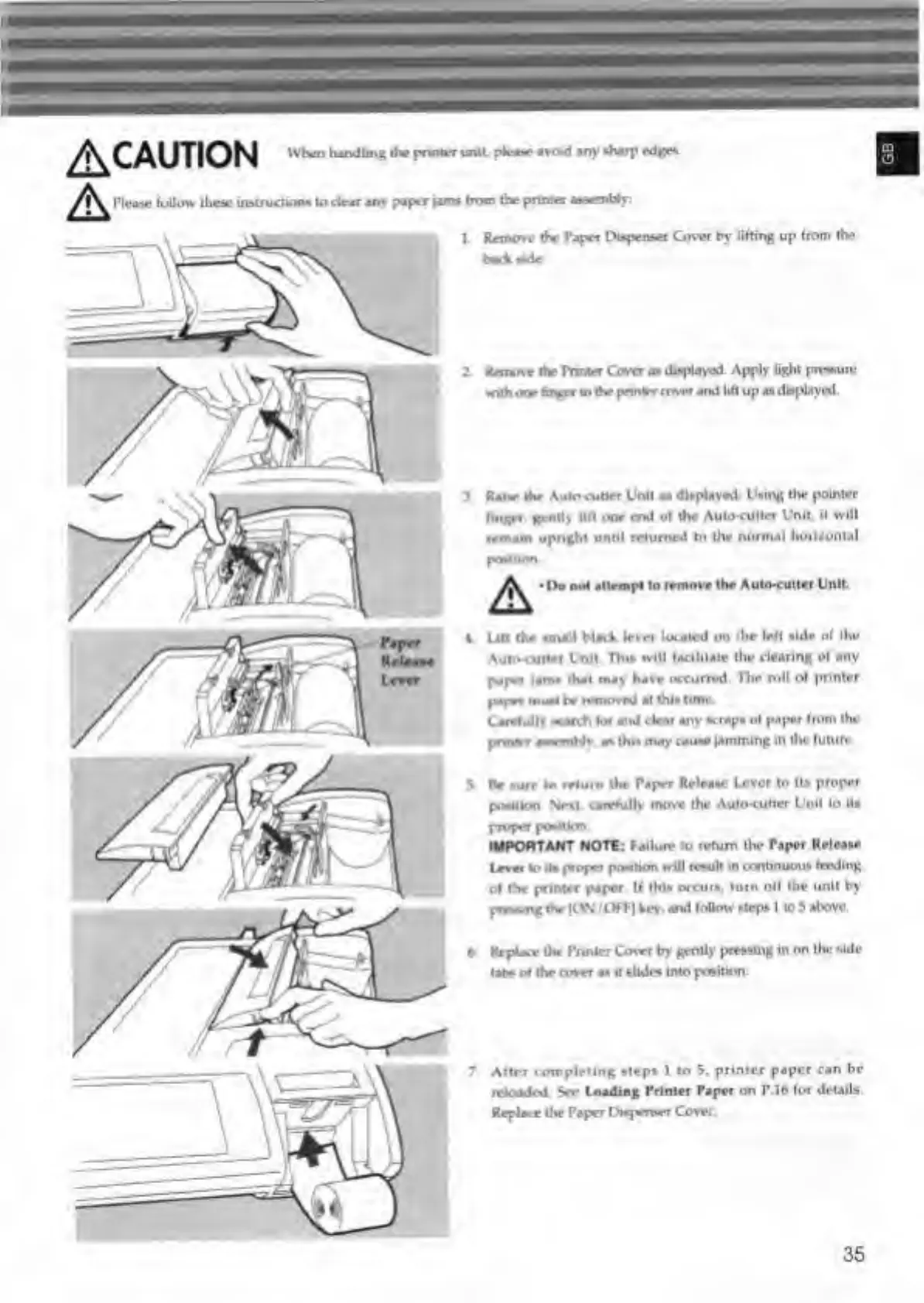
^CAUTION
When
handling
the
printer
unit
pie**
avoid
any
-harp
edges.
PIm
follow
these
instruction*
lodnr
any
paper
yams
from
the
primer
mmmUy.
1.
Remove
the
Paper
Dispenser
Cosvi
by
lifting
up
from
the
bad
wde
Z
Remove
the
Printer
Cover
m
displayed
Apply
light
prrvtun-
with
one
hr^r
to
the
pnnirr
cover
and
lift
up
«*
displayed.
3
Ranr
the
Auto
cutter
Unit
as
displayed
U.ing
the
pointer
linger,
gently
lift
one
end
of
the
Aukxutter
Unit,
it
will
remain
upnght
until
relumed
to
the
normal
horizontal
Do
not
attempt
to
remove
the
Auto-cutter
Unit.
4.
Lift
the
small
Naik
lever
located
on
the
left
aide
of
the
Auto-cutter
Unit
Thi*
will
facilitate
the
clearing
of
any
paper
|*m»
that
may
have
occurred
The
roll
of
printer
paper
musl
be
removed
at
thi*
tune
Carefully
ward*
he
and
dear
any
wrap,
of
paper
from
the
prmfrr
a—
Hv.
a*
thl»
may
cau*e
jamming
In
the
future
Be
»urr
to
return
the
Paper
Release
Lever
to
It.
proper
position
Next
carefully
move
the
Auto-culler
Unit
lo
lt»
proper
poaMon
IMPORTANT
NOTE:
Failure
to
return
the
Paper
Relea.e
Lever
lo
it.
proper
poution
will
result
in
ccmtinuou.
feeding
of
die
printer
paper.
If
thi.
occur*,
turn
off
the
unit
by
prevung
the
|ON
tOFT]
key.
and
follow
.lep*
I
lo
3
above,
6.
Replace
the
Punier
Cover
by
gently
pressing
in
on
ihc
side-
tab*
of
the
cover
a.
it
slide,
into
position
7
After
completing
steps
1
to
5,
printer
paper
can
be
reloaded
See
Loading
Printer
Paper
on
P.16
fin
details.
Replace
the
Paper
l)i»pm*r
Cover.
35

Related product manuals