Need help?
Do you have a question about the TaoTronics TT-CL023 and is the answer not in the manual?
Instructions for safe installation, usage, and functioning of the product.
Use only provided adapter, avoid wet hands, unplug before maintenance.
Do not place near heat/moisture, avoid damaged cords, not a toy.
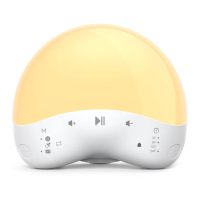
Identifies key controls and ports of the nursery light.
Details model, input, power, Wi-Fi, OS, lumens, color temp, CRI, temp, lifespan.
Explains how to use Sound Mode, Sound Selection, Play/Pause, and Volume controls.
How to turn the night light on/off and adjust brightness via button press.
Instructions to set or cancel the auto OFF timer using the device buttons.
Steps to turn Wi-Fi on/off and enter pairing mode, with indicator status.
Guide to download the TaoTronics app and create an account.
Steps to connect the light to a 2.4GHz Wi-Fi network via the app.
Using default and custom modes for light and sound settings in the app.
Explains app controls for sound, light, timer, schedule, and toddler lock.
How to clean the nursery light using a dry cloth and avoid liquids.
Precautions for handling, avoiding damage, and proper storage.
Solutions for pairing, verification code, Wi-Fi, and app connection problems.
Clarifies if the light can be used without the app and its features.
Addresses issues like failure to light up or unresponsive control panel.
Details the product warranty period and conditions under which it is void.
Details FCC rules, interference, and compliance conditions for the device.
States FCC radiation exposure limits and installation distance requirements.
 General
| Model | TT-CL023 |
|---|---|
| Type | LED Desk Lamp |
| Brightness Levels | 5 |
| Power Consumption | 12W |
| USB Charging Port | Yes |
| Adjustable Arm | Yes |
| Touch Control | Yes |
| Lifespan | 50000 hours |
| Dimmable | Yes |
| Beam Angle | 120° |
| Base Type | Clamp |
| Warranty | 12 months |
| Luminous Flux | 800 lm |

 To Next Page