30
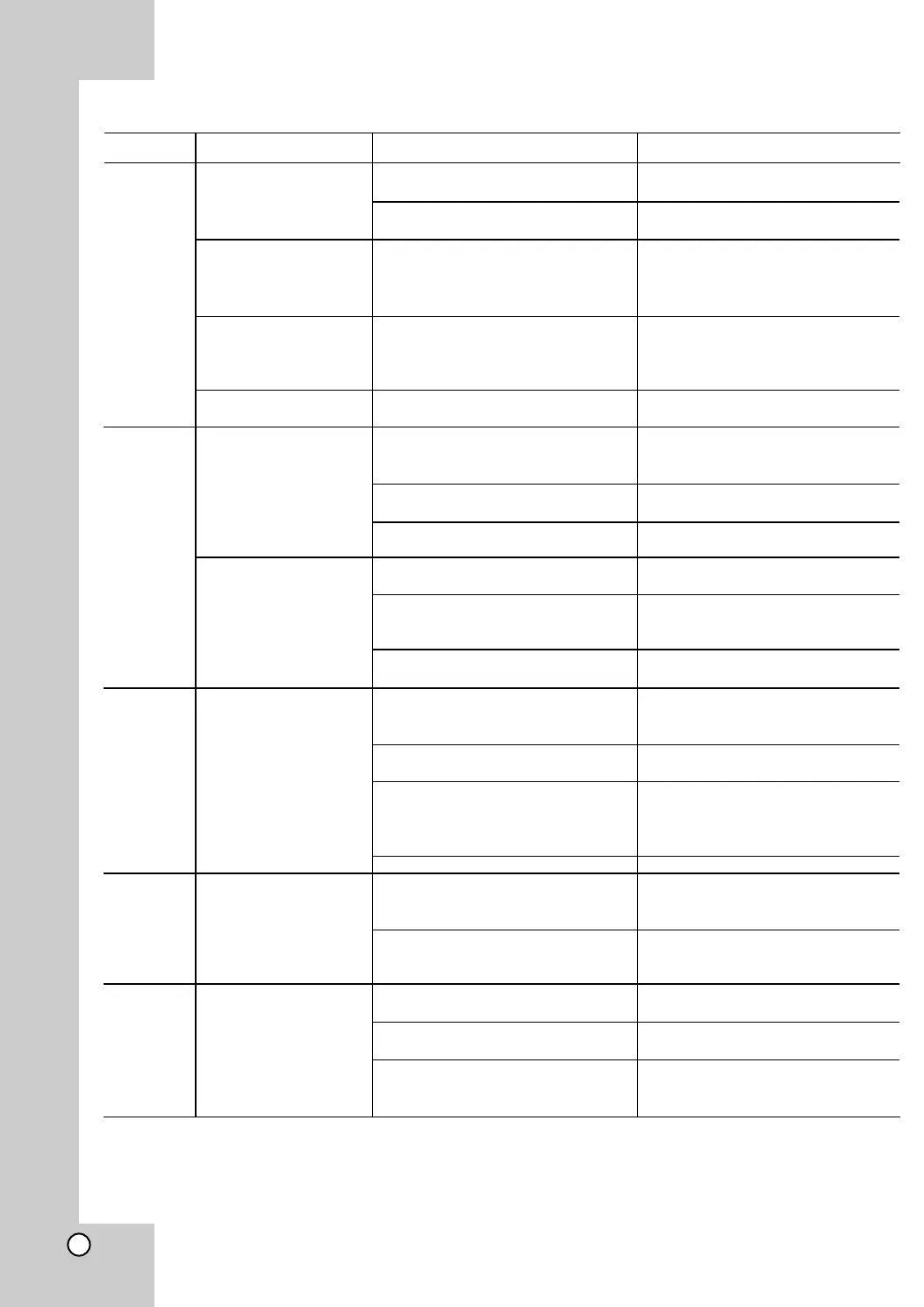
Symptom
• No Power
• No information on
display, red light
(close to O/I
switch) is on
• The power is on,
but the DVD
player does not
work.
• Language not
readable
• No picture.
• Distorted picture
•
No sound.
•
No sound on loud
speakers.
• No sound on
optional digital
receiver.
Possible Cause
• The power cord is
disconnected.
• The power switch on the back
side is off
• The O/I switch is off
• No disc is inserted.
• Wrong language
• The TV is not set to receive
DVD signal output.
• The video cable is not
connected securely.
• No picture because of
Progressive scan is on.
• Sometimes a small amount of
picture distortion.
• Looks like a double picture
because of Progressive scan is
on.
•
Wrong picture set up
(4:3 or 16:9)
•
The equipment connected with
the audio cable is not set to
receive DVD signal output.
• The power of the equipment
connected with the audio cable.
• The Audio options are set to the
wrong position.
•
Volume to low
• 5.1 connectors from DVD Player
not 1:1 linked to optional 5.1
Receiver
•
Load speakers directly
connected with DVD Player
•
Optical or RCA cable are not
connected to receiver
•
Input source on Receiver not
linked with connectors
•
Receiver or/and DVD-Player not
set to DTS or Dolby Digital
Sound
Correction
• Plug the power cord into the wall
outlet.
• Switch the power switch on the
back side to on
• Press O/I button
• Insert a disc. (Check that the
DVD or audio CD indicator in the
display window is lit.)
• Change language
•
Select the appropriate video
input mode on the TV (YUV,
RGB, S-Video or Video)
• Connect the video cable
securely
• Switch Progressive Scan button
to off
• This is not a malfunction
• Switch Progressive Scan button
to off
• Set TV and DVD-Player to the
same picture size
•
Select the correct input mode of
the audio receiver so you can
listen to the audio cable.
•
Turn on the equipment
connected with the video cable
•
Set the Digital Audio Output to
the right correct position, then
turn on the DVD player again by
pressing POWER.
•
Adjust volume
• Connect cable as described in
the operating manual
• Check the load speakers on
active base, if not use a 5.1
Receiver
•
Connect optical or RCA cable
from DVD to Receiver
•
Switch receiver to digital Input
source
• Switch Receiver and DVD-Player
(Audio Selection) to DTS or
Dolby Digital
Troubleshooting
Heading
General
Picture
Audio
general
Audio 5.1
Audio
Digital



 To Next Page