12
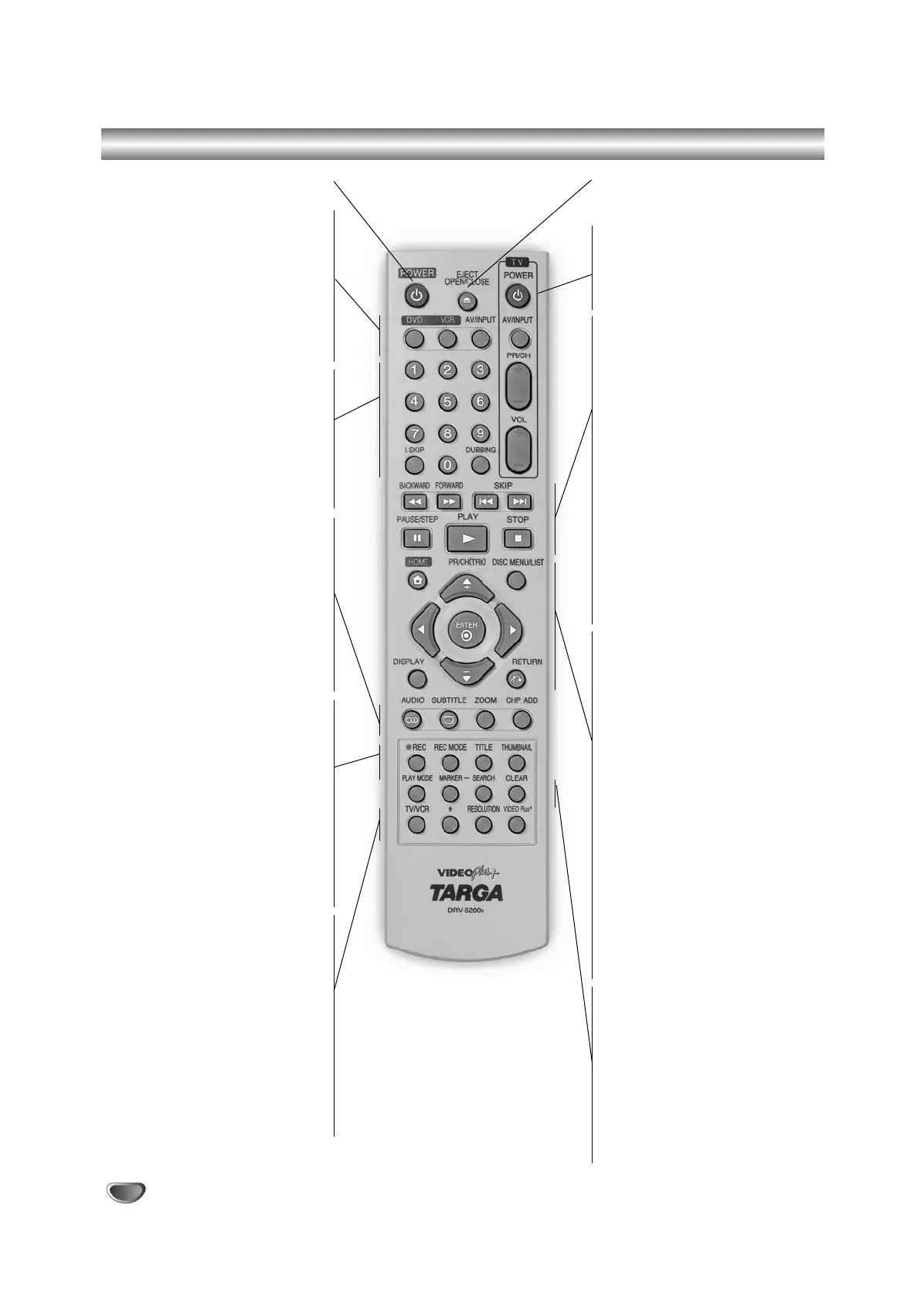
Remote control - Overview
POWER (Stand-by/On)
Switches the recorder ON or OFF.
DVD
Select the Recorder’s function mode to
DVD.
VCR
Select the Recorder’s function mode to
VCR.
AV/INPUT
Changes the input to use for recording
(Tuner, AV1-3, or DV IN).
0-9 numerical buttons
Selects numbered options in a menu.
I.SKIP (INSTANT SKIP)
Skips 30 seconds forward on the disc
(about the length of a typical TV com-
mercial).
DUBBING
Press to copy DVD to VCR (or VCR to
DVD).
AUDIO
Selects an audio language (DVD) or an
audio channel (CD).
SUBTITLE
Selects a subtitle language.
ZOOM
Enlarges DVD video image.
CHP. ADD
Inserts a chapter marker when playing/
recording a VR mode DVD-RW (and
DVD+RW/+R) disc.
REC (z)
Starts recording. Press repeatedly to set
the recording time.
REC MODE
Selects the recording mode:
XP, SP, LP, or EP.
TITLE
Displays the disc’s Title menu, if
available.
THUMBNAIL
Selects a thumbnail picture for the
current title and chapter for use in the
Original and Playlist menu.
TV/VCR
To view channels selected by the
recorder tuner or by the TV tuner.
*
Feature is not available.
RESOLUTION
Sets the output resolution for HDMI and
COMPONENT/PROGRESSIVE SCAN
VIDEO OUT jacks.
- HDMI: 1080i, 720p, 576p, 576i
- COMPONENT: 576p, 576i
VIDEO Plus
+
To display the programme menu for
VIDEO plus programming.
EJECT, OPEN/CLOSE
- Opens and closes the disc tray.
- Ejects the tape in the VCR deck.
TV Control Buttons
(See page 58)
POWER: Turns the TV on or off.
AV/INPUT: Selects the TV’s source.
PR/CH +/–: Selects TV’s channel.
VOL +/–: Adjusts TV’s volume.
BACKWARD / FORWARD (m/M)
-
DVD: Search backward or forward.
- VCR: Rewinds the tape during the
STOP mode, for fast reverse picture
search and Advances the tape during
the STOP mode, fast forward picture
search.
SKIP (. / >)
Go to next chapter or track. Returns to
beginning of current chapter or track or
go to previous chapter or track.
PAUSE/STEP (X)
Pause playback temporarily / press
repeatedly for frame-by-frame
playback.
N (PLAY)
Starts playback.
STOP (x)
Stops playback or recording.
HOME
Accesses or removes the HOME menu.
b / B / v / V (left/right/up/down)
Selects an option in the menu.
PR/CH(TRK)(+/-)
-
Select channel programme of the recorder.
- To adjust tracking.
- To control vertical tremble during picture
still.
DISC MENU / LIST
Accesses menu on a DVD disc, Title List
or Playlist menu.
ENTER
- Acknowledges menu selection.
- Displays information while viewing a
TV program.
DISPLAY
Accesses On-Screen Display.
RETURN (O)
- Removes the menu.
- Displays the menu of a video CD
with PBC.
PLAY MODE
Accesses the play mode function
(Repeat, Random, Repeat A-B).
MARKER
Marks any point during playback.
SEARCH
Displays Marker Search menu.
CLEAR
- Removes a mark on the Marker
Search menu.
- Reset tape counter to zero.
RC174P1_NA4UTTA_S_48T_ENG 7/24/06 2:07 PM Page 12



 To Next Page