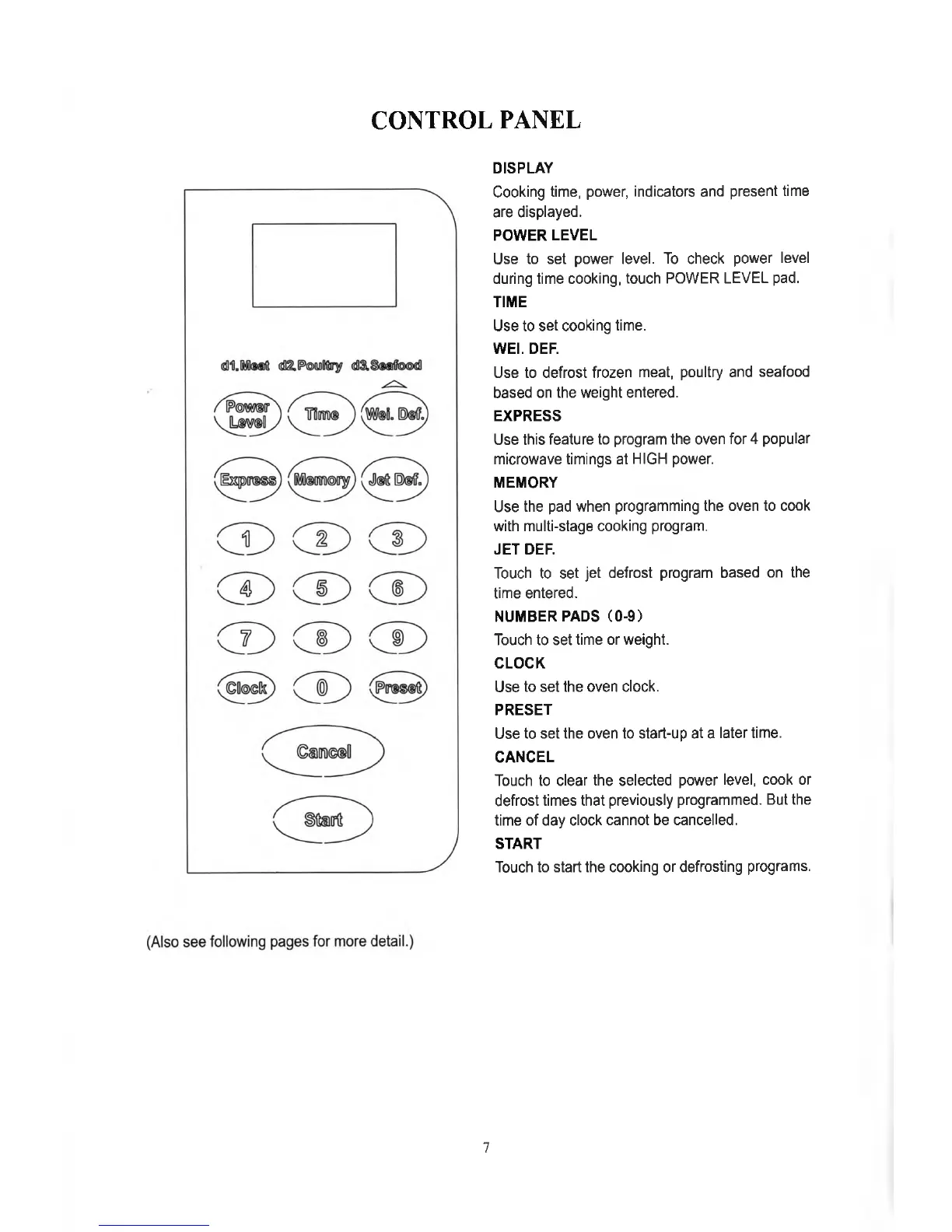
CONTROL PANEL
DISPLAY
Cooking time, power, indicators and present time
are displayed.
POWER LEVEL
Use to set power level. To check power level
during time cooking, touch POWER LEVEL pad.
TIME
Use to set cooking time.
WEI. DEF.
Use to defrost frozen meat, poultry and seafood
based on the weight entered.
EXPRESS
Use this feature to program the oven for 4 popular
microwave timings at HIGH power.
MEMORY
Use the pad when programming the oven to cook
with multi-stage cooking program.
JET DEF.
Touch to set jet defrost program based on the
time entered.
NUMBER PADS (0-9)
Touch to set time or weight.
CLOCK
Use to set the oven clock.
PRESET
Use to set the oven to start-up at a later time.
CANCEL
Touch to clear the selected power level, cook or
defrost times that previously programmed. But the
time of day clock cannot be cancelled.
START
Touch to start the cooking or defrosting programs.
7


 To Next Page