Safety Measures
• While the mouse is functioning, no laser light is visible to the naked
eye. Although this mouse is a Class 1 Laser Product and safe for
operation, avoid pointing the laser into the eyes or looking directly
into the laser emitter.
• Keep the mouse away from young children.
• Any attempt to disassemble, adjust or repair the mouse may result
in exposure to laser light or other safety hazards.
Troubleshooting
I do not see the laser light when the mouse is active.
• Unlike traditional optical mice, the light is not visible when the laser
mouse is active.
• To make sure the mouse is on and functioning properly, move the
mouse back and forth and check to see if the cursor responds.
My mouse does not work on a mirror or glass surface.
• Though rated for most of these kinds of surfaces, occasionally there
will be one such surface that will cause the mouse to work
improperly or not at all.
• If you are using the mouse on a reflective or mirrored surface, move
it to another surface.
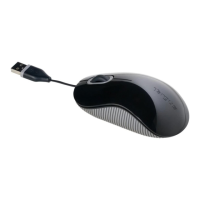
Targus USB 3-button Laser Notebook Mouse



 To Next Page