9
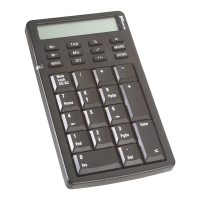
USB Calculator/Keypad Display Screen
The keypad’s screen shows letters, numbers and other symbols
that display calculation results or the status or current function of
the keypad. The following tables list the keypad’s display
messages and what they mean.
Display Screen - Rounding Selector
2
↓
NumLock on – enters “2” on the display.
NumLock off – moves the cursor down one line of
text.
3
PgDn
NumLock on – enters “3” on the display.
NumLock off – emulates the Page Down key.
0
Ins
NumLock on – enters “0” on the display.
NumLock off – emulates the Insert key.
•
Del
NumLock on – inserts a decimal point.
NumLock off – deletes a number.
Message Description
-MINUS Negative value
MEMORY Independent memory
ERROR Error
‘ 3-digit separator (apostrophe)
GT Grand total
Message Description
F Floating decimal point system, which displays the
value without rounding.
Key Function

 To Next Page
 Loading...