8
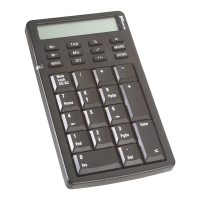
Keypad Keys
+/- Switches the displayed value between positive (+)
and negative (-).
Calculator mode – deletes the far right digit by
shifting the display value to the right.
Keypad mode – back space.
MODE Switches between calculator and keypad modes.
SEND Sends calculation results to your computer.
Key Function
NumLock
CE/AC
Power on
Calculator mode – Pressing once clears the entry.
Pressing a second time clears the operating register.
Keypad mode – NumLock.
NOTE: The following keys work in conjunction with the
NumLock key.
7
Home
NumLock on – enters “7” on the display.
NumLock off – emulates the Home key.
8
↑
NumLock on – enters “8” on the display.
NumLock off – moves the cursor up one line of text.
9
PgUp
NumLock on – enters “9” on the display.
NumLock off – emulates the Page Up key.
4
←
NumLock on – enters “4” on the display.
NumLock off – moves one character to the left of the
cursor position.
5 NumLock on – enters “5” on the display.
6
→
NumLock on – enters “6” on the display.
NumLock off – moves one character to the right of
the cursor position.
1
End
NumLock on – enters “1” on the display.
NumLock off – emulates the End key.
Key Function

 To Next Page
 Loading...