7
3Press the SEND key.
The negative result now appears in the active program on
your computer.
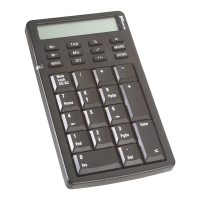
USB Calculator/Keypad Keys
Function Keys
The following tables list the keypad’s keys and their functions.
Key Function
M+ Adds the displayed number into memory.
M- Subtracts the displayed number from memory.
MRC Pressing once transfers the memory contents onto the
display. Pressing a second time clears memory.
TAB Specifies the number of decimal places for rounding.
MU
(Mark Up)
Calculates price and percentage values based on
known factors.
Example 1: Calculate the selling price, where the
original cost is $100 and the margin on the sale price
is 20%.
Key Sequence: 100[/]20[MU]
Result: The selling price is $125
Example 2: Calculate the mark up percentage, where
the original cost is $100, the margin on the sale price
is 20% and the selling price is $125.
Key Sequence: 100[/]20[MU][MU]
Result: The mark up amout is $25
GT Displays the grand total memory.
% Performs percentages, mark up, mark down, ratio,
and rate of change calculations.
Extracts the square root of the displayed positive
number.


 To Next Page
 Loading...