EasyManua.ls Logo

Tascam CD-A500 - User Manual

Tascam CD-A500
17 pages
Print Icon
To Next Page IconTo Next Page
Loading...
»
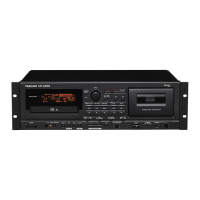
CD-A500
Compact Disc Player/Reverse Cassette Deck
3D0017100A
D
NEDERLANDS
ESPAÑOL
ITALIANO
DEUTSCH
FRANÇAIS
ENGLISH
This appliance has a serial number located
on the rear panel. Please record the model
number and serial number and retain them
for your records.
Model number
Serial number
WARNING: TO PREVENT FIRE OR SHOCK
HAZARD, DO NOT EXPOSE THIS
APPLIANCE TO RAIN OR MOISTURE.
The exclamation point within an equilateral triangle is intended to alert the user to the pres-
ence of important operating and maintenance (servicing) instructions in the literature
accompanying the appliance.
The lightning flash with arrowhead symbol, within an equilateral triangle, is intended to alert
the user to the presence of uninsulated “dangerous voltage” within the product’s enclosure
that may be of sufficient magnitude to constitute a risk of electric shock to persons.
CAUTION: TO REDUCE THE RISK OF ELECTRIC SHOCK, DO NOT
REMOVE COVER (OR BACK). NO USER-SERVICEABLE PARTS INSIDE.
REFER SERVICING TO QUALIFIED SERVICE PERSONNEL.
Ü
ÿ
Ÿ
OWNER'S MANUAL / MANUEL DU PROPRIETAIRE
BEDIENUNGSANLEITUNG / MANUALE DI ISTRUZIONI
MANUAL DEL USUARIO / GEBRUIKSAANWIJZING

Other manuals for Tascam CD-A500

Questions and Answers

  • T
    Taylor CamposAug 17, 2025
    What to do if there is no audio output from my Tascam CD Player?
    • M
      melissa20Aug 17, 2025
      If your Tascam CD Player is not producing any audio output, the connection to your stereo system might be incorrect. Please check all connections to ensure they are properly configured.
  • R
    Richard RiceAug 20, 2025
    Why is the remote control not working on my Tascam CD Player?
    • K
      Kelli HernandezAug 20, 2025
      If your Tascam CD Player remote control is not working, ensure that the POWER switch is set to ON. Also, check that batteries are correctly inserted in the remote control.
  • E
    Eddie SmithAug 22, 2025
    What to do if my Tascam CD-A500 CD Player is mistracking?
    • L
      lopezkristiAug 22, 2025
      If your Tascam CD Player is mistracking, producing sound jumps, it could be due to vibration or shock affecting the player. Try changing the installation position of the unit. Also, a dirty disc can cause mistracking, so clean the disc surface.
  • C
    cwilsonAug 26, 2025
    Why is my Tascam CD-A500 CD Player making a strange sound?
    • B
      Brandon PerezAug 26, 2025
      If your Tascam CD Player is producing a strange sound, the PITCH CONTROL may have been changed. Set the PITCH CONTROL pot to the center position.
  • R
    robertsnathanAug 27, 2025
    What to do if my Tascam CD Player won't play when a disc is loaded?
    • R
      Robin BrooksAug 27, 2025
      If your Tascam CD Player is not playing when a disc is loaded, ensure that the disc is loaded with the label side up.
  • D
    donaldchurchAug 30, 2025
    Why does my Tascam CD-A500 CD Player have no CD output?
    • D
      david41Aug 30, 2025
      If your Tascam CD Player has no CD output, the cassette deck might be in Playback mode. Stop the deck. You can also connect the CD output with the amplifier.
  • G
    Gary MillerSep 2, 2025
    What to do if my Tascam CD Player has no power?
    • J
      Jason PetersonSep 2, 2025
      If your Tascam CD Player is not getting power when you press the POWER button, the power plug may not be inserted securely. Plug it in securely.
  • C
    Charles JohnsonSep 4, 2025
    Why does my Tascam CD-A500 only play a single tune?
    • W
      wrightisaiahSep 4, 2025
      If your Tascam CD Player is only playing a single tune, the SINGLE button might be engaged. Press the button to disengage it.
  • E
    esawyerSep 6, 2025
    Why is there noise in the tuner of my Tascam CD-A500?
    • E
      Earl DaviesSep 6, 2025
      If you're getting noise in the tuner of your Tascam CD Player, it might be too close to the tuner. Keep a reasonable distance between them or switch off the power of this unit.
  • S
    susanowensSep 9, 2025
    Why is my Tascam CD-A500 humming?
    • A
      Alvin HollandSep 9, 2025
      If your Tascam CD Player is producing a hum, the pin-cord plug may not be connected securely. Re-connect the plug securely.

Summary

Important Safety Instructions

General Safety Guidelines (1-4)

Basic operating and safety instruction guidelines.

Environmental and Placement Precautions (5-14)

Guidelines for cleaning, attachments, placement, ventilation, and power.

Operational and Servicing Safety (15-24)

Detailed safety precautions for operation, servicing, and environment.

Laser Safety Precautions

Laser Component Warning

Warning about hazardous invisible laser radiation exposure.

Connections and Setup

Audio and Power Connections

How to connect audio signals, power cord, and headphones.

CD Player Operations

CD Program Playback Modes

Programming and Reviewing Tracks

Steps for programming, displaying, and canceling CD tracks.

RANDOM Playback

Repeat Function

Cassette Deck Operations

Cassette Tape Advanced Functions

Cassette Recording Features

CD to Tape Copying

CD SYNC and A-B Dubbing

Guide to copying CDs to tape using CD SYNC and A-B Program Dubbing.

Timer-Controlled Operations

Troubleshooting Guide

General Troubleshooting

Common problems and solutions for power, hum, and audio output.

CD Player Troubleshooting

Solutions for CD playback, output, and mistracking issues.

Cassette Deck Troubleshooting

Common cassette deck problems like sound quality and recording issues.

Tascam CD-A500 Specifications

General IconGeneral
Digital tunerNo
Media types supportedCD
Device typeHiFi CD player
Cassette deckYes
Dimensions (WxDxH)483 x 133 x 270 mm
Weight and Dimensions IconWeight and Dimensions
Weight6400 g

Related product manuals