EasyManua.ls Logo

Tascam DA-P1 - Test Modes; LCD Display Test Mode; System Data Display Mode

Tascam DA-P1
59 pages
Print Icon
To Next Page IconTo Next Page
To Previous Page IconTo Previous Page
Loading...
2-5.
LCD
Display
Test
Mode
Press
COUNTER
RESET.
All
indications
in
the
LCD
display
window
will
go
out,
then
a
set
of
indications
will
light
up
then
turn
off.
All
the
sets
of
indications
will
do
so
in
sequence.
Finally,
all
the
indications
are
light
up
at
once
to
show
that
the
tests
are
complete.
If
you
hold
down
COUNTER
RESET
while
the
test
is
taking
place,
the
display
at
that
moment
"freezes."
It
"unfreezes"
when
you
release
the
key.
2-6.
System
Data
Display
Mode
1.
To
activate
this
mode,
press
COUNTER
MODE.
2.
Each
time
you
press
COUNTER
MODE,
the
following
data
will
be
displayed
in
sequence
:
@
Version
Number
Example
:
"ur"
”01m00”
@
Category
Code
Data
These
data
are
available
only
when
a
digital
signal
is
plugged
into
the
DIGITAL
IN
terminal
and
the
Input
Monitor
Mode
is
activated.
for
Version
01.00
"се
"CO"
for
DAT
;
"Ci"
for
DAT-P
;
"80"
for
CD.
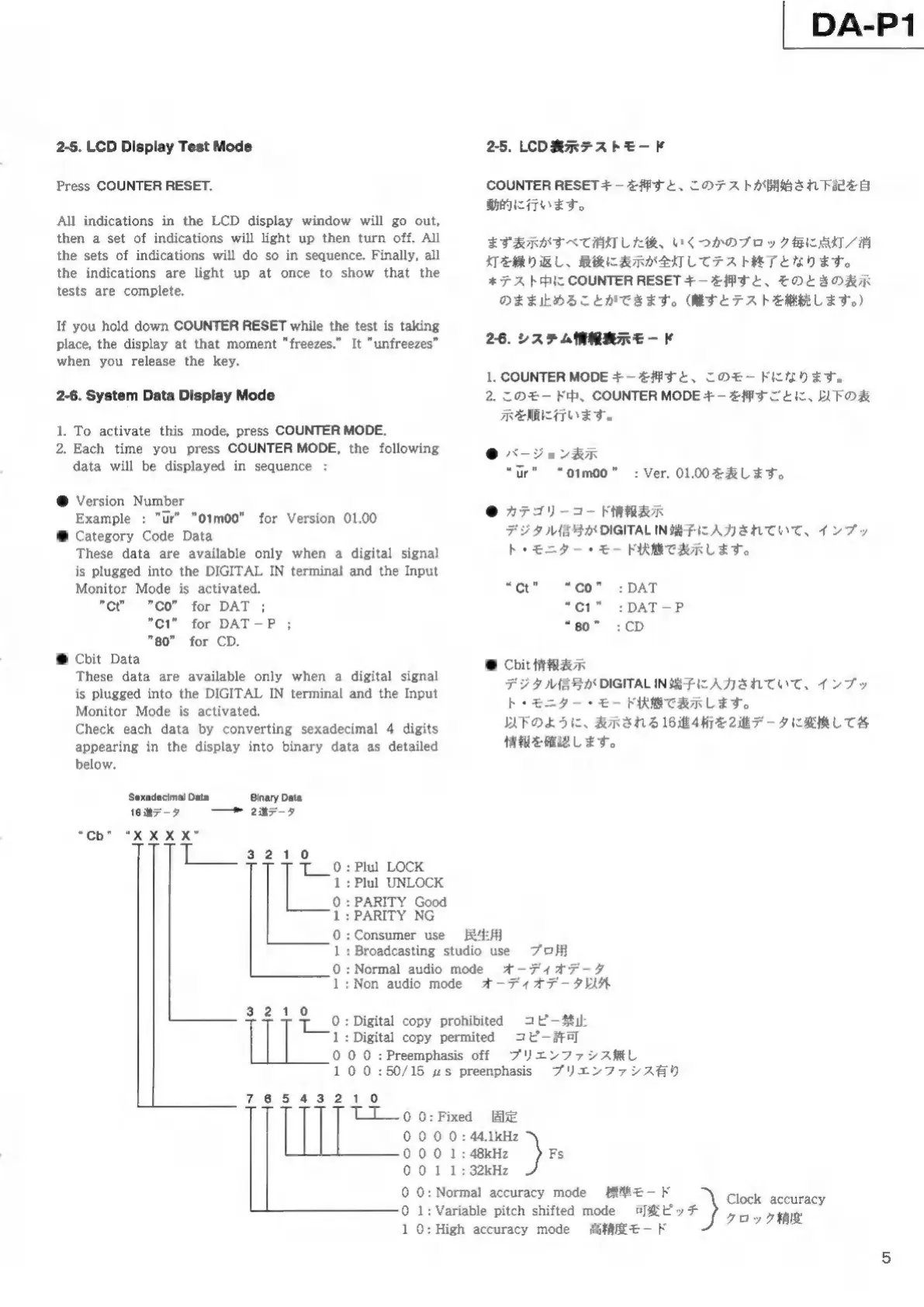
Cbit
Data
These
data
are
available
only
when
a
digital
signal
is
plugged
into
the
DIGITAL
IN
terminal
and
the
Input
Monitor
Mode
is
activated.
Check
each data
by
converting
sexadecimal
4
digits
appearing
in
the
display
into
binary
data
as
detailed
below.
Sexadecimal
Data
Binary
Data
16
デー
7—9
2187-7
“Cb”
"X
X
X
X”
:
Plul
LOCK
:
Plul
UNLOCK
0
1
0
:
PARITY
Good
1
:
PARITY
NG
0
:
Consumer
use
1
0
1
:
Broadcasting
studio
use
:
Normal
audio
mode
:
Non
audio
mode
Digital
copy
prohibited
Digital
copy
permited
0
ТТТ
9°:
1:
|
0
0 0
:
Preemphasis
off
1
00
:
50/15
us
preenphasis
DA-P1
2-5.
LCD
表示
テス
トモ
COUNTER
RESET
押す
テス
開始
され
下記
行い
ます
まず
表示
すべ
消灯
くつ
ブロ
点灯
繰り
返し
後に
表示
テス
*
スト
COUNTER
RESET
キー
押す
表示
まま
止め
こと
きま
。(
テス
継続
ます 。)
26.
シス
テム
情報
表示
モー
1.
COUNTER
MODE
キー
押す
モー
2.
この
モー
、COUNTER
MODE
押す
以下
順に
行い
ます
“01т00”
:
Ver.
01.00
表し
ます
カテ
ゴリ
情報
表示
デジ
タル
信号
DIGITAL
IN
端子
入力
され
いて
ンプ
ブッ
ニタ
ー・
状態
表示
ます
“ot”
“co”
:DAT
“С1”
:DAT-P
“80”
:CD
@
Cbit
表示
デジ
タル
信号
DIGITAL
IN
端子
入力
され
いて
ンプ
ニタ
ー・
状態
表示
ます
以下
よう
表示
され
16
4
2
変換
情報
確認
ます
民生
プロ
オー
ディ
オデ
オー
ディ
オデ
以外
コピ
コピ
プリ
エン
ファ
シス
無し
ブリ
エン
ファ シス
有り
0
:
44.1kHz
1:48kHz
)
Fs
1
TT
0
0:
Fixed
固定
000
000
001
00:N
標準
モー
0
1:Variable
pitch
shifted
mode
可変
ピッ
*)
10:
High
accuracy
mode
1
:
32kHz
lormal
accuracy
mode
Clock
accuracy
RISE
クロ

Other manuals for Tascam DA-P1

Related product manuals