EasyManua.ls Logo

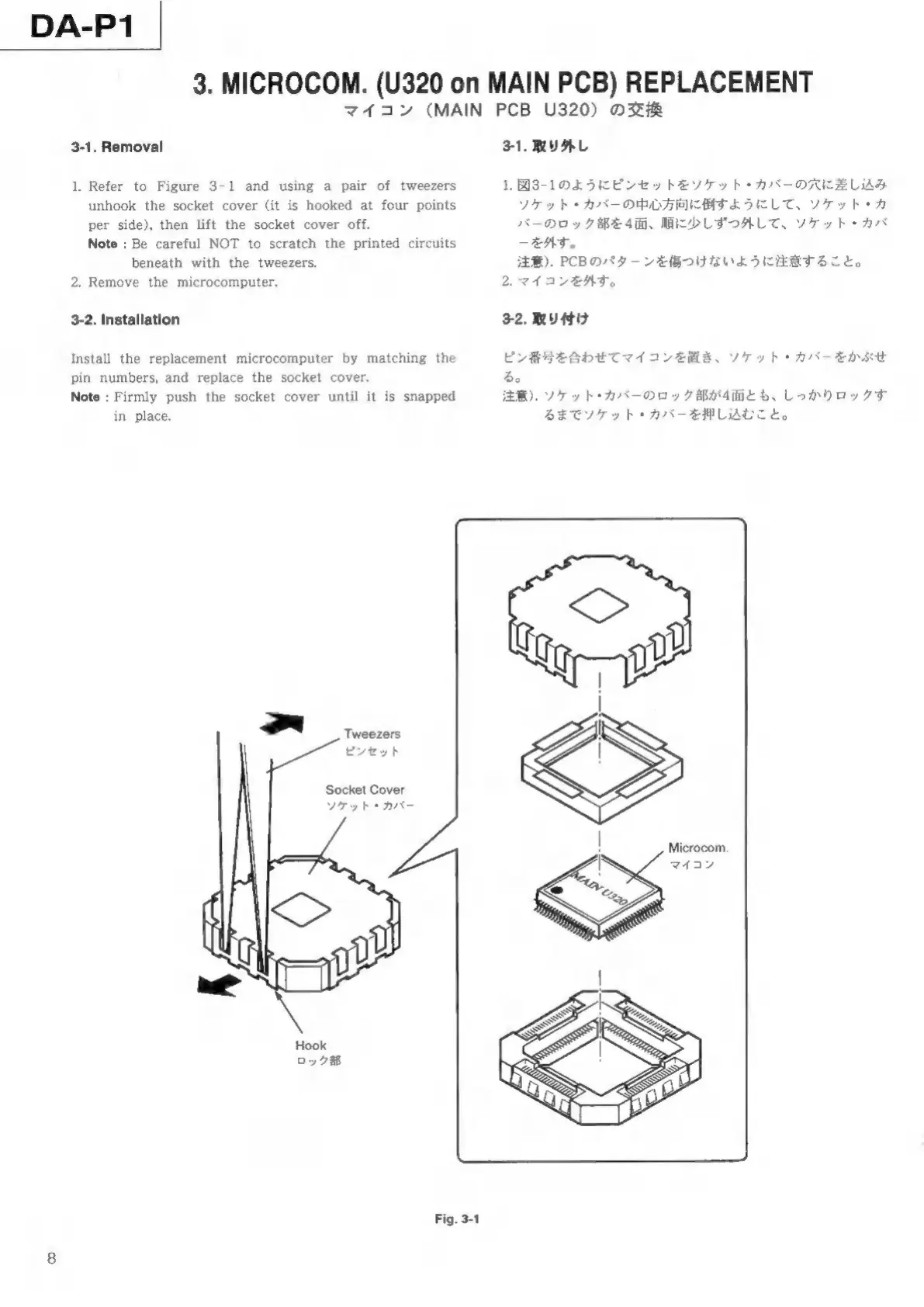
Tascam DA-P1 - Microcomputer Replacement; Microcomputer Removal; Microcomputer Installation

Tascam DA-P1
59 pages
Print Icon
To Next Page IconTo Next Page
To Previous Page IconTo Previous Page
Loading...
DA-P1
3.
MICROCOM.
(U320
on
MAIN
PCB)
REPLACEMENT
マイ
コン
(MAIN
PCB
U320)
交換
3-1.
Removal
.
Refer
to
Figure
3-1
and
using
a
pair
of
tweezers
unhook
the
socket
cover
(it
is
hooked
at
four
points
per
side),
then
lift
the
socket
cover
off.
Note
:
Be
careful
NOT
to
scratch
the
printed
circuits
beneath
with
the
tweezers.
2.
Remove
the
microcomputer.
3-2.
Installation
Install
the
replacement
microcomputer
by
matching
the
pin
numbers,
and
replace
the
socket
cover.
Note
:
Firmly
push
the
socket
cover
until
it
is
snapped
in
place.
3
'
Tweezers
ピンセット
Socket
Cover
ソケット
パー
Fig.
3-1
3-1.
取り
外し
1.
3-1
よう
ピン
セッ
ソケット
バー
差し
込み
ソケット
バー
倒す
よう
ケッ
バー
ロッ
4
少し
ずつ
外し
ケッ
外す
注意
).
PCB
パタ
傷つけ
いよ
2.
マイ
コン
外す
E
する
こと
3-2.
取り
付け
ピン
番号
合わ
マイ
コン
置き
ケッ
バー
ぶせ
注意
)。
ソケット
バー
ロッ
4
まで
ソケット
バー
押し
込む
こと
Microcom.

Other manuals for Tascam DA-P1

Related product manuals