TASCAM MD-CD1
Owner’s Manual
11
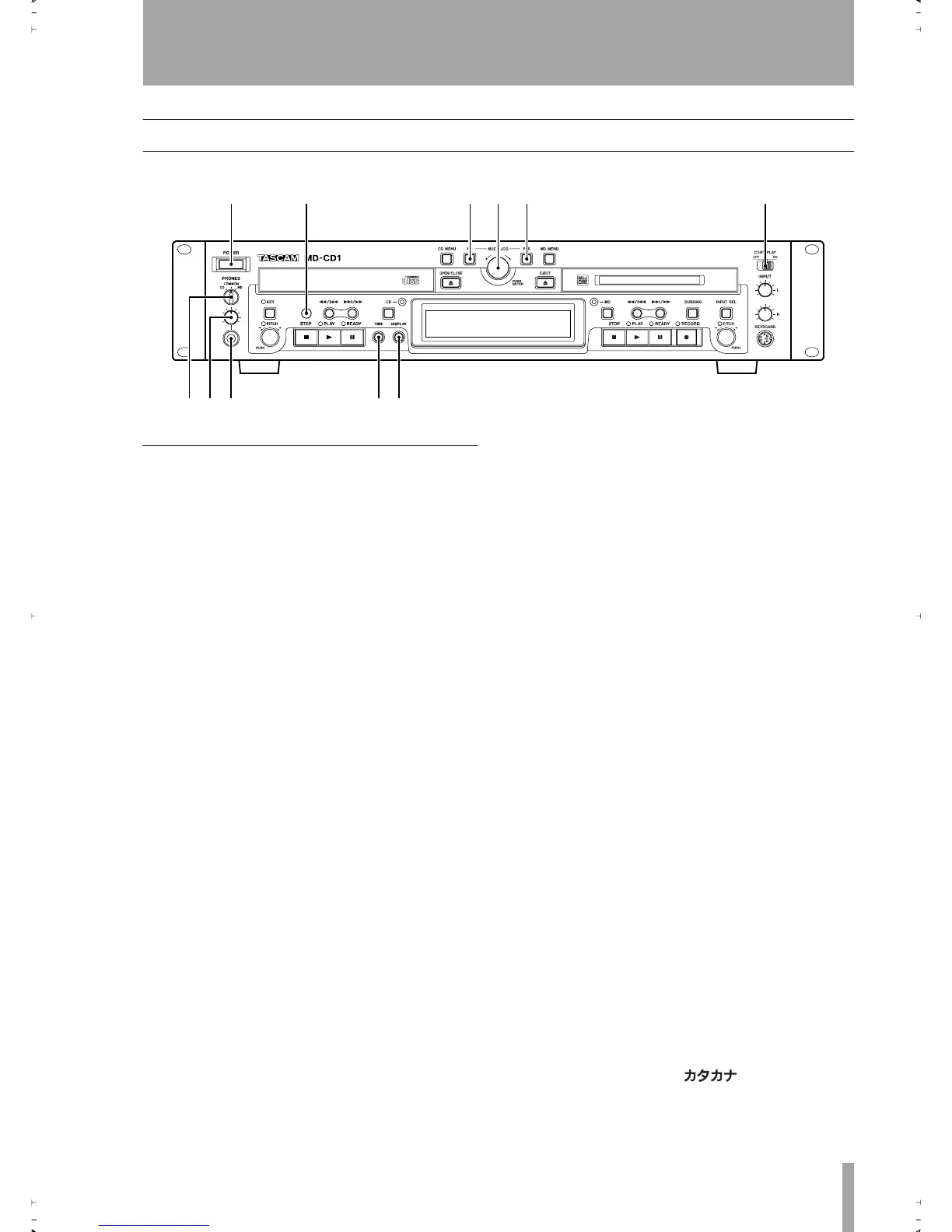
4 – Features and their functions
Front panel
Shared features
1
Power switch
2
Remote signal sensor
3
NO key
Used to cancel menu operations dur-
ing menu mode
.
During title input mode, it is used to delete character
inputs
4
MULTI JOG dial / ENTER key
Func-
tions as the MULTI JOG dial when rotated, and as
the ENTER key when pushed
MULTI JOG dial functions
Normal mode: selection of MD disc groups (when
MD indicator is lit and group mode is ON) or selec-
tion of MP3 disc directories (when CD indicator is
lit)
Program mode: selection of recorded tracks
Menu mode: selection of menu options and their set-
tings
MD Edit mode: selection of editing points
Title input mode: character input selection
ENTER Key functions
Program mode: confirmation of selected tracks
Menu mode: confirmation of menu options and con-
firmation of settings and editing on the menu (works
the same as the YES key)
Title input mode: confirmation of selected characters
5
Yes key
Menu mode: confirmation of menu
options and confirmation of settings and editing on
the menu
Title input mode: inserts characters
6
CONT PLAY switch
When ON, the CD and
MD decks play successively. During playback, the
deck automatically becomes the display master.
7
PHONES source selection switch
During headphone monitoring, CD, COMMON or
MD can be selected as the source. When COMMON
is selected, both CD and MD sources can be simulta-
neously monitored. When both decks output a signal,
the monitored source depends on the “COMMON?”
option setting on the SYSTEM menu.
8
PHONES level control
Adjusts the head-
phone output level
9
PHONES jack
This is a standard pin jack for
stereo headphone connection. When using head-
phones with a stereo mini plug, an adaptor is
required.
A
TIME key
Pressing this key changes the time
mode on the display. Refer to “Time display switch-
ing” on page 30. Even when the power is turned off,
the time mode is retained.
B
Display key
Used to select input character
type during Title Input mode. Refer to “Title input”
on page 45.
The type of character selected is indicated by the dis-
play.
Lower case letters/code: no indication
Capital letters/code: CAPS
Japanese:
12 345 6
789 0q
2ReMD-CD1.fm 11 ページ 2004年11月5日 金曜日 午前7時35分


 To Next Page