Need help?
Do you have a question about the Tasco 119270CW and is the answer not in the manual?
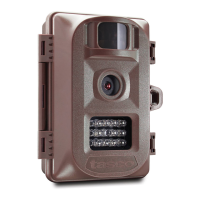
General overview of the digital scouting camera, its features, and capabilities.
Explains how to access controls and use the power/mode switch for operation.
Instructions on inserting batteries, polarity, and recommended types for optimal performance.
Guidance on inserting SD cards, compatibility requirements, and potential error messages.
Instructions on how to place the power switch in AIM to access the setup menu.
Steps to set the camera's current time and date for imprinting on photos/videos.
How to set the delay time between triggered images when motion is detected.
Options for single photo, rapid sequence of 3 photos, or video clips.
How to assign a reference ID to the camera for multiple units.
Instructions and caution for formatting the SD card to erase all files.
How to reset specific camera settings to their original factory defaults.
Recommendations for mounting location, height, and methods like web belt or tripod socket.
Procedure to test the camera's detection range and angle for optimal placement.
Steps to turn on the camera and understand the AIM/Status LED behavior.
How to transfer photos and videos from the SD card to a computer for viewing.
Explains false triggers caused by environmental factors and how to resolve them.
Reasons for short battery life and troubleshooting steps, including battery and card recommendations.
Solutions for when the camera fails to capture images due to card issues, power, or settings.
Troubleshooting steps for when the camera does not turn on, checking batteries and switch position.
Addresses issues like dark/bright photos, color cast, and short video clips.
How to ensure the correct date and time are set for imprinting on captured media.
Tips for avoiding missed shots due to environmental factors or obstructions.
Explains the behavior and purpose of the AIM/Status LED during setup and operation.
Troubleshooting common problems with the camera's LCD display, such as no text.
How to ensure settings are saved correctly by pressing the OK key after changes.
 General
| Brand | Tasco |
|---|---|
| Model | 119270CW |
| Category | Scouting Camera |
| Language | English |

 To Next Page