English
Induction plate
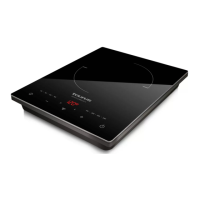
Darkre
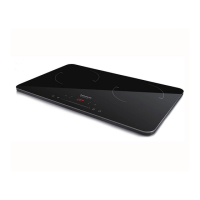
Darkre Double
DESCRIPTION
A Induction Hob
B LED Display
C Timer
D Mode Selector
E Slide Control
F Child lock
G On/O Button
H Hob selector
(*) Only available in the model Darkre Double
- If the model of your appliance does not have
the accessories described above, they can
also be bought separately from the Technical
Assistance Service.
PRACTICAL
RECOMMENDATIONS
- Use cookware suitable for the size of the
hotplate.
- Do not use excess water to cook foods. The
more water used; the more energy needed.
- Whenever possible use a pressure cooker, it
saves time and energy.
- Switch the hotplates on only when the cookwa-
re is ready and switch them o before removing
it.
- Cookware must be at.
- Use cookware suitable for the amount being
cooked. Large pots used for small amounts
increase power consumption.
- Cooking without using the lid for the cookware
increases power consumption.
USE AND CARE
- Fully extend the appliance‘s power cable befo-
re each use.
- Disconnect the appliance from the mains when
not in use and before undertaking any cleaning
task.
- Store this appliance out of reach of children
and/or persons with physical, sensory or
reduced mental or lack of experience and
knowledge.
- Do not store the appliance if it is still hot.
INSTRUCTIONS FOR USE
BEFORE USE
Make sure that all products’ packaging has been
removed.
USE
- Connect the appliance to the mains.
- Turn the appliance on, by using the on/o
button.
- The LED display will show 4 lines indicating
that it is in StandBy
- Prepare the appliance according to the function
you wish to use:
CHOOSING THE HOB
(Only in the model Darkre Double)
- Once the appliance is in StandBy, push the
button hob selector (H) to choose the hob you
want to command.
- The hob chosen will remind indicated by a LED
light in the selector.
- To change the commanded hob, just push the
its hob button any time you need.
COOKING WITH POWER MODE
- Push the mode selector once. The LED display
will show P8 or P7 indicating that it starts at
Power level 8 or 7.
- To change the power level, just slide your nger
through the slide control.
NOTE: Darkre plate has 8 power levels
equivalent to:
P1: 400W, P2: 600W, P3: 900W, P4: 1200W, P5:
1400W, P6: 1600W, P7: 1800W, P8: 2000W
NOTE: Darkre Double plate has 7 power
levels equivalent to:
P1: 300W, P2: 600W, P3: 1000W, P4: 1300W,
P5: 1500W, P6: 1800W, P7: 2000W
COOKING WITH TEMPERATURE MODE
- Push the mode selector to change from power
mode to temperature mode in any moment.


 To Next Page