ENGLISH
3736
88 88
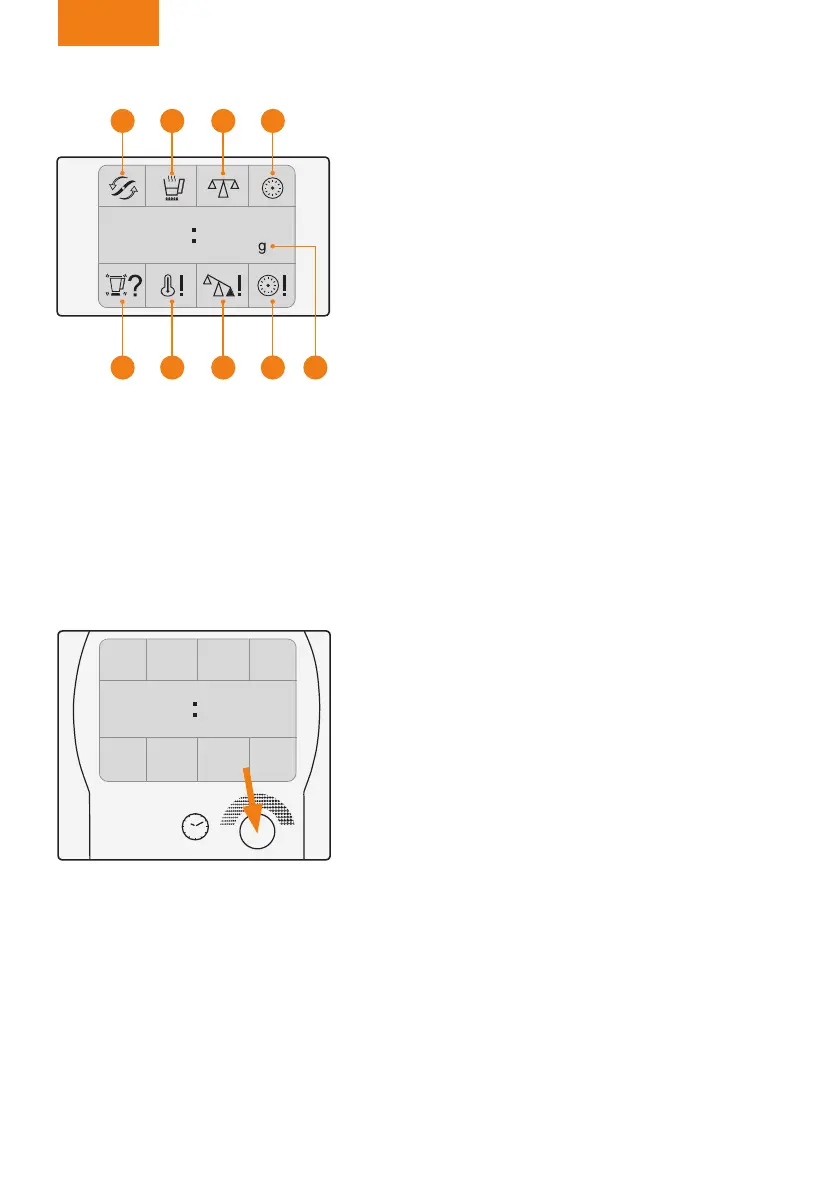
Digital screen
(Figure 44)
Function icons at the top:
Q Blades activated.
R Heating activated.
S Scales activated.
T Timer activated.
Control display icons in the centre:
U Timer
Weight counter. Grams symbol (scales function).
Information icons in the bottom:
V Jug missing, not properly covered or improperly
tted onto the central unit.
X The jug and the temperature sensor are hot.
Y Weight limit exceeded.
Z Timer nished.
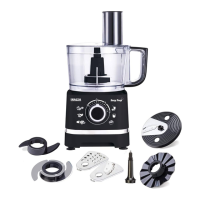
Time selector control
(Figure 45)
Turn the control slowly to the right to select the ope-
ration time.
Maximum: 90 minutes.
Turn the control slowly to the left to reduce the time.
Activation scale:
• From 0 to 1 minute:
Counted in seconds.
• From 1 to 10 minutes:
Counted in 30 second intervals.
• From 10 to 90 minutes:
Count in minutes.
Turning the control quickly allows a faster selection.
Figure 44
Q
V
S
Y
R
X
T
Z U
Figure 45
00 30
Manual Mycooks.indb 36 12/11/15 16:27



 To Next Page