6-216-21TX / TXH / TXB 180S - 400L (Rev. 4/23/07)TX / TXH / TXB 180S - 400L (Rev. 4/23/07)
Main Measure / Adjust ScreenMain Measure / Adjust Screen
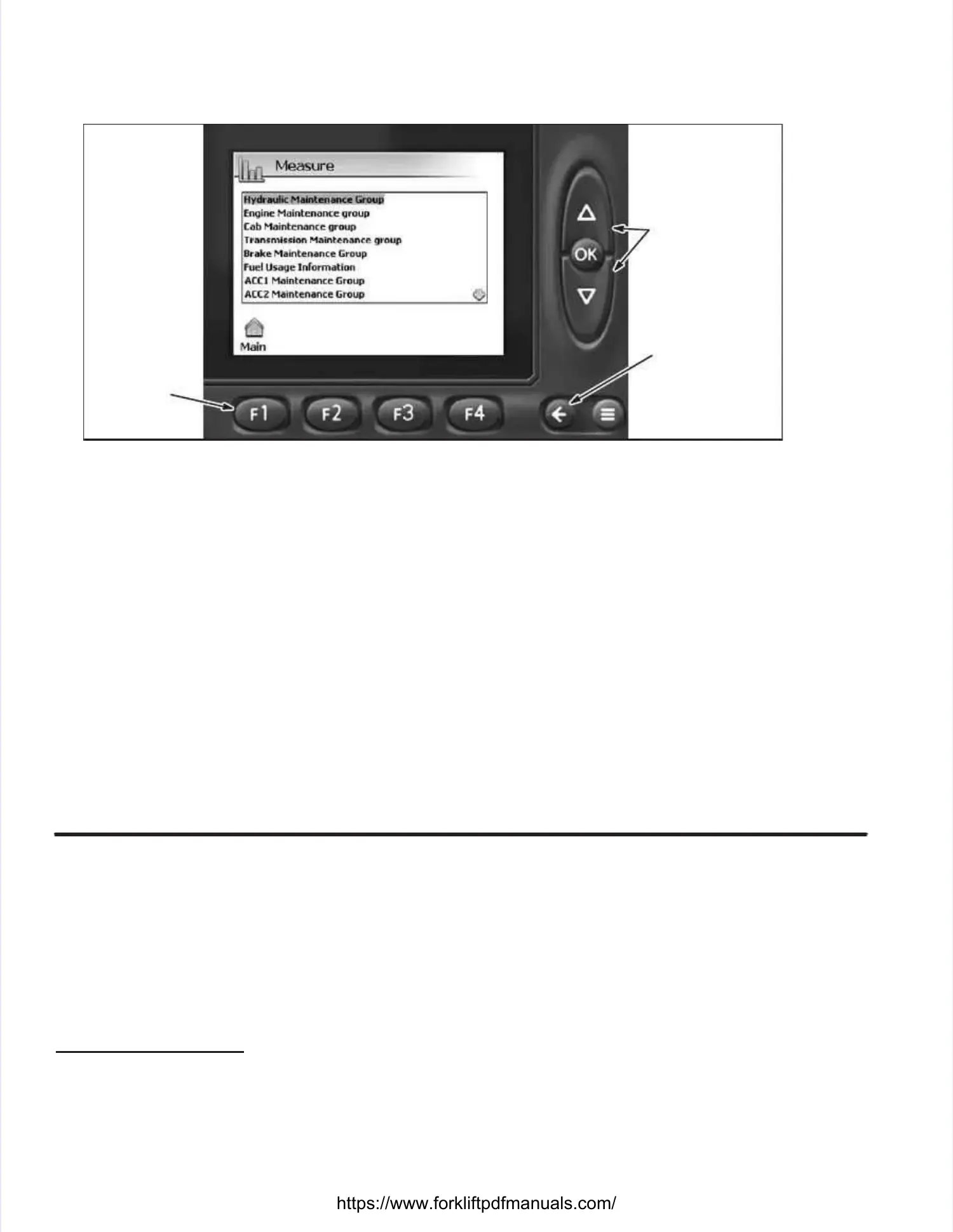
2.2. At the MaAt the Main Measin Measure / Adjuure / Adjust screst screen, depren, depress thess the F2 (Mease F2 (Measure) buture) button. ton. This wThis will dispill display the Mlay the Measureeasure
screen.screen.
DEPRESS UP ORDEPRESS UP OR
DOWN BUTTONSDOWN BUTTONS
SELECT GROUP;SELECT GROUP;
DEPRESS OKDEPRESS OK
BUTTON TOBUTTON TO
ENTER INTOENTER INTO
DESIRED GRDESIRED GROUPOUP..
DEPRESS THEDEPRESS THE
BACK ARROWBACK ARROW
TO GO TOTO GO TO
PREVIOUSPREVIOUS
DISPLAYDISPLAY
DEPRESSDEPRESS
F1 TOF1 TO
RETURN TORETURN TO
THE MAINTHE MAIN
DISPLAYDISPLAY
Measure ScreenMeasure Screen
3.3. DepresDepress the UP or DOWs the UP or DOWN button tN button to highlio highlight the desght the desired mainired maintenanctenance group and dee group and depress thpress the OKe OK
button to display the values of tbutton to display the values of the selected group. he selected group. Depress the F2 button to tDepress the F2 button to toggle between the Rawoggle between the Raw
and Scaled values (refer to description of values below). and Scaled values (refer to description of values below). TTo exit out of the selected group values,o exit out of the selected group values,
depress thedepress the ←←button to return to the Measure Groups list display.button to return to the Measure Groups list display. NOTE:NOTE: A list A list of the of the Measure andMeasure and
Maintenance Groups is illustrated in this section.Maintenance Groups is illustrated in this section.
Sensor StatusSensor Status
Scaled VScaled Value –alue – Analog senAnalog sensor valuesor values are displays are displayed in program defed in program defined units (Pined units (PSI,SI,
Degrees, etc.) while the Digital sensors are displayed as True (12 VDCDegrees, etc.) while the Digital sensors are displayed as True (12 VDC
input to module from sensor) or False (no input to module from sensor).input to module from sensor) or False (no input to module from sensor).
Raw Raw Value Value –– Analog Analog sensor sensor values values are are displayed displayed in in Millivolts. Millivolts. Digital Digital sensors sensors are are notnot
displayed.displayed.
Communication StatusCommunication Status
OKOK –– IndicaIndicates that ttes that the sensor inhe sensor input to modulput to module connece connection is function is functionintioning correcg correctlytly..
!!!!!! –– IndicIndicates ates that tthat there ihere is a pros a problem wblem with seith sensor insor input tnput to moduo module (See le (See note bnote below).elow).


 To Next Page
 Loading...