
 Need help?
Do you have a question about the TC Electronic Konnekt 8 and is the answer not in the manual?
Covers essential safety warnings like avoiding water, ventilation, and heat, plus general electrical precautions.
Highlights user cautions regarding modifications and the importance of the exclamation point symbol.
Specifies that all servicing must be performed by qualified personnel.
Details EMC/EMI compliance for Class B digital devices and user measures to correct interference.
Lists the product conformity certificate, standards met, and issuing authority.
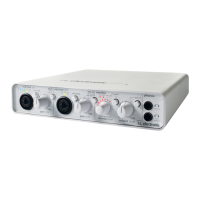
Introduces the Konnekt 24D/8 audio interface, its features, and benefits.
Explains that the manual covers both Konnekt 24D and Konnekt 8 models.
Provides links for support and upgrades related to Cubase LE.
Guides through unpacking, checking contents, and initial setup for quick operation.
Outlines computer requirements and the software installation process.
Covers accessing the TC Near control panel and integrating with Cubase.
Details the steps for installing Cubase LE with the Konnekt.
Explains selecting Konnekt as audio interface and setting up Cubase projects.
Describes how ASIO channels are named and distributed in Cubase.
Guides on setting up Fabrik R as a VST send effect in Cubase.
Guides on setting up Fabrik C as a VST insert effect in Cubase.
Describes the FireWire/Power LED indicator and combo XLR/Jack input.
Explains the function of Pad/Inst selectors and input level LEDs.
Details the Gain/Trim control and phantom power activation.
Explains input level LEDs and how to adjust the Gain/Trim.
Covers phantom power for mics and switching between front/rear line inputs.
Details channel selection and monitor LED functions.
Describes channel 3/4 linking, AUX input, DI input, and user settings.
Explains output level control and the DSP total recall preset system.
Details the two headphone output modes: muting and non-muting.
Discusses bus power, 4-pin connectors, and potential insufficient power issues.
Details rear panel power switch, FireWire ports, and MIDI I/O.
Describes coaxial S/PDIF, ADAT I/O, and balanced line outputs.
Covers rear panel line inputs and optical digital input/output ports.
Highlights front panel differences for Konnekt 8, such as AUX In.
Lists features omitted on the Konnekt 8 rear panel compared to the 24D.
Illustrates a typical studio setup with speakers, keyboard, headphones, and computer.
Details rear panel connections, power supply, FireWire, and instrument inputs.
Explains ADAT interface for digital expansion and front panel instrument connections.
Illustrates a small mobile setup with guitar, microphone, laptop, and headphones.
Shows a live setup integrating Konnekt for PA and headphone monitoring.
Illustrates a stand-alone setup with CD player, microphones, guitar, and speakers.
Shows how to connect up to four Konnekt units via FireWire.
Details the main interface elements and controls on the Mixer page.
Explains DAW monitoring and the Fabrik R reverb return level control.
Details how to set the output level for the monitor mixer.
Explains how to load and save presets using the file menu.
Describes the three preset storage locations and their total recall functionality.
Details the DAW main mix level, metering, and fader control.
Explains the control for the Fabrik R reverb return level.
Details how to set the monitor mixer's output level to various outputs.
Covers input settings, monitor view options, and light ring assignment.
Details output routing options and digital input/output format settings.
Explains linking multiple units and configuring stand-alone clock settings.
Details auto-sensing inputs, PAD/INST, and stereo link for channels 1/2.
Explains digital input lock status and available format options.
Describes options for displaying digital channels in the mixer view.
Details monitor mix settings and assigning the light ring to channels.
Explains how to set up and monitor multiple Konnekt units in a system.
Details mixer view settings and stereo link functionality.
Explains routing sources for line and S/PDIF outputs.
Describes routing options for optical outputs like ADAT and S/PDIF.
Covers stand-alone sync source options and sample rate settings.
Explains the use of WDM drivers for Windows audio applications.
Guides on configuring WDM audio settings in Windows Control Panel.
Details buffer size settings and their impact on audio latency.
Explains system clock master selection and sync source settings.
Covers sample rate settings and displays control panel/driver version info.
Explains how to adjust buffer size to resolve audio issues like clicks and pops.
Details selecting the clock master and sync source in a digital setup.
Explains jitter rejection technology and sample rate settings.
Describes the meaning of Internal Lock, External Lock, and No Reference status.
Guides on checking for, downloading, and installing firmware updates.
Explains how to reset the Konnekt unit to its factory default settings.
Introduces Fabrik C, its MINT technology, and key features.
Explains the selectable routing modes: Internal and Plug-In.
Provides an overview of Fabrik C and discusses full-band vs. 3-band compression.
Details specific application scenarios for 3-band compression on bass.
Explains compression for grouped sources and techniques for vocal tracks.
Details guitar compression and the role of the Limiter for peak control.
Covers the 4-band EQ, De-Esser, and headroom processing in Fabrik C.
Illustrates the signal path through the algorithm in Fabrik C's 3-band mode.
Illustrates the signal path through the algorithm in Fabrik C's full-band mode.
Explains how to control EQ bands, frequency, gain, and band on/off.
Details bandwidth/type selection for EQ filters and the bypass function.
Describes Parametric, Notch, Shelving, and Cut filter types for the EQ.
Lists frequency ranges and gain parameters for Notch and Parametric filters.
Lists parameters for Shelving and Cut filters, including bandwidth.
Provides key values for bandwidth (BW) and quality factor (Q) for filters.
Explains how to select the material type for compression processing.
Guides on setting input gain and make-up gain for compression.
Details the interface for controlling compression amount across three bands.
Details the interface for controlling individual band levels.
Explains compressor operation in full-band mode, noting redundant controls.
Describes advanced grid adjustment for compressor parameters.
Explains the Limiter's purpose in preventing overloads and its threshold setting.
Details the De-Esser for sibilance reduction, including bypass and amount control.
Explains how to select between Internal mode and Plug-In mode for Fabrik C.
Introduces Fabrik R, its four reverb algorithms, and MINT technology.
Explains the selectable routing modes: Internal and Plug-In for Fabrik R.
Describes the reverb section and details the Live and Hall reverb types.
Details the Plate and Club reverb emulation characteristics.
Explains parameter adjustments in the Tweak section and meter readings.
Explains modulation rate and depth settings for enhancing reverb.
Explains LoColor, HiColor, and HiFactor controls for sonic spectrum adjustment.
Details Dry, Early, and Reverb level settings for perceived distance.
Covers bypass function, input/output levels, and meter performance.
Lists the routing options available for Fabrik R on Setup and Fabrik R pages.
Covers the installation of the Integrator plug-in and its main parameters.
Explains selecting the Konnekt unit and audio channels for external effects.
Details the calibration function for latency and test signal functions.
Describes the layout and elements of the Tuner page in the TC Near Control Panel.
Explains tuner indications and how to switch between Strobe and normal modes.
Details tuner features like lightring assignment, play tone, pitch, and mute.
Lists the various musical scale modes supported by the Konnekt tuner.
Advises on shutting down TC Near control panel to avoid instability during computer standby.
Lists keyboard shortcuts for quick access to main pages in the control panel.
Details S/PDIF, ADAT, FireWire ports, formats, and IO engine.
Lists specifications for analog inputs, DAC, ADC conversion, and delays.
Covers output, headphone specs, and EMC compliance details.
Details dimensions, weight, operating temperature, humidity, and power.
 General
| Type | Audio Interface |
|---|---|
| Audio Inputs | 4 |
| Audio Outputs | 8 |
| Mic Preamps | 2 |
| Bit Depth | 24-bit |
| A/D Resolution | 24-bit |
| AD/DA Resolution | 24-bit |
| Connectivity | FireWire |
| Phantom Power | Yes |
| Direct Monitoring | Yes |
| Digital I/O | S/PDIF |
| USB | No |
| MIDI I/O | Yes |


 To Next Page