Need help?
Do you have a question about the TCL 20 SE and is the answer not in the manual?
Identifies physical buttons, ports, front camera, and connectors on the phone.
Details rear camera, fingerprint sensor, back flash, and navigation button modes.
Provides instructions on how to charge the phone's battery.
Guides on inserting or removing SIM and microSD cards into the device.
Explains quick access to apps, shortcuts, and folders on the Home screen.
Details how to open and interact with the notification panel.
Instructions on how to dial a number and initiate a phone call.
Steps for answering or rejecting an incoming phone call.
How to view, search, create, and manage contacts on the phone.
Explains how to create, edit, and receive SMS and MMS messages.
Guide to setting up and managing your Gmail account on the phone.
Instructions on how to check for and install software updates.
Guidance on backing up personal data to Google Drive.
Steps to perform a factory data reset on the phone.
Information on accessing TCL support resources and contact numbers.
This document serves as a Quick Start Guide for the TCL 20 SE, a mobile phone designed for everyday use. It provides essential information on the device's physical layout, basic setup, and core functionalities such as making calls, managing contacts, sending messages, and using Gmail. The guide emphasizes user-friendliness and offers tips for maintaining the device and accessing further support.
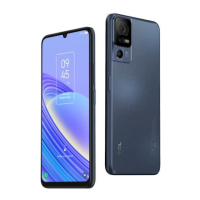
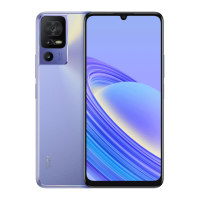
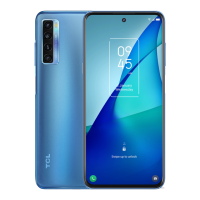
The TCL 20 SE features a standard smartphone design with several key physical components. On the front, it includes a headset connector, a front camera, and a display. The right side of the device houses the volume up/down buttons and the power key. The bottom of the device features a USB Type-C port for charging and data transfer. On the back, the phone is equipped with a back flash, a back camera system, and a fingerprint sensor for secure unlocking and authentication.
The device's interface includes a Google Assistant Button, which provides quick access to Google's voice assistant for various tasks. The navigation bar at the bottom of the screen offers a "Recent button" to view recently opened applications, a "Home button" to return to the main home screen, and a "Back button" for navigating back in applications. The guide also highlights the flexibility of the navigation bar, allowing users to switch between right-hand and left-hand modes to suit their preference, which adjusts the placement of the back, home, and recent buttons.
To begin using the TCL 20 SE, users must first charge the battery. The guide illustrates the process of inserting or removing the microSD card and the SIM card, which are crucial for expanding storage and enabling cellular connectivity, respectively. These steps are presented with clear visual aids to ensure easy understanding.
The home screen is the central hub for accessing all applications, shortcuts, and folders. The guide explains that users can customize their home screen by placing frequently used items for quick access. A fundamental navigation tip provided is that touching the Home button always returns the user to the main home screen, regardless of the current application.
The notification panel is another key interface element. Users can access it by touching and dragging down from the top of the screen. This panel displays important alerts, ongoing activities (like charging status), and silent notifications. The guide also points out how to access the device's settings, which provides a comprehensive list of options for customizing the phone's behavior and features.
Phone Call: The TCL 20 SE facilitates easy phone calls. Users can make a call by entering the desired number on the keyboard and then tapping the call icon. The guide also details how to answer incoming calls, offering options to "Tap ANSWER" or swipe up to accept, and "Tap DECLINE" or swipe down to reject. Additionally, users have the option to "Tap Reply" to reject a call by sending a preset message, which is a convenient feature for situations where answering is not possible.
Contacts: The device allows users to view, create, and manage contacts. These contacts can be synchronized with Gmail accounts or other applications, ensuring that important contact information is always accessible and backed up. The guide outlines how to search for contacts, open the Quick contact panel for quick actions, and add new contacts. It also mentions the ability to touch and hold a contact to share or delete it, providing efficient contact management.
Messaging: The TCL 20 SE supports both SMS (Short Message Service) and MMS (Multimedia Messaging Service). Users can create, edit, and receive messages. An important feature highlighted is the automatic conversion of an SMS to an MMS when media files (such as images, videos, audio, or slides) are attached, or when a subject or email addresses are added. The messaging interface includes options to send text messages and insert emoticons, enhancing the communication experience.
Gmail: For email communication, the TCL 20 SE integrates Gmail. Upon initial setup, users can choose to use an existing Gmail account or create a new one. The Gmail interface provides features such as account information access, options and settings, and the ability to archive emails by swiping right or left. Users can also easily create new emails, making it a comprehensive tool for managing electronic correspondence.
The guide emphasizes the importance of maintenance and provides resources for support. Users are encouraged to visit the TCL website (tclusa.com or tcl.com/mx/es.html) for tutorials, frequently asked questions, and to download the full User Manual. This ensures that users have access to detailed information beyond the quick start guide.
Software Updates: Keeping the phone's software up to date is crucial for performance and security. The guide instructs users to navigate to "Settings > System > System Update" to check for and install available software updates.
Data Backup: To prevent data loss, users are advised to back up their personal data. The guide recommends using Google Drive for this purpose, accessible via "Settings > System > Backup > Back up to Google Drive."
Device Reset: In cases where the device needs to be restored to its original factory settings, the guide provides instructions for a factory data reset: "Settings > System > Reset > Factory data reset > RESET PHONE." This can be useful for troubleshooting persistent issues or preparing the phone for resale.
The TCL 20 SE is designed to be an accessible and functional mobile device, with this guide serving as a foundational resource for new users to quickly get acquainted with its features and ensure proper usage and maintenance.
 General
| Panel type | LCD |
|---|---|
| Screen shape | Flat |
| Pixel density | 263 ppi |
| Display diagonal | 6.82 \ |
| Display brightness | 450 cd/m² |
| Display resolution | 720 x 1640 pixels |
| Processor cores | 8 |
| Processor model | 460 |
| Processor family | Qualcomm Snapdragon |
| Processor frequency | 1.6 GHz |
| RAM capacity | 4 GB |
| Compatible memory cards | MicroSD (TransFlash) |
| Maximum memory card size | 256 GB |
| Internal storage capacity | 64 GB |
| Flash type | LED |
| Digital zoom | 4 x |
| Rear camera type | Quad camera |
| Front camera type | Single camera |
| Maximum frame rate | 30 fps |
| Video recording modes | 1080p |
| Rear camera sensor size | 1/5.0 \ |
| Rear camera aperture number | 1.8 |
| Front camera aperture number | 2 |
| Third rear camera pixel size | 1.75 µm |
| Second rear camera pixel size | 1.12 µm |
| Second rear camera sensor size | 1/5 \ |
| Video capture resolution (max) | - pixels |
| Rear camera resolution (numeric) | 16 MP |
| Front camera resolution (numeric) | 8 MP |
| Third rear camera aperture number | 2.4 |
| Second rear camera aperture number | 2.2 |
| Third rear camera resolution (numeric) | 2 MP |
| Second rear camera resolution (numeric) | 5 MP |
| Third rear camera field of view (FOV) angle | 83 ° |
| Second rear camera field of view (FOV) angle | 115 ° |
| 4G standard | LTE |
| 3G standards | HSPA+ |
| SIM card type | NanoSIM |
| Wi-Fi standards | 802.11b, 802.11g, Wi-Fi 4 (802.11n) |
| Bluetooth version | 5.0 |
| SIM card capability | Dual SIM |
| Mobile network generation | 4G |
| Subscription type | No subscription |
| USB version | 2.0 |
| USB connector type | USB Type-C |
| Headphone connectivity | 3.5 mm |
| Form factor | Bar |
| Product color | Black |
| Graphics card | Adreno 610 |
| Wireless charging | - |
| Audio formats supported | AAC, AAC+, AMR, APE, AWB, FLAC, MP3, PCM |
| Platform | Android |
| Operating system installed | Android 11 |
| Talk time (3G) | - h |
| Battery capacity | 5000 mAh |
 Weight and Dimensions
| Depth | 9.1 mm |
|---|---|
| Width | 77.14 mm |
| Height | 172.08 mm |
| Weight | 206 g |


 To Next Page