EasyManua.ls Logo

TCL 40 SE - User Manual

TCL 40 SE
32 pages
Print Icon
To Next Page IconTo Next Page
Loading...
Service Manual TCL Communication Technology Holdings Ltd.
Rev.: 1.0
TCL 40 SE_T610K_K2_Service Manual V1.0
Page: 1/32
Confidential and proprietary information contained in this repair guide is subject to change without notice.
Distribution, transfer, copy of any content or data in this document without the written permission of TCL is strictly prohibited.
TCL 40 SE
T610K/K2
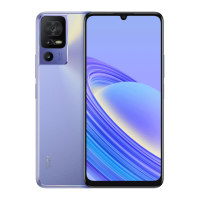
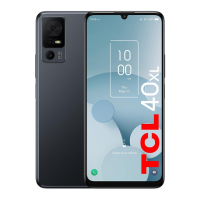
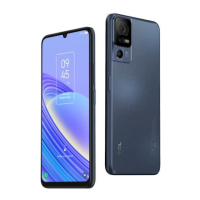
Dark Gray
Twilight Purple
Warning:
All features, functions, specifications, and other product information provided in this document,
including but not limited to the advantages, aesthetics, price, components, performance, availability
and capacity of the product are subject to change without notice.
TCL will not be responsible for any damage to the product, injury or other safety issues caused by the
result of repair by an unauthorized service provider, user repair or unprofessional product repair.
Any damage to the product resulted from an attempt to repair the product by any person or 3
rd
party
other than TCL authorized service provider will not be covered by warranty.

Questions and Answers

  • D
    Devin HuberAug 7, 2025
    What to do if my TCL 40 SE cannot charge or charges slowly?
    • M
      Mariah BrownAug 7, 2025
      If your TCL Cell Phone cannot charge or charges slowly, and there's visible damage to the charger USB, the charger itself, or the charging port, back up your data and take your device and proof of purchase to a repair center for assistance. Otherwise, charge the device with a TCL official charger for at least 30 minutes and try again.
  • C
    Christina ClarkAug 17, 2025
    Why does my TCL 40 SE Cell Phone keep lagging or freezing?
    • G
      Gabriel RichardsonAug 17, 2025
      If your TCL Cell Phone system lags or freezes, start by restarting your device. Ensure your battery is at least 20% charged. If too many apps are running, tap the Menu key and 'Clear all'. Uninstall unused apps to free storage space and remove any third-party apps that might be causing the issue. For poor network connection, enable Airplane mode briefly or move to a better location. As a last resort, try resetting or updating your device.
  • D
    Daniel RossAug 27, 2025
    Why does my TCL Cell Phone keep rebooting?
    • E
      ericwellsAug 27, 2025
      If your TCL Cell Phone reboots by itself, it could be due to anomalies in a file; in this case, it is recommended to continue using the device normally. Also, try using the official charger and data cable. Ensure third-party apps are compatible with your device's Android version, and try uninstalling them. If the problem persists, try to reset or update your device.

Summary

Precautions

Tool and Material Safety Guidelines

Use specific tools and genuine parts; handle components carefully to prevent damage.

Repair Environment and ESD Protection

Repair in a safe, static-free environment; ensure device is powered off.

Component Handling and Data Backup

Protect sensitive parts, backup data, and avoid damaging battery/screen.

Maintenance Preparation Steps

Battery Level and Accessory Readiness

Ensure 50% battery charge and have necessary accessories like SIM/SD cards and chargers available.

PC Setup for Software Updates

Details PC specifications and connectivity required for device software updates via PC.

Data Backup Procedure

Instructions on how to back up user data before performing maintenance or reset.

Factory Reset and Recovery Procedures

Google Account Removal Before Reset

Essential step to remove Google account to ensure proper device setup after reset.

Executing a Factory Data Reset

Comprehensive guide to perform a factory data reset on the device.

Utilizing Recovery Mode Functionality

Steps to access and use recovery mode for troubleshooting or system reset.

Software Update Methods

Wireless FOTA Update Process

How to perform software updates wirelessly using the Firmware-Over-The-Air (FOTA) method.

PC-Based Mobile Upgrade Tool

Instructions for updating device software using the TCL Mobile Upgrade PC tool.

Hardware Diagnostics with Support Centre

Initial Test Setup and NCK Code Handling

Verifying SD card, powering on for auto-test, and managing NCK code prompts.

Performing Hardware Diagnosis Tests

Step-by-step guide to running hardware diagnostics via the Support Centre app.

Troubleshooting Common Device Issues

Resolving Reboots, Lags, and Freezes

Solutions for unexpected device restarts, slow performance, and system unresponsiveness.

Addressing Charging and Battery Drain

Steps to fix slow charging, no charging, and rapid battery depletion issues.

Fixing Fingerprint and Auto Power-Off Problems

Troubleshooting tips for fingerprint sensor failures and unexpected device shutdowns.

Managing Device Overheating and Power-On Failures

Guidance on cooling down an overheating device and troubleshooting power-on issues.

Locating Support and Service Centers

Finding Official TCL Support Contact Info

How to find contact details for TCL's customer support hotline and service centers.

Device Disassembly and Reassembly Guide

Tools and Preparation for Disassembly

List of necessary tools and initial steps for disassembling the device.

Detailed Disassembly Steps

Step-by-step instructions for the physical disassembly of the TCL 40 SE.

Reassembly Process and Adhesive Management

Guide for reassembling the device, including component placement and adhesive replacement.

Visual Component Breakdown

Exploded View of Device Components

An illustration showing all internal and external parts separated for easy identification.

Split View for Component Analysis

A visual presentation of device components laid out separately for analysis.

TCL 40 SE Specifications

General IconGeneral
Color nameTwilight Purple
Form factorBar
Product colorPurple
Housing materialPolycarbonate (PC), Polymethyl methacrylate (PMMA)
International Protection (IP) codeIP51
Screen shapeFlat
Pixel density260 ppi
Display diagonal6.75 \
Touchscreen typeCapacitive
Display brightness450 cd/m²
Display resolution720 x 1600 pixels
Native aspect ratio20:9
Maximum refresh rate90 Hz
Fingerprint resistantYes
Contrast ratio (typical)1500:1
Graphics cardIMG GE8320
Country of originChina
Electronic compassNo
Processor cores8
Processor familyMediaTek
Processor frequency2.3 GHz
Processor architectureARM Cortex-A53
Speakersstereo
Speaker power1 W
Audio formats supportedAPE, MP3, AAC, AWB, AAC+, WAV, HE-AAC, HE-AAC v2, OGG, OPUS, PCM, eAAC+, FLAC, MIDI, AMR
Video formats supportedVP8, H.264, VP9, MPEG2, H.265, MPEG4, H.263
PlatformAndroid
Operating system installedAndroid 13
User memory106 GB
RAM capacity4 GB
Memory card slot typeDedicated slot
Compatible memory cardsMicroSD (TransFlash), MicroSDHC, MicroSDXC
Maximum memory card size1000 GB
Internal storage capacity128 GB
Rear camera typeTriple camera
Front camera typeSingle camera
Maximum frame rate30 fps
Image stabilizer typeElectronic Image Stabilization (EIS)
Rear camera pixel size0.7 µm
Front camera pixel size1.12 µm
Rear camera sensor size1/2.55 \
Front camera sensor size1/4 \
Macro camera sensor size0.2 \
Rear camera lens elements5-element lens
Rear camera aperture number1.8
Front camera aperture number2
Second rear camera pixel size1.75 µm
Video capture resolution (max)1920 x 1080 pixels
Third rear camera lens elements3-element lens
Rear camera resolution (numeric)50 MP
Front camera resolution (numeric)8 MP
Macro camera resolution (numeric)2 MP
Second rear camera aperture number2.4
Rear camera field of view (FOV) angle79.4 °
Front camera field of view (FOV) angle80.2 °
Second rear camera field of view (FOV) angle88.8 °
Talk time (3G)38 h
Battery voltage9 V
Battery capacity5010 mAh
Standby time (3G)876 h
Standby time (4G)899 h
Battery recharge time2 h
CertificationRoHS, REACH, SVHC-XVII-17, WEEE, UL94
Cables includedUSB Type-C
4G standard-
3G standardsHSPA+
SIM card typeNanoSIM
Wi-Fi standards802.11a, 802.11g, Wi-Fi 5 (802.11ac), 802.11b, Wi-Fi 4 (802.11n)
Bluetooth version5.1
SIM card capabilityDual SIM
Mobile network generation4G
Subscription typeNo subscription
USB version2.0
Headphone connectivity3.5 mm
Weight and Dimensions IconWeight and Dimensions
Depth8.45 mm
Width76.5 mm
Height167.91 mm
Weight190 g
Package depth91 mm
Package width172 mm
Package height35 mm
Package weight313.04 g

Related product manuals