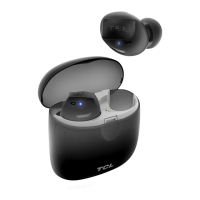
The TCL MOVEAUDIO S108 are true wireless earbuds designed for music enjoyment and hands-free calling, offering a range of useful functions controlled by touch. The device comes with a charging case that doubles as a portable charger for the earbuds.
Function Description
The earbuds primarily function as a personal audio device, allowing users to listen to music and manage phone calls wirelessly via Bluetooth. They are equipped with touch control areas on each earbud, enabling various operations without needing to access the connected phone. A key feature is the voice assist function, which can be activated by pressing and holding either earbud, providing access to Bixby, Siri, or Google Assistant.
Usage Features
Getting Started:
To begin using the earbuds, users first need to charge them. The charging case itself is charged via a USB Type-C™ port, connecting to a computer or a compatible USB adapter using the supplied cable. Both the earbuds and the charging case can be charged simultaneously. The case LED indicator flashes white during charging and remains solid white when fully charged. For the earbuds, they are placed inside the charging case, and the lid is closed. The case LED indicator will flash solid white when the earbuds start charging. A low battery prompt tone will be heard via the earbuds when their battery level drops below 10%. It's important not to insert wet or dirty earbuds into the charging case.
Ear Tips:
For optimal comfort and sound experience, users can replace the ear tips. The manual provides instructions to firmly pull off the existing tip, choose a new one (S, M, L sizes are available), align it with the earbud, and push until it clicks.
Connecting to a Bluetooth Device:
Pairing the earbuds with a Bluetooth device is straightforward. For the first-time connection or after a reset, users should take the earbuds out of the charging case and keep them near the device. The earbud LED indicators will flash blinking white, indicating pairing mode. Users then unlock their device, turn on Bluetooth, and select "TCL MOVEAUDIO S108" from the list of available devices. If pairing is not established within 5 minutes, the pairing mode will be canceled, and the earbuds will turn off.
Manual pairing options are also available. One method involves removing both earbuds, disconnecting them from any previously paired device (which will put them into pairing mode), and then connecting to the new device. Another manual method requires removing both earbuds, wearing them, triple-pressing either earbud, and holding the third press for about 4 seconds to initiate pairing mode, then connecting via the device's Bluetooth settings.
Disconnecting and Reconnecting:
To disconnect, users can place both earbuds back in the charging case and close the lid, turn off Bluetooth on their device, or manually select the disconnection option from their device's Bluetooth menu. After successful pairing, the earbuds will automatically reconnect to the last paired device when taken out of the charging case, provided the device is on and within range. If automatic reconnection fails, the earbuds will enter pairing mode, allowing manual reconnection.
Music Control:
Music playback is controlled by tapping the touch control area on the earbuds. A double tap on either earbud will play or pause music. A triple tap on the left earbud will play the previous song, while a triple tap on the right earbud will play the next song.
Call Control:
The earbuds also facilitate call management. A double tap on either earbud will answer or end a call. To reject an incoming call, users can press and hold either earbud for 2 seconds. In case of call waiting, a double tap will answer the incoming call and place the current call on hold, while pressing and holding for 2 seconds will reject the incoming call and stay on the current call.
Voice Assist:
Activating the voice assistant (Bixby, Siri, or Google Assistant) is done by pressing and holding either earbud for 2 seconds.
Resetting the Earbuds:
If connection or pairing issues arise, the earbuds can be reset. This involves disconnecting them from the Bluetooth device, then tapping either earbud 4 times. The earbud LED indicators will flash blinking white during the reset process, after which they will automatically enter pairing mode.
Maintenance Features
Cleaning:
The device should be cleaned regularly with a dry and soft cloth. Liquids or cleaning products should not be used. Before cleaning, the earbuds should be removed from the case, and the USB cable disconnected from both the case and the power adapter.
Charging Best Practices:
Only the supplied USB Type-C cable and a compatible USB adapter (5Vdc/1A, CE approval type) should be used for charging to prevent product damage and ensure safety. Charging should occur in a well-ventilated area, and damaged cables or chargers must not be used.
Battery Care:
Users are advised not to attempt to replace the batteries themselves, as this could cause damage, overheating, or injury. Battery servicing should only be performed by an authorized service provider. Batteries must be recycled or disposed of separately from household waste and should not be incinerated. Local waste regulations for electronic products should be followed for proper disposal.
Operating Temperature:
The device is designed to operate and be stored in ambient temperatures between 0 °C and 45 °C (32 °F and 113 °F). Storing or operating outside these ranges can damage the device and shorten battery life.


 To Next Page
 General
 Weight and Dimensions