Need help?
Do you have a question about the TCL MW63 and is the answer not in the manual?
Describes the device's physical buttons and their functions.
Explains the meaning of the signal strength indicator light.
Details the Wi-Fi connection status indicated by the LED.
Describes the LED status for SMS messages.
Explains the LED indicators for battery level and charging.
Provides guidelines for safe device operation and handling.
Details the device's compliance with radio wave exposure guidelines.
Explains consumer rights beyond the limited warranty.
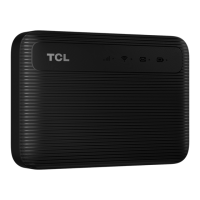
This document provides an overview and instructions for the TCL LINKZONE MW63, a portable Wi-Fi device. It covers the device's functions, how to use it, and important safety and maintenance information.
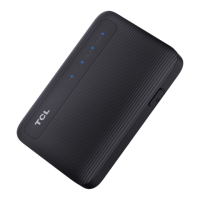
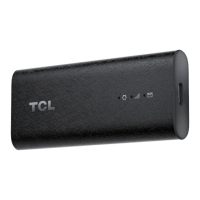
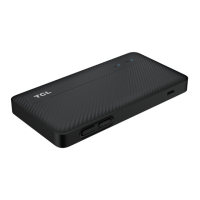
The TCL LINKZONE MW63 is a mobile Wi-Fi hotspot designed to provide internet connectivity on the go. It allows multiple devices to connect to the internet wirelessly via a cellular network. The device features a power button and a Micro USB port for charging.
Powering On/Off and Rebooting: To power on or off the device, press and hold the power button for 3 seconds. For a device reboot, press and hold the power button for 10 seconds.
Charging: The device is charged via the Micro USB port. It should be connected to a power supply (5V/1A) using the provided USB cable. It's important to note that the provided USB cable is intended for charging only.
SIM Card and Battery Installation: To use the device, a SIM card and battery must be installed. The manual emphasizes the importance of correctly orienting the SIM card and sliding it into the slot until it sits properly.
Connecting to the Network: Once powered on, the LINKZONE MW63 broadcasts a Wi-Fi network. The default Wi-Fi name (SSID) and password can be found on a label inside the device. Users can connect their devices (e.g., smartphones, computers) to this Wi-Fi network by selecting the appropriate SSID and entering the password.
Configuring the Network: For advanced network configuration, users can access a web browser on a device connected to the LINKZONE network. The login website for configuration can be found on the label beneath the battery. Users should follow the on-screen instructions to configure the Wi-Fi network. The default login information is also located on the label inside the LinkZone.
Status LED Indicators: The device features several LED indicators to provide information about its status:
Safety and Handling: The manual provides crucial safety and handling instructions to ensure the longevity and safe operation of the device:
Power Adapter and Battery Care:
Operating Environment: The device is designed to operate best in ambient temperatures between 0 °C and 45 °C (32 °F and 113 °F). For storage, temperatures between -10 °C and 70 °C (14 °F and 158 °F) are recommended. Operating or storing the device outside these ranges may lead to malfunction. It's also advised to avoid exposing the device to dramatic changes in temperature or humidity.
Waste Disposal and Recycling: The device, its accessories, and battery must be disposed of according to local environmental regulations. The symbol on the products indicates that they should be taken to municipal waste disposal centers with specific bins or collection bins at points of sale for recycling, to prevent harmful substances from entering the environment. In European Union countries, these collection points are free of charge. In non-European Union jurisdictions, items with this symbol should be taken to collection points for recycling rather than ordinary bins, if suitable facilities exist.
Warranty and Data Backup: The device comes with a limited warranty. The warranty period for the TCL device is 24 months, and for accessories like the USB cable and battery, it's 12 months. This period may vary by country and purchase channel. In case of a defect, users must inform their vendor and provide proof of purchase. Repairs or replacements may be carried out using reconditioned components. The warranty does not cover defects due to non-compliance with instructions, connection to unrecommended equipment, unauthorized repairs, software/hardware modifications, or environmental factors like weather, liquids, or malicious software.
Users are responsible for regularly backing up their data, files, applications, and settings. The manufacturer, retailer, or service providers are not responsible for data loss. Before sending the device for servicing, it is recommended to remove any peripherals (memory card, SIM card) and personal data. The warranty does not cover data backup, recovery, or reinstallation.
 General
| 4G LTE Bands | B1/B3/B5/B7/B8/B20/B28/B38/B40/B41 |
|---|---|
| 3G UMTS Bands | B1/B5/B8 |
| Security | WPA/WPA2 |
| Type | 4G LTE Mobile WiFi |
| Wi-Fi | 802.11b/g/n |
| Wireless Standards | IEEE 802.11b/g/n |
| Frequency Band | 2.4 GHz |
| Maximum Data Rate | 150 Mbps |
| Ports | Micro-USB |


 To Next Page