DKC301DC SLIDING GATE OPERATOR INSTALLATION AND USER’S MANUAL
7
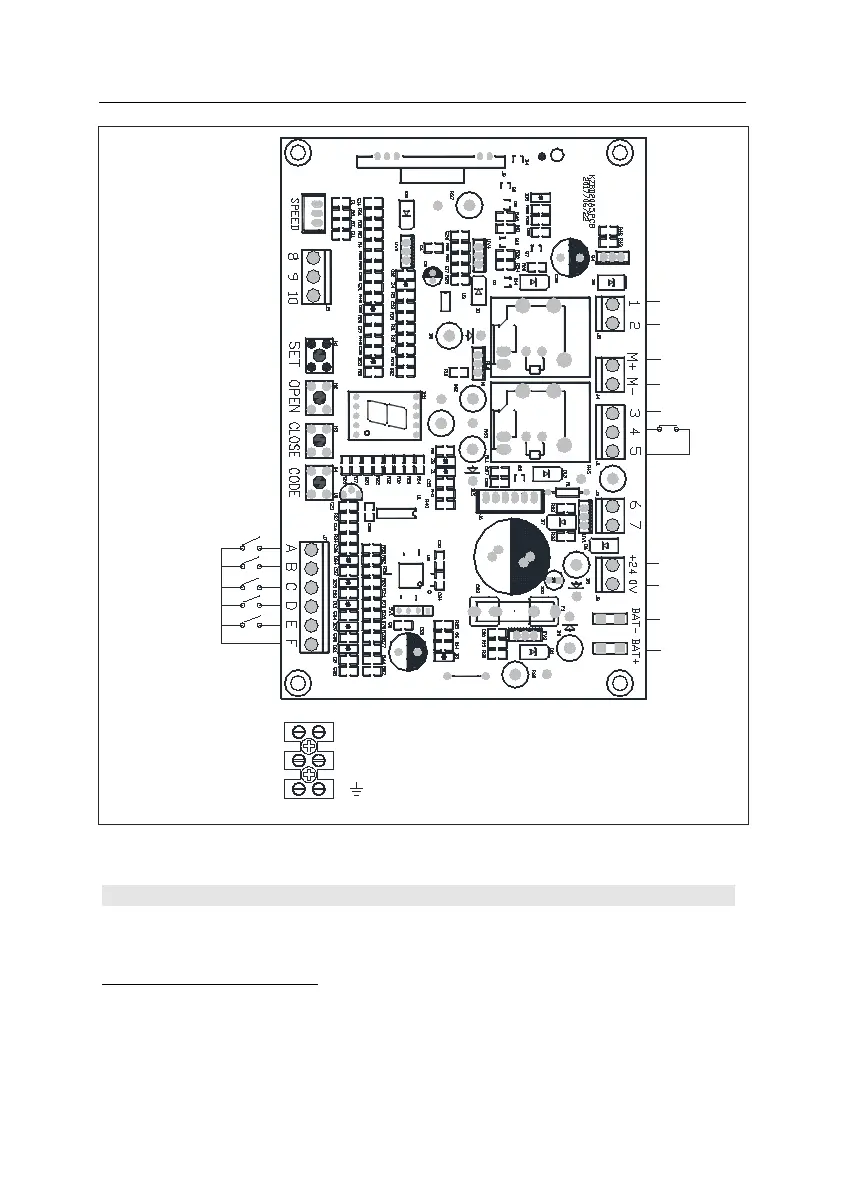
Fig.5 Control board Diagrams
6. Programming
Short the infrared terminal block(see Fig.5 terminal 4 and 5) if the gate only runs in open direction.
Setting Open and Close Position
1. Press and hold SET (see Fig.5 control board) until ‘1’ indicated on the LED display.
2. Press and hold OPEN to set open position, release the button until the gate has reached the
desired position. (You also can press CLOSE to close the gate, OPEN and CLOSE can be used
to adjust the door position.)
3. Press the SET to confirm the open position, and ‘2’ will be displayed.
4. Press and hold CLOSE to set close position, release the button until the gate has reached the
Encoder
Pedestrian Mode Key
Keypad
Open button
Close button
Stop button
Com
Battery
-
Power
+
Power
-
Motor
+
Battery
+
Alarm lamp
-
Alarm lamp
+
+24V
output
Com
Infrared
Motor
-
L
N
POWER SUPPLY
AC240V
Input
Reserve for
mechanical
limit switch



 To Next Page