EasyManua.ls Logo

TDK NX-4CD - Repeat Play; Program Mode

TDK NX-4CD
15 pages
Print Icon
To Next Page IconTo Next Page
To Previous Page IconTo Previous Page
Loading...
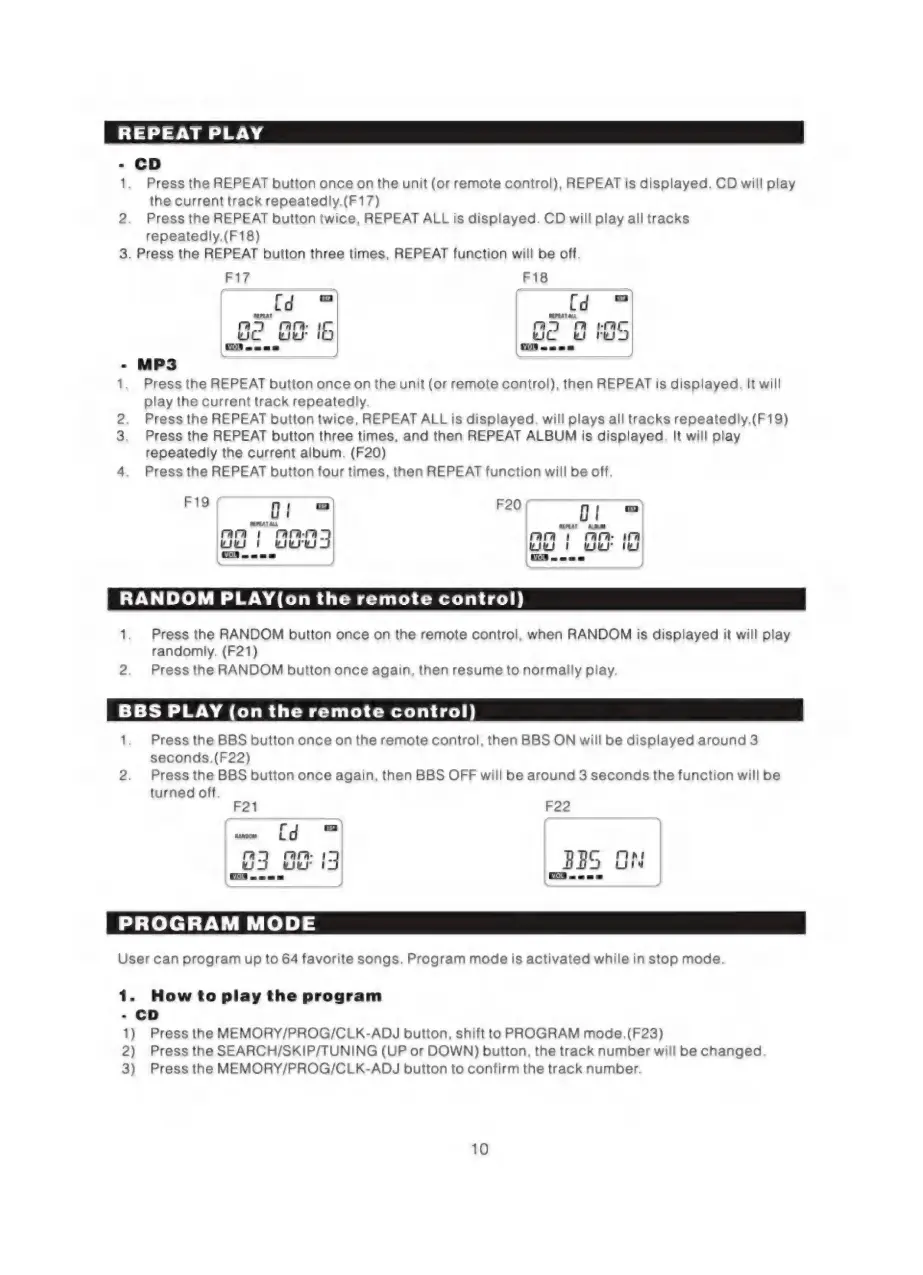
REPEAT
PLAY
-
CD
1.
Press
the
REPEAT
button
once
on
the
unit
(or
remote
control),
REPEAT
is
displayed.
CD
will
play
the
current
track
repeatedly.(F17)
2.
Press
the
REPEAT
button
twice,
REPEAT
ALL
is
displayed.
CD
will
play
all
tracks
repeatedly.(F18)
3.
Press
the
REPEAT
button
three
times,
REPEAT
function
will
be
off.
F17
F18
|
ыла
ш
ЖЕ
5.
T
rara.
fa
fa
Ha
по
08:
15
00
8
05
0778
„т
а
КОМ
„а
|
-
МРЗ
1.
Ргеѕѕ
ће
REPEAT
button
once
on
the
unit
(ог
remote
control),
then
REPEAT
is
displayed.
It
will
play
the
current
track
repeatedly.
2.
Pressthe
REPEAT
button
twice,
REPEAT
ALL
is
displayed.
will
plays
all
tracks
repeatedly.(F19)
3.
Press
the
REPEAT
button
three
times,
and
then
REPEAT
ALBUM
is
displayed.
It
will
play
repeatedly
the
current
album.
(F20)
4.
Pressthe
REPEAT
button
four
times,
then
REPEAT
function
will
be
off.
F19
|
|
f
У
REPEAT
ALL
лт
мм
AA
ро
пыл
я
V)
|
0003
00108981
|
ES
wees
KS
не
та
а
-
“.
RANDOM
РІАҮ
(оп
the
remote
control)
1.
Press
the
RANDOM
button
once
on
the
remote
control,
when
RANDOM
is
displayed
it
will
play
randomly.
(F21)
2.
Press
the
RANDOM
button
once
again,
then
resume
to
normally
play.
BBS
PLAY
(on
the
remote
control)
1.
Press
the
BBS
button
once
on
the
remote
control,
then
BBS
ON
will
be
displayed
around
З
seconds.(F22)
2.
Press
the
BBS
button
once
again,
then
BBS
OFF
will
be
around
З
seconds
the
function
will
be
turned
off.
F21
22
[
td
=
|
ӨЗ
пи:
13
885
ON
КЛ----
KS
=
м
mm
PROGRAM
MODE
User
can
program
up
to
64
favorite
songs.
Program
mode
is
activated
while
in
stop
mode.
1.
How
to
play
the
program
.
CD
1)
Press
the
MEMORY/PROG/CLK-ADJ
button,
shift
to
PROGRAM
mode.(F23)
2)
Pressthe
SEARCH/SKIP/TUNING
(UP
or
DOWN)
button,
the
track
number
will
be
changed.
3)
Press
the
MEMORY/PROG/CLK-ADJ
button
to
confirm
the
track
number.

Related product manuals