11
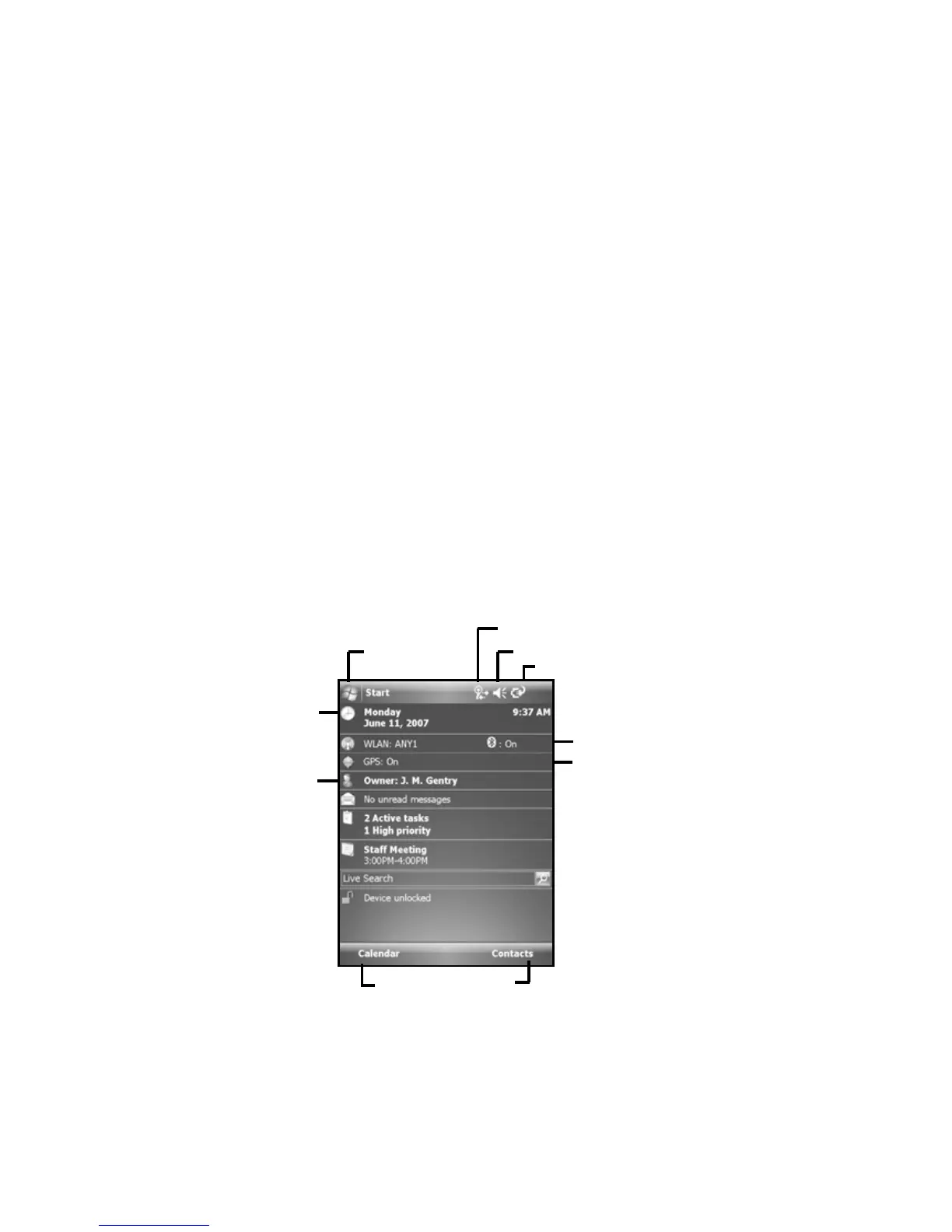
Tap to view and change connection settings.
Tap to go to
a program
Tap to change or mute volume
Speaker and microphone
Your unit comes with an integrated speaker and a microphone. It
also has an audio jack that is wired for a headset with a mono
speaker(s) and mic combination. It is not for stereo headsets.
To record, tap Start / Programs / Notes. If you do not see the
Recording toolbar, tap Menu / View Recording Toolbar. Tap
the round record symbol on the screen. The unit will record until
Stop is pressed. The recorded file will be saved in the Notes
folder. To change the directory where recorded files will be saved,
tap the folder icon and navigate to the desired folder.
To play the recorded file, tap the desired file from the Notes
program. To change the volume or mute all sounds, tap the
speaker icon in the status bar of the Today screen.
The Today screen
The Today screen provides information that you need for the day.
Tap an item to view or edit details. To customize which items are
shown on the Today screen, tap Start / Settings / Today / Items.
Your day at a glance.
Tap to open the
associated program.
Tap to view power settings
Application soft keys
The screen shows the function of
the two application soft
keys.
Tap to change owner
information.
Tap to change time
settin
s.
Tap to change WLAN &
Bluetooth settin
s.
Indicates whether GPS is
turned on or off. (Not a live
link, but informational only.)


 To Next Page